9 Best Cheap Instagram Schedulers in 2026 (Under $20/Month)
Nine Instagram schedulers under $20 a month, priced from vendor pages in July 2026, with true 12-month costs and honest trade-offs.

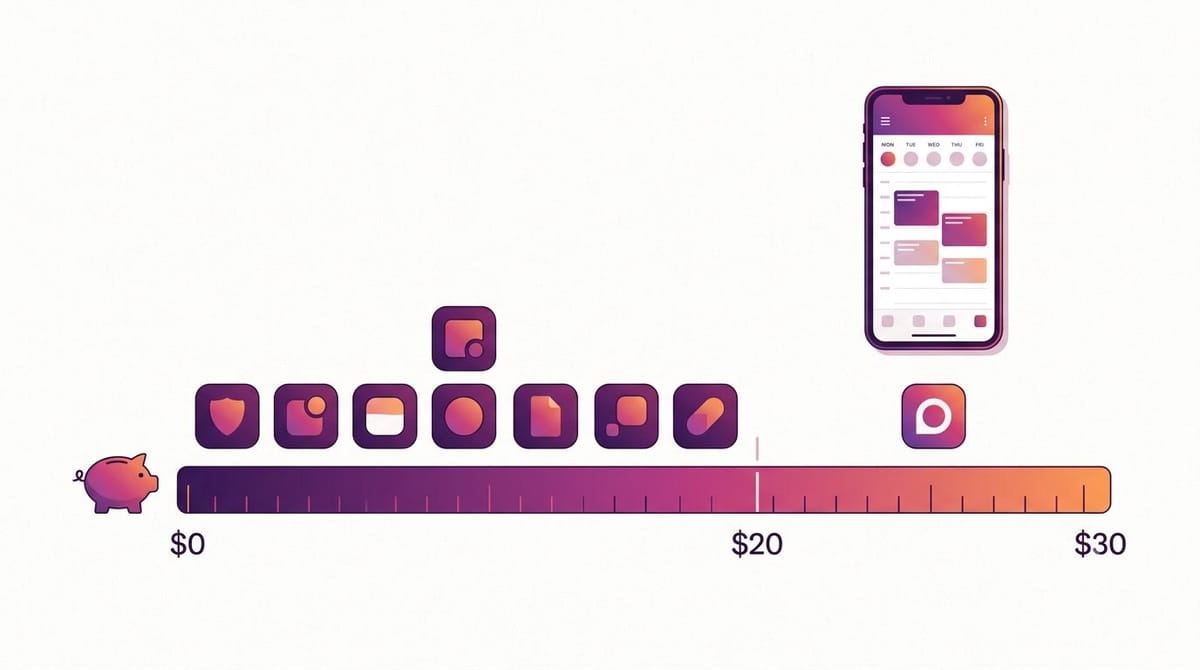
A cheap Instagram scheduler costs somewhere between $0 and $20 a month in 2026. Meta Business Suite is free, Buffer and Publer start at $5, ReelDrop now starts at $9.99 a month with its new Influencer plan, and Metricool lands at $20 with annual billing. Sprout Social charges $199 for the same core job.
Updated: September 2026
Table of contents
- How we evaluated these tools
- The 9 schedulers at a glance
- What a year actually costs
- The 9 best cheap Instagram schedulers
- Which should you pick
- Frequently asked questions
- Sources
How we evaluated these tools
We pulled every price in this post from the vendor's own pricing page in July 2026, rechecked ReelDrop's pricing at the end of August 2026 after it added a new plan, and linked each one so you can check our math. Beyond price, we looked at how each tool publishes to Instagram (the official Graph API or a workaround), whether the pricing is honest or full of asterisks, what AI content help you get at the cheap tier, whether a real free plan exists, and who the tool actually suits. One tool on this list no longer fits the sub-$20 frame at all, and we say so rather than quietly dropping it.
The 9 schedulers at a glance
| Tool | Best for | Free plan | Starting price |
|---|---|---|---|
| Meta Business Suite | Free official scheduling, nothing else | Entirely free | $0 |
| Buffer | Simple posting to several networks | 3 channels, 10 posts each | $5/channel/mo (annual) |
| Publer | Bulk scheduling on a budget | 3 accounts, 10 posts each | $5/mo (1 account) |
| ReelDrop | Instagram-only creators who want AI content help and DM automation | 1 account, unlimited posts | $9.99/mo (Influencer plan) |
| Tailwind | Pinterest plus Instagram | 1 account, 5 posts/mo | $17.99/mo (annual only) |
| ContentStudio | Marketers who curate and create | No (7-day trial) | $19/mo (annual only) |
| Hopper HQ | Simple unlimited scheduling | No (14-day trial) | About $19/mo per bundle |
| Metricool | Scheduling plus serious analytics | 1 brand, 20 posts/mo | $20/mo (annual) |
| SocialRails | Honestly, it no longer qualifies | No (3-day trial) | $29/mo |
Best free option: Meta Business Suite. It is Meta's own tool, it schedules posts, reels, and stories with no monthly cap, and it costs nothing. If you want analytics with your free plan, Metricool's free tier is the strongest third-party choice. We compared free tiers in more depth in our free Instagram schedulers roundup.
What a year actually costs
Monthly prices hide the real gap. Several tools on this list only get under $20 if you commit to a year up front, and the difference between monthly and annual billing over 12 months is bigger than the difference between some of the tools. Here is the full-year cost for one Instagram account on each entry plan, both billing ways.
| Tool (entry plan) | 12 months, billed monthly | 12 months, billed annually | Under $20/mo? |
|---|---|---|---|
| Meta Business Suite | $0 | $0 | Yes, it is free |
| Buffer Essentials (1 channel) | $72 | $60 | Yes, both ways |
| Publer Professional (1 account) | $60 | About $50 (2 months free) | Yes, both ways |
| ReelDrop Influencer | $119.88 | $79 | Yes, both ways |
| Tailwind Pro | $359.88 | $215.88 | Only annual |
| ContentStudio Standard | $348 | $228 | Only annual |
| Hopper HQ (1 bundle) | About $228 | About $194 (15% off) | Yes, per listed prices |
| Metricool Starter | $300 | $240 | Only annual, and just barely |
| SocialRails Creator | $348 | About $278 (20% off) | No |
Two things jump out. Buffer, Publer, and now ReelDrop's Influencer plan are cheap however you bill them. Everything else in the paid tier depends on annual commitment, which means paying $194 to $240 up front for a tool you might stop opening by March. If you are not sure a tool will stick, a couple of months on monthly billing costs less than an abandoned annual plan.
The 9 best cheap Instagram schedulers
Ordered by price, cheapest first. Every tool here auto-publishes to Instagram, and auto-publishing is only possible through Meta's official Graph API, which caps API publishing at 100 posts per account per 24 hours. That limit will never bother a human. We explain why the API route matters for account safety in our guide to Instagram Graph API auto-publishing.
1. Meta Business Suite (free)
Meta's own scheduling tool, and the baseline every paid product has to beat. It schedules posts, reels, and stories to Instagram and Facebook, shows native analytics, and handles your comment and DM inbox in one place. There is no post cap and no paid tier hiding features. For a lot of people posting a few times a week, this is genuinely enough.
The catch is the experience. The calendar is clunky, cross-posting outside Meta's platforms does not exist, and there is zero help with the actual content: no caption AI, no hashtag suggestions, no carousel tools. You get a place to put finished posts, and that is all you get.
- Schedules posts, reels, and stories to Instagram and Facebook
- Native analytics straight from Meta
- Unified comment and message inbox
- No post limits, no paid tier
Price: free, at business.facebook.com. Trade-off: no AI help, no platforms beyond Meta, and a calendar that feels like an afterthought. Account safety: this is Meta's own product, so it is the definition of official.
2. Buffer
The most established name in budget scheduling, and the pricing is refreshingly simple: $5 per channel per month billed annually, or $6 month to month. One Instagram account costs $60 a year. The interface stays out of your way, the mobile app is solid, and the free plan (3 channels, 10 scheduled posts per channel) is the most usable free tier among the big names.
Buffer's weakness for Instagram specifically is depth. There is no visual grid planner, and the AI assistant is a general-purpose writing helper rather than anything built for reels or carousels. Per-channel pricing also adds up quietly: Instagram plus TikTok plus LinkedIn is $15 a month, not $5. We covered where it falls short for Instagram-first creators on our Buffer alternatives page.
- Auto-publishes posts and reels via the official API
- Free plan with 3 channels and 10 posts per channel
- AI assistant for drafting and repurposing copy
- Covers 8+ platforms with one consistent interface
- Hashtag manager on paid plans
Price: from $5/channel/month billed annually (buffer.com/pricing). Trade-off: per-channel pricing grows fast, and there is no Instagram grid planner. Account safety: long-standing official Meta partner publishing through the Instagram Graph API.
3. Publer
Publer is the volume pick. The Professional plan starts at $5 a month for one social account, with each extra account at $4, per Publer's own pricing guide, and yearly billing adds two months free. For that you get bulk scheduling of up to 500 posts, evergreen content recycling, RSS auto-posting, and first-comment scheduling. No other tool at this price moves this much content.
The flip side is that Publer feels built for people who need all of that. The interface is dense, and if you post four times a week, most of the bulk machinery just sits there. It is a warehouse, and some people only need a shelf. If you are deciding between Publer's volume features and a creator-focused tool, our ReelDrop vs Publer comparison walks through the differences.
- Bulk-schedule up to 500 posts at once
- Evergreen post recycling and RSS automation
- First-comment scheduling for Instagram
- Free plan with 3 accounts and 10 posts each
- Per-account pricing that scales in small steps
Price: Professional from $5/month for 1 account (publer.com/plans). Trade-off: dense interface, and light posters pay for bulk features they will not touch. Account safety: auto-publish and first comments run through the official Instagram API.
4. ReelDrop
ReelDrop is our tool, so read this entry knowing that. It is an Instagram-only workspace for creators: scheduling with auto-publish for posts, reels, and carousels, an AI carousel generator that turns a topic into a carousel of 3 to 10 slides in about 30 seconds, AI captions and hashtags, comment-to-DM automation with real follow verification, and first-comment scheduling on paid plans. The point is doing the whole idea-to-posted workflow in one tab instead of five.
On price, the lineup has changed since we first put this list together. There's a free Starter plan with unlimited scheduling and posting, no post-count cap, though AI captions are capped at 3 a month and DM automations at 5 active. A new Influencer plan sits at $9.99 a month or $79 a year, built for creators who want unlimited DM automation more than deep content tools. The Creator plan, which unlocks the full AI carousel generator, unlimited captions and hashtags, and up to 5 Instagram accounts, is $29 a month normally, $149 a year on the founding annual deal (about $12.40 a month), or $249 as a one-time lifetime purchase. The caveats are real: ReelDrop is younger than Buffer or Metricool, and it only does Instagram by design.
- Auto-publish for posts, reels, and carousels via the official Graph API
- AI carousel generator, captions, and hashtags built in (full access on Creator)
- Comment-to-DM automation with real follow verification (unlimited on Influencer and Creator)
- Up to 5 Instagram accounts on Creator
- Free Starter plan with unlimited scheduling and posting
Price: Influencer from $9.99/month ($79/year); Creator $29/month, $149/year founding deal (about $12.40/month), or $249 one-time (reeldrop.io/pricing). Trade-off: Instagram-only by design, and a younger product than the incumbents on this list. Account safety: publishes through the official Instagram Graph API, with Meta's login flow and no password sharing.
5. Tailwind
Tailwind grew up on Pinterest and still thinks like a Pinterest tool, but it schedules to Instagram, Pinterest, and Facebook on every plan, including the free one. The Pro plan is $17.99 a month billed annually, covering 150 posts a month, with AI-generated post designs and copy as the standout feature. The free plan gives you 5 posts a month, enough to test whether the workflow fits.
The annual qualifier matters here. Month to month, Pro is $29.99, well over this list's ceiling. And Instagram is clearly the second platform: the smart features, the community, and the roadmap all lean Pinterest. If Pinterest drives real traffic for you, Tailwind earns its slot. If it does not, you are paying for a lot of Pinterest.
- Schedules to Instagram, Pinterest, and Facebook on all plans
- AI-generated post designs and copy ("Made for You")
- Smart posting-time suggestions
- Free forever plan with 5 posts a month
Price: Pro at $17.99/month billed annually, $29.99 monthly (tailwindapp.com/pricing-overview). Trade-off: Pinterest-first at heart, and it only fits under $20 on annual billing. Account safety: auto-publishes to Instagram, which requires Meta's official publishing API.
6. ContentStudio
ContentStudio bundles scheduling with content discovery: it surfaces trending articles in your niche to share and includes generous AI credits (25,000 text credits on the entry plan) for captions. The Standard plan covers 5 social accounts for $19 a month billed annually, which is a lot of account capacity for the money. Month to month it is $29.
The catch is focus. ContentStudio does many things across many platforms, and the Instagram-specific experience is shallower than the Instagram-first tools here. There is also no free plan, just a 7-day trial, so you are deciding on a year's commitment after one week.
- 5 social accounts on the entry plan
- Content discovery feed for curating shareable articles
- 25,000 AI text credits a month for captions
- Auto-publish to Instagram via the official API
- 7-day free trial, no credit card required
Price: Standard at $19/month billed annually, $29 monthly (contentstudio.io/pricing). Trade-off: broad rather than deep, and the under-$20 price requires a year up front. Account safety: Instagram auto-publish through the official API.
7. Hopper HQ
Hopper HQ sells one thing: straightforward scheduling with no per-post limits, priced per "social bundle" (one Instagram, Facebook, TikTok, and LinkedIn account together). Bulk upload from CSV, a grid planner, and posts that go out while you sleep. It is the tool for people who find even Buffer's option count unnecessary.
One honesty note on price. Hopper HQ's own pricing page renders its numbers dynamically and did not show us a figure we could quote directly, so the $19 per bundle per month we list comes from G2's mirror of its pricing table, with 15% off for annual billing. Check the live page before you buy. There is no free plan, just a 14-day trial.
- Unlimited scheduled posts, no per-post caps
- Bulk upload from CSV
- Instagram grid planner
- Bundle pricing covering 4 platforms per bundle
Price: about $19/month per bundle (hopperhq.com/pricing, figure via G2). Trade-off: few standout features beyond the basics, and no free plan. Account safety: advertises Instagram auto-publish, which runs on Meta's official publishing API.
8. Metricool
Metricool is scheduling bolted onto an analytics suite that could sell on its own. The Starter plan is $20 a month billed annually ($25 monthly), and it covers up to 5 brands, unlimited publishing, and competitor tracking that most tools reserve for expensive tiers. The free plan (1 brand, 20 posts a month, 5 competitor profiles) is arguably the best free third-party plan in the category.
It squeaks under this list's ceiling at exactly $20, and only on annual billing. The other gap is content help: there is no real AI writing or carousel generation, so Metricool assumes you arrive with finished posts. Data-minded creators love it. Creators who struggle to produce the content in the first place get a great report on posts they never made.
- Deep Instagram analytics plus competitor tracking
- Free plan with 1 brand and 20 posts a month
- Auto-publish on all paid tiers
- Up to 5 brands on the Starter plan
- PDF and PPT reporting
Price: Starter at $20/month billed annually, $25 monthly (metricool.com/pricing). Trade-off: thin content creation features, and the sub-$20 price needs annual commitment. Account safety: connects Instagram through Meta's official Graph API account linking.
9. SocialRails
Here is the honest entry. SocialRails shows up on "cheap scheduler" lists at $19 a month, and that price no longer exists. As of July 2026, the entry Creator plan is $29 a month, and the 20% annual discount only brings it to about $23. It does not belong under a $20 headline anymore, and we would rather tell you that than pad the list.
The product itself is fine: official-API auto-publishing, AI captions and images included, simple plans. But it is a young tool with a short track record, the trial is only 3 days, and at $29 you are in the same price band as much more established options. If SocialRails wins you over in those 3 days, fair enough. Nobody should arrive expecting $19.
- Auto-publish via the official Instagram Graph API
- AI captions and AI images included
- Simple three-tier pricing
- 3-day free trial
Price: Creator at $29/month, about $23/month with the annual discount (socialrails.com). Trade-off: no longer under $20 at all, short trial, and little track record. Account safety: publishes through the official Instagram Graph API.
Which should you pick
- Nothing to spend: Meta Business Suite, no contest.
- A few accounts across different networks: Buffer, and stay on annual billing.
- High volume, bulk uploads, recycled evergreen content: Publer.
- Instagram-only creator who wants help making the content as well as scheduling it: ReelDrop's Creator plan on the founding annual deal, with the caveat that it is the youngest tool here. Mainly want deep DM automation without the content tools? ReelDrop's Influencer plan at $9.99 a month covers that for less.
- Pinterest drives real traffic for you: Tailwind Pro on annual billing.
- You curate as much as you create: ContentStudio Standard, annual.
- You want unlimited posts and zero decisions: Hopper HQ, after checking the live price.
- You care about the numbers as much as the posts: Metricool, and its free plan is a legitimate starting point.
- SocialRails: only if $29 is comfortable, at which point widen your search past this list. Our full Instagram schedulers guide covers the $25-and-up tier too.
Whichever you choose, posting time still matters more than the tool. Our free best time to post checker works with any scheduler.
Frequently asked questions
What is the cheapest way to schedule Instagram posts? Meta Business Suite, which is free and made by Meta itself. It schedules posts, reels, and stories to Instagram and Facebook with no post limits. If you want a third-party tool instead, Buffer and Publer both start at $5 a month, and both publish through the official Instagram API.
Is Buffer really only $5 a month? Yes, with two catches. The $5 rate is per channel and requires annual billing, so one Instagram account costs $60 a year, and month-to-month billing is $6 per channel. Connect Instagram, TikTok, and LinkedIn and you are at $15 a month. Buffer also has a free plan with 10 scheduled posts per channel.
Are cheap Instagram schedulers safe to use? The cheap tools in this list are as safe as the expensive ones, because they publish through Meta's official Instagram Graph API, the same route Sprout Social uses. You log in through Meta's own screen and never hand over your password. Meta caps API publishing at 100 posts per account per 24 hours.
Which cheap scheduler has the best free plan? Metricool's free plan is the most generous third-party option: one brand, 20 scheduled posts a month, plus analytics and competitor tracking that other tools charge for. Buffer's free plan covers 3 channels with 10 posts each. Meta Business Suite is entirely free, though it only covers Instagram and Facebook.
Does Tailwind still schedule Instagram posts? Yes. Every Tailwind plan, including the free one, schedules to Instagram, Pinterest, and Facebook. The free plan allows 5 posts a month and Pro allows 150. Just know that Tailwind is built Pinterest-first, so Instagram-only creators tend to outgrow it faster than a dedicated Instagram tool.
Is SocialRails still under $20 a month? No. SocialRails' entry Creator plan is $29 a month as of July 2026, and the 20% annual discount only brings it to about $23. Several older lists still quote $19, but that price is gone. If your ceiling is $20, Publer, ContentStudio on annual billing, or ReelDrop (its $9.99 Influencer plan, or the Creator founding deal) fit better.
Do annual plans actually save money on these tools? Usually, and the gap is large at this end of the market. ContentStudio drops from $29 to $19 a month on annual billing, Tailwind from $29.99 to $17.99, and Metricool from $25 to $20. The trade-off is paying up front for a year of a tool you may stop using by March.
Sources
- Buffer pricing
- Publer plans and Publer pricing help article
- ReelDrop pricing
- Tailwind plans and pricing
- ContentStudio pricing
- Hopper HQ pricing and G2 pricing mirror for Hopper HQ
- Metricool pricing
- SocialRails
- Meta Business Suite
- Meta: Publish content using the Instagram Platform