

Features built for creators.
One Instagram management tool that schedules, designs carousels, writes captions, and answers DMs, so you stop paying for four.











You don't need to post 3x a day.
You just need to
Every feature, explained
Each page covers how it works, which plan includes it, and how it compares to other tools.
Schedule Instagram posts and reels in one calendar
Schedule Instagram posts, reels, and carousels from one calendar, with reel cover selection and a scheduled first comment. Free plan, paid from $9.99/mo.
Turn a topic into a ready-to-post Instagram carousel
AI Instagram carousel maker: type a topic and get every slide drafted in your colors, editable before it posts. 100 AI images a month on Creator.
Captions and hashtags for the post you are actually making
Three caption options per post, each with a tone label and character count, plus hashtag suggestions for that post. 3 free a month, unlimited on Creator.
Instagram DM Automation
Auto-DM everyone who comments your keyword on an Instagram Reel. Comment-to-DM is free: 5 active automations, no card. Influencer adds every trigger type.
Instagram comment to DM automation
Send an automatic DM when someone comments a keyword on your Instagram post or Reel, with a public reply and an optional follow check. Free plan, no card.
Instagram story reply automation
Auto-reply to Instagram story replies with a DM, link, or answer. Trigger on any reply or on a keyword, and add a follow check and a timed follow-up.
Instagram follow gate, with follow verification
Ask commenters to follow before the link sends, then verify the follow through the Instagram API instead of trusting it. On the Influencer and Creator plans.
Instagram keyword triggers and auto-reply
Trigger an Instagram auto-reply on a keyword in a comment, DM, or story reply. Contains, exact, or any match, with rotating replies and a per-post limit.
See every scheduled Instagram post in one place
See every scheduled Instagram post, reel, and carousel in one calendar, spot the empty Thursday, and let each one publish itself through the official API.
Plan your Instagram grid on top of your real feed
See your real Instagram grid with upcoming posts on top, drag tiles to swap their publish times, and sketch ideas in empty slots. Included on every plan.
Run ReelDrop from Claude
Connect ReelDrop to Claude Desktop, Claude Code, or any MCP client. Schedule reels, edit queued posts, read analytics, and manage DM automations by chat.
Everything ReelDrop does, in plain terms
Running an Instagram account usually means paying for a scheduler, a design tool, a DM bot, and a caption assistant that have never heard of each other. ReelDrop is those four tools in one tab, built around a single idea: make the post, and everything that should ship with it ships with it.
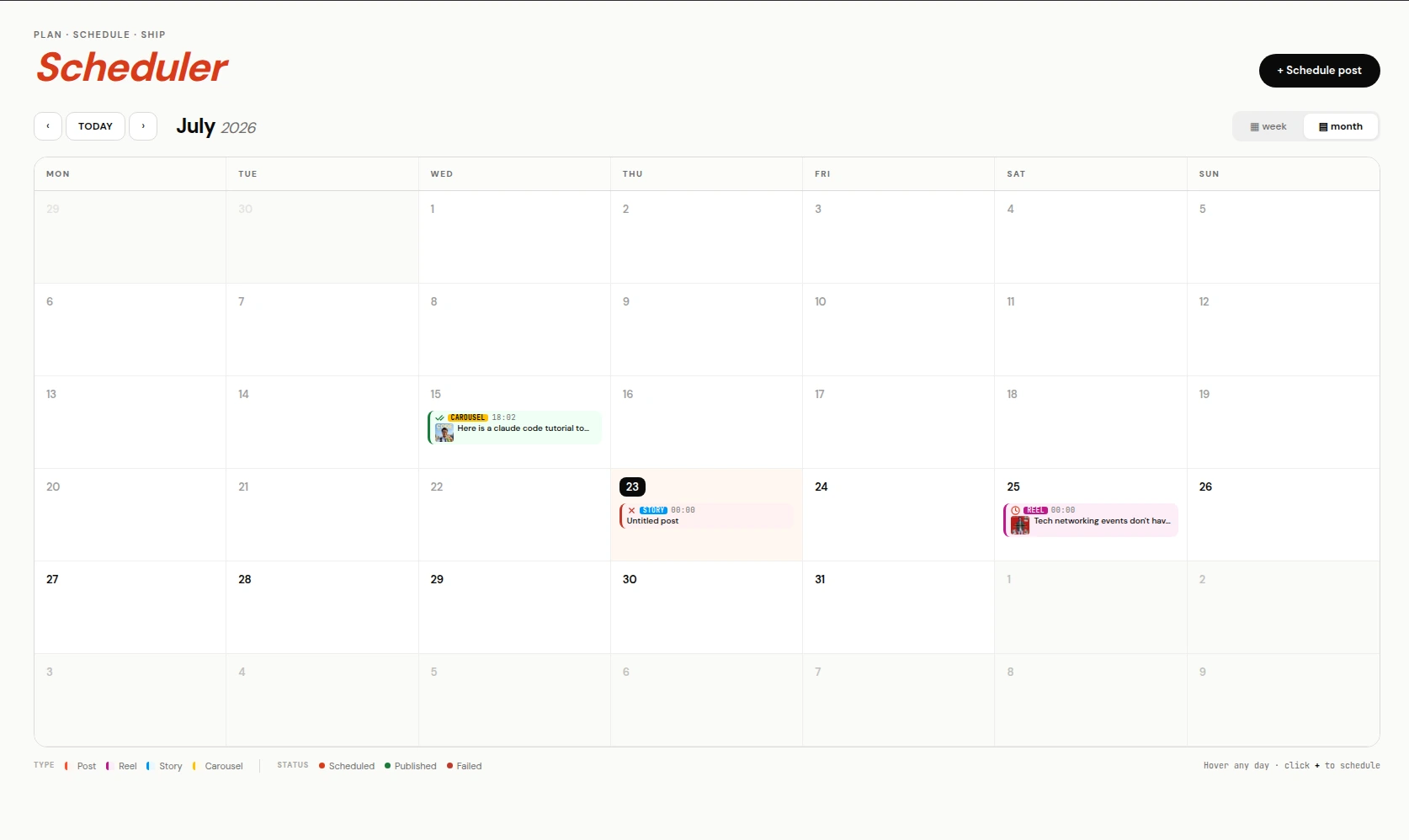
Instagram scheduler for posts, reels, and carousels
Plan everything from one calendar and auto-publish through the official Instagram Graph API. No reminder notifications, no password sharing. Schedule reels, single images, and multi-slide carousels from one calendar.
How it works: pick a slot on the calendar, drop in your reel or images, and set the caption. ReelDrop publishes on its own at the scheduled time. You never get a "time to post!" notification at 6 p.m., because there is nothing left for you to do. The calendar shows each published post with its permalink, so you can confirm it went live without opening Instagram.
Explore the Instagram scheduler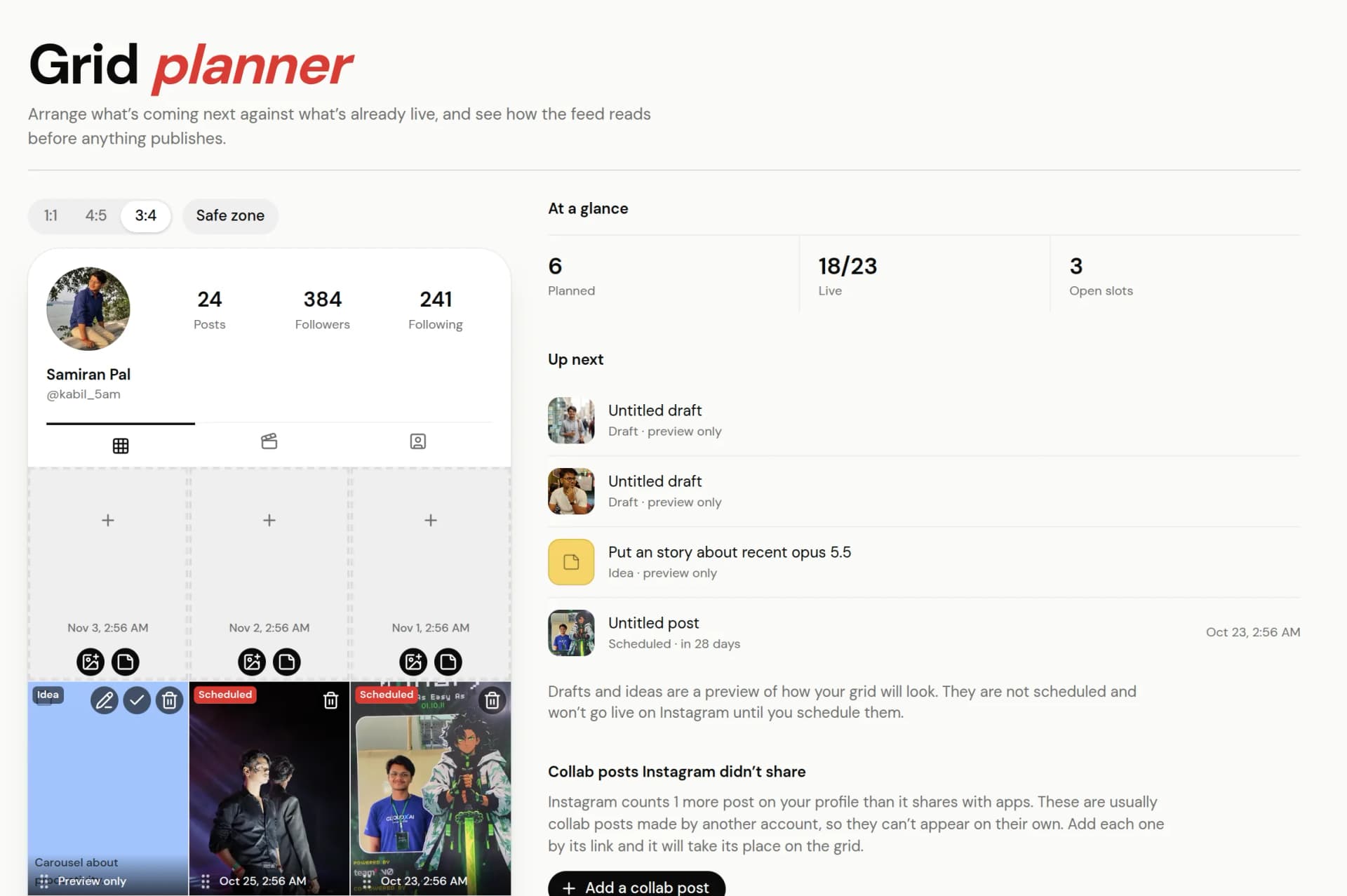
Instagram grid planner
See your real Instagram grid with your drafts and scheduled posts placed above it in publish order. Drag one tile onto another to swap their times, and hold empty slots with idea tiles. Included on every plan.
How it works: connect your Instagram account and open Grid. Your published posts load underneath and your planned posts sit on top. Dragging a planned tile onto another swaps their publish times, so the order you see is the order they go out.
See the grid planner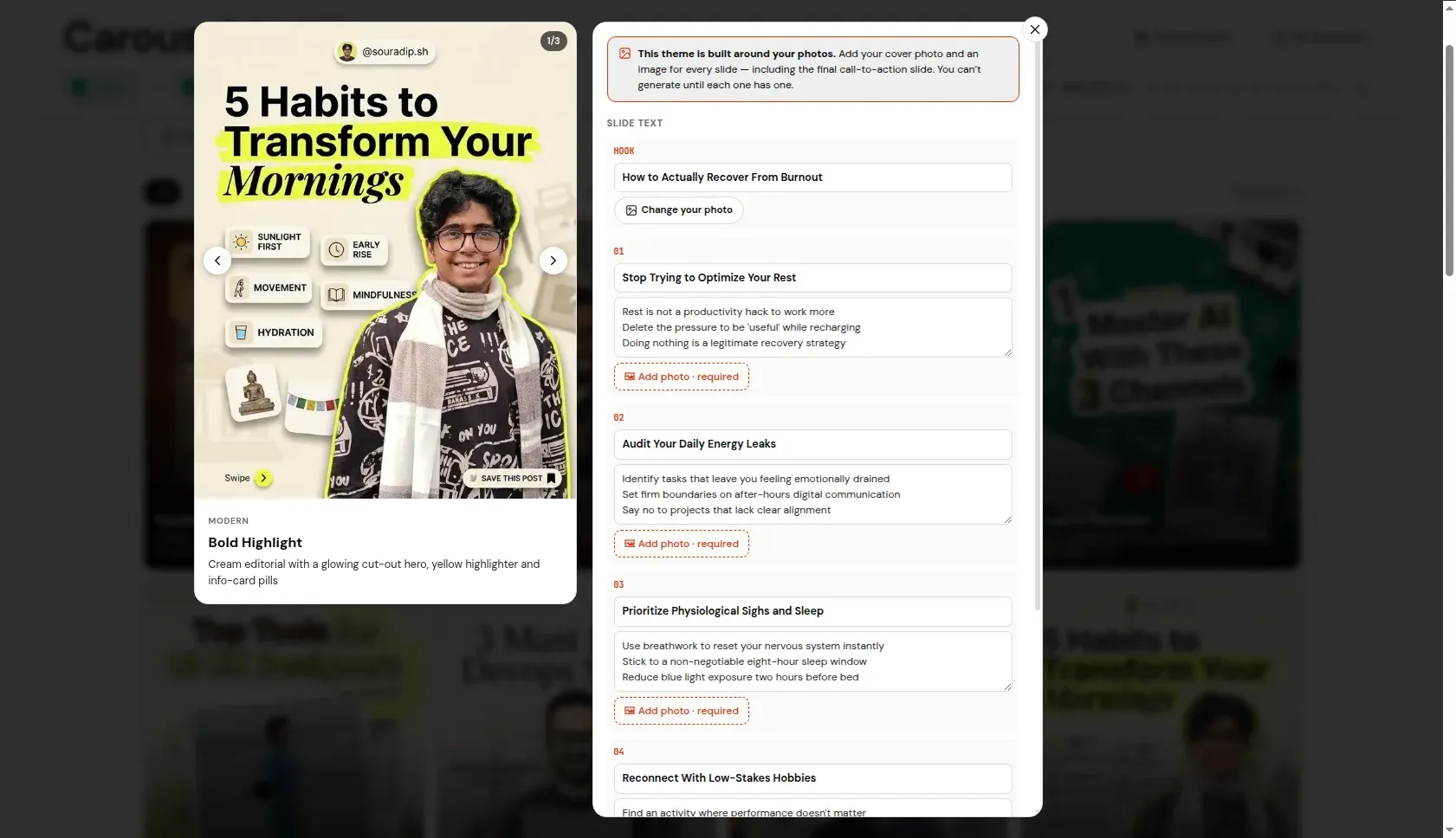
AI carousel generator with 30+ designed themes
Turn a topic or a rough outline into a designed 10-slide carousel. Pick from more than 30 themes in the gallery, keep your fonts and colors consistent, and send the finished set straight to the scheduler.
How it works: type the idea, pick a slide count and a theme, and ReelDrop drafts every slide. Each slide is its own card, so you can rewrite slide four without touching the other nine. When the set looks right, one click sends it to the scheduler. Most people get from idea to scheduled carousel in under ten minutes, which used to be an evening in a design tool.
Explore the AI carousel generator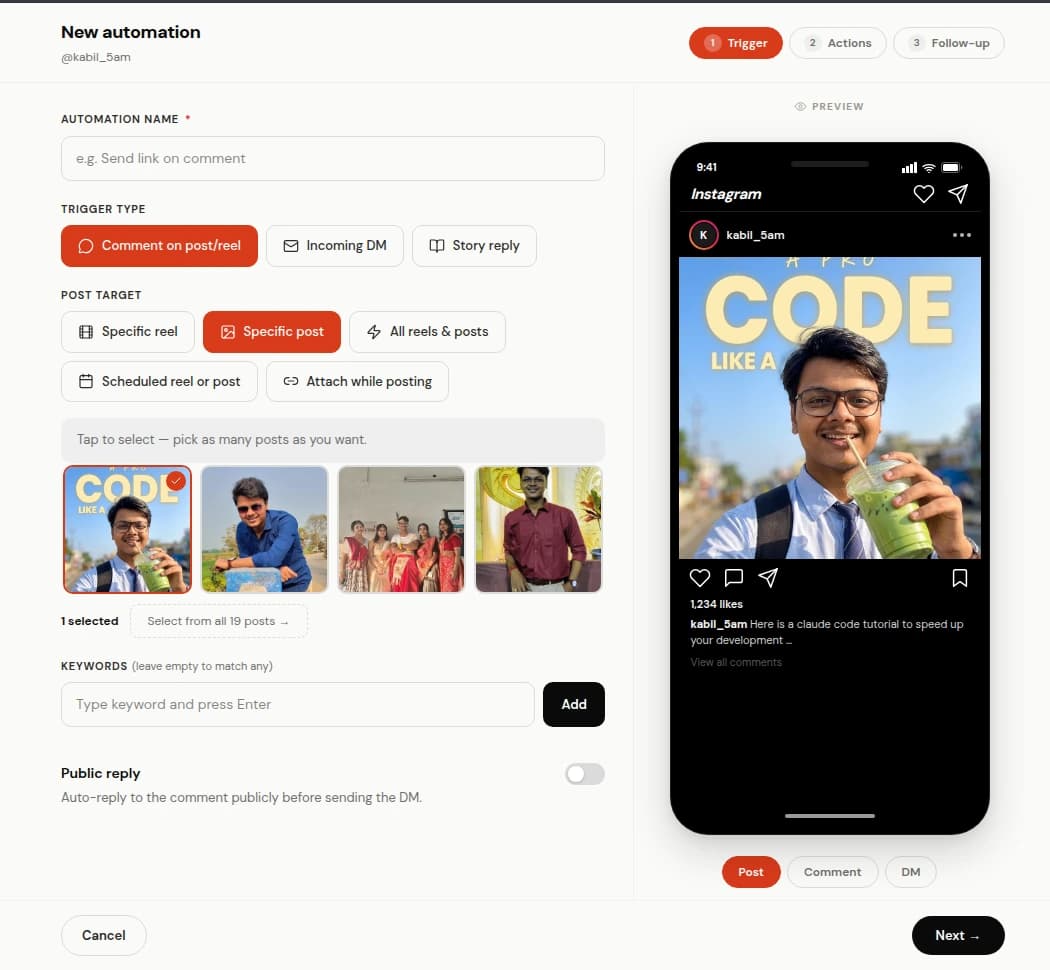
Instagram DM automation
Reply to comment keywords, story replies, and DMs automatically, and send your link, lead magnet, or FAQ answer while you film. Runs on the official API, with rate limits respected, so your account stays safe.
How it works: while scheduling a post, attach a trigger word like "GUIDE" and write the reply once. When someone comments the word, ReelDrop answers publicly and sends the DM with your link. The automation goes live with the post because it is part of the post, not a separate bot you wire up afterwards. That last part is the difference from every standalone DM tool.
Explore DM automation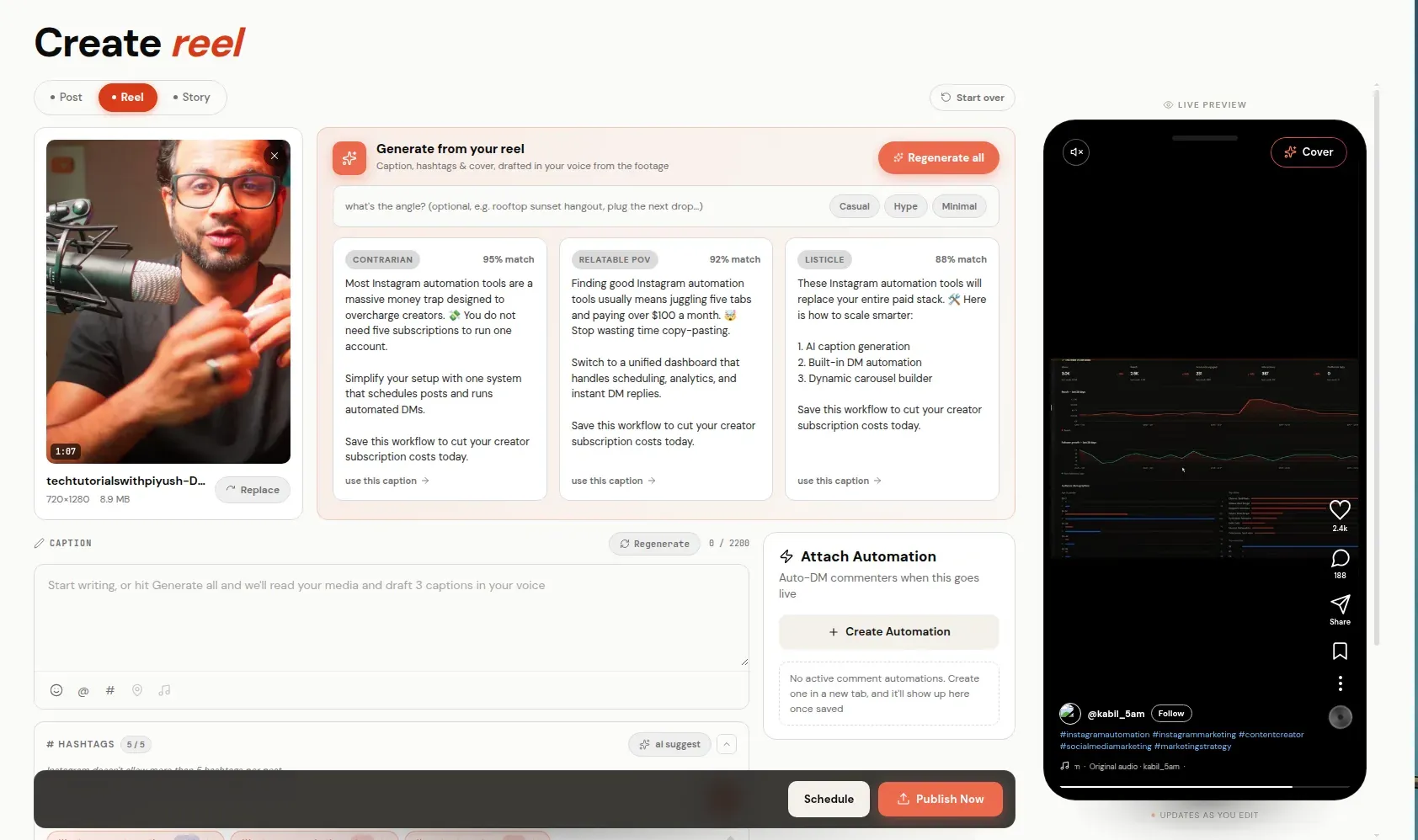
AI caption and hashtag writer
Generate captions that match your tone and hashtag sets sized to your niche, then edit inline before scheduling. Pair it with the free hook generator and caption length checker for the full writing flow.
How it works: paste your idea or upload the reel, hit generate, and pick from a few caption options written in your tone. Hashtags come sized to your niche instead of the same 30 tags everyone copies from a note. Edit inline, then schedule. If you want to sanity-check a hook or a caption length first, the free tools handle that without an account.
Explore AI captions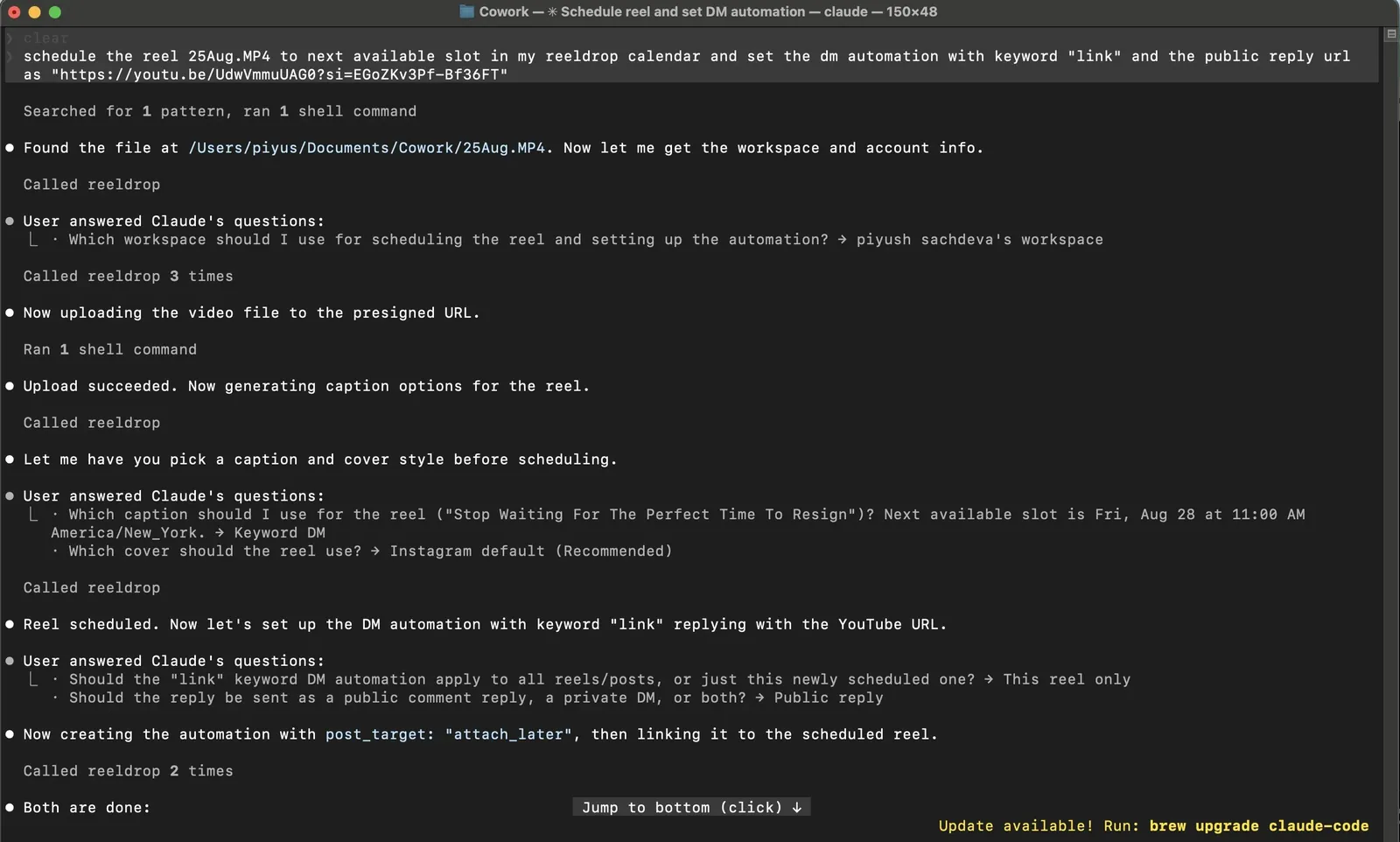
Run ReelDrop from Claude (MCP)
Connect ReelDrop to Claude Desktop or Claude Code over MCP and operate your account by chat: schedule reels, edit the queue, read analytics, and set up DM automations. Sign-in is your ReelDrop account, not an API key. Included on Influencer and Creator.
How it works: add the ReelDrop connector in Claude with one URL and sign in once. Then it is plain English. Hand Claude a video and it uploads it, drafts captions with your allowance, asks about the cover, and books your next open slot. It checks in before anything is published, and it reads posting times from your own schedule settings instead of guessing.
Explore ReelDrop + ClaudeWhat ReelDrop replaces in your stack
Most creators end up paying for the same four tools, each with its own login and its own bill. Here is where each job lands in ReelDrop. If you are weighing options, the alternatives hub ranks the tools honestly and the side-by-side comparisons show where competitors win.
| The job | What people pay for | In ReelDrop | Worth reading |
|---|---|---|---|
| Scheduling posts and reels | Later (~$25/mo) or Buffer | Scheduler with auto-publish, reel covers, and a scheduled first comment | Later alternatives ReelDrop vs Buffer |
| Planning how the feed looks | Later (from ~$25/mo) or Planoly | Grid planner on your real feed, tied to the schedule | Grid planner ReelDrop vs Planoly |
| Designing carousels | Canva templates and an evening of layout work | AI carousel generator with 30+ themes | AI carousel generator Theme gallery |
| Comment-to-DM replies | ManyChat (from $14/mo) | DM automation attached to the post at scheduling | Instagram DM automation ManyChat alternatives ReelDrop vs ManyChat |
| Follow gates and story-reply replies | A second DM tool, or nothing | Follow gate with API-verified follow checks, story-reply triggers | Follow gate Story reply automation |
| Captions and hashtags | A ChatGPT tab plus a hashtag app | AI caption and hashtag writer, tuned to your tone and niche | AI caption writer Free caption tools |
| Running it all from an AI assistant | Copy-pasting between a chat window and four tabs | MCP server: Claude schedules reels, edits the queue, and reads analytics for you | ReelDrop + Claude (MCP) Connect Claude to ReelDrop |
The prices above are what the standalone tools list as of July 2026; the alternatives pages keep them current and dated. Add it up and the typical stack runs $40 to $70 a month before anyone writes a caption.
How the pieces fit together
These are not four products bolted together after the fact. The flow: upload a reel or type an idea, hit Generate All, and the caption, hashtags, and DM automation are drafted while the carousel renders. You review, fix whatever the AI got wrong, and pick a slot on the calendar. Our best time to post data feeds the green windows, so the slot is a decision, not a guess. Then the post publishes on its own, the automation goes live with it, and analytics show what happened. That is the whole pitch: post less, grow more. Plans start free on the pricing page.
Free Instagram tools. No account needed.
Caption checkers, hook generators, hashtag finders, and more, built for creators who want results without the signup wall.
Frequently asked questions
What features are included in ReelDrop?
ReelDrop bundles an Instagram scheduler (posts, reels, carousels), an AI carousel generator with 30+ themes, DM automation, an AI caption and hashtag writer, and a content calendar: one tool instead of four subscriptions.
Is ReelDrop a full Instagram management tool or just a scheduler?
A management tool. Scheduling is one feature next to AI carousels, DM automation, caption and hashtag writing, a content calendar, and analytics. The free tools cover one-off jobs without an account; the app covers the whole posting workflow.
Can ReelDrop replace Later, Buffer, or ManyChat?
For an Instagram-first creator, usually yes. It schedules like Later or Buffer and handles comment-to-DM automation like ManyChat, in the same place. If you post across five platforms or need enterprise approval flows, a multi-platform tool still makes sense. The comparison pages spell out where each competitor wins.
Can I use ReelDrop from Claude or another AI assistant?
Yes. ReelDrop runs an MCP server, so Claude Desktop, Claude Code, and any other MCP client can schedule reels, edit queued posts, read analytics, and manage DM automations on your account. You connect it from the Connect your AI assistant page in the app and sign in with your ReelDrop login. MCP access is included on the Influencer and Creator plans.
Does ReelDrop auto-publish or send reminder notifications?
ReelDrop auto-publishes through the official Instagram Graph API. Scheduled posts go live on their own, with no push-notification reminders and no manual publishing step.
Do I need to give ReelDrop my Instagram password?
No. You connect through the official Instagram authorization flow as with any Meta-approved tool. ReelDrop is a Meta Tech Provider and never sees your password.
Which features can I try for free?
All 20 free tools (engagement rate calculator, hook generator, hashtag finder, and more) work now without an account, and the carousel theme gallery is public. The free Starter tier adds 1 Instagram account with unlimited scheduling and posting; AI carousel images and AI reel thumbnails are on the Creator plan.