Do Third-Party Apps Get You Banned on Instagram? Meta's Partner System, Explained
What Meta's Tech Provider and Business Partner labels mean, why password logins are the real risk, and a five-check test for any app.

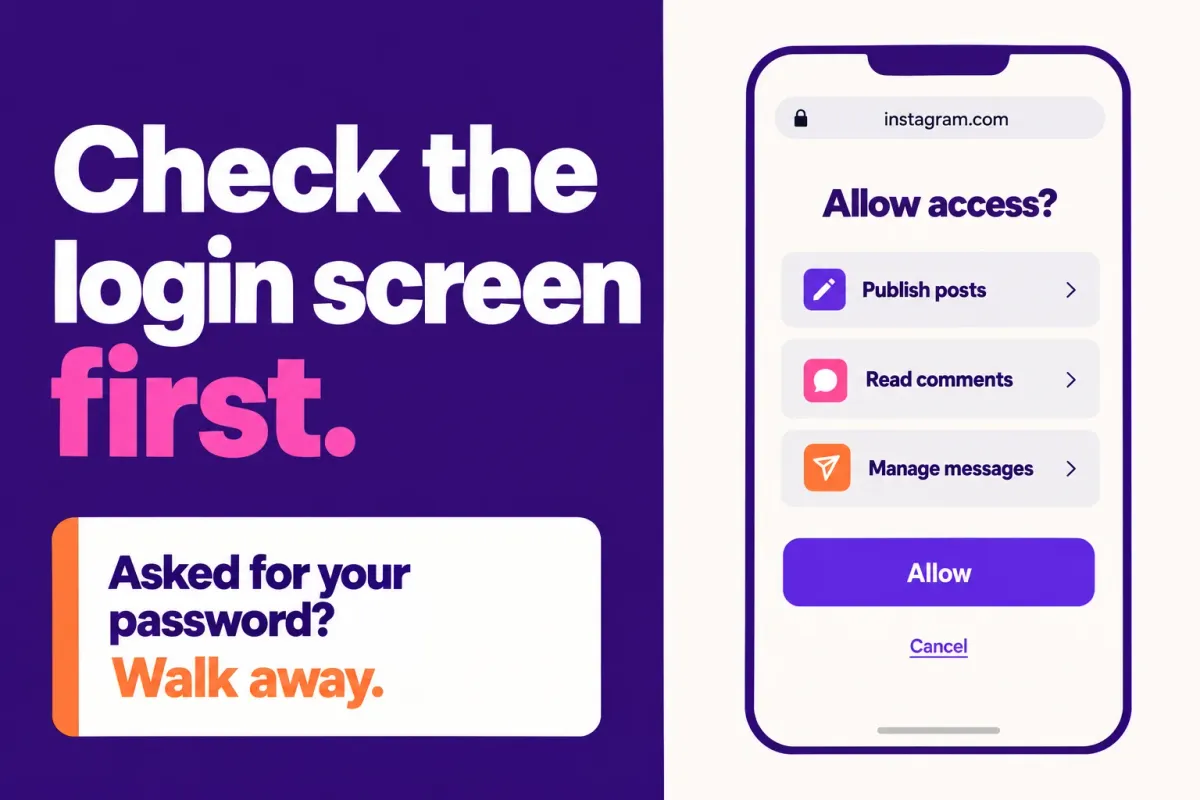
The mistake is asking whether third-party apps get you banned, as if they were one thing. They aren't. Apps that ask for your password or automate actions Instagram's API doesn't offer put your account at risk. Apps that connect through Instagram's own login screen, with permissions Meta reviewed, don't carry that risk by design.
Updated: October 2026
TLDR
- Connecting an app does not trigger a ban. Instagram has acted against fake-engagement apps and tools that collect passwords.
- The login screen is the fastest test. An Instagram or Facebook domain means Meta's flow. The tool's own page means a password handover.
- Meta Tech Provider and Meta Business Partner are different programs.
- Approval does not remove limits on messaging and publishing.
Quick answers
- Do third-party apps get you banned? Not by existing. Instagram has acted against fake-engagement apps and password sharing.
- Is it safe to give an app my password? No. The official login never needs one.
- What is a Meta Tech Provider? A business Meta verified to access other businesses' data through its APIs.
- How do I remove an app? Settings, Website permissions, Apps and websites, then Remove.
Table of contents
- Do third-party apps get you banned on Instagram?
- What is the difference between a password login and OAuth?
- What do Meta Tech Provider and Business Partner actually mean?
- Does Meta approval mean an app can't get you in trouble?
- A five-check test for any third-party app
- What should you do if you already connected a risky app?
- Where does ReelDrop fit?
- Frequently asked questions
- Sources
Do third-party apps get you banned on Instagram?
Not for being third-party. Instagram's own announcements sort apps into two groups, and only one group causes trouble. In November 2018 Instagram said it would start removing inauthentic likes, follows and comments from accounts that use third-party apps to boost their popularity, and it called those apps a violation of its Community Guidelines and Terms of Use. Affected accounts got an in-app message and a prompt to change the password.
The same post explains how those apps work. People who use them share a username and password, and the apps sometimes use the accounts to generate fake activity. Changing the password is how you revoke access, which tells you the access was a password to begin with. Instagram added that accounts that keep using such apps "may see their Instagram experience impacted."
Instagram's data scraping page covers the other half: automation often built to look like ordinary use, which Instagram says dedicated teams work to detect. We found no Meta statement that penalizes an account for connecting an app through the official login. That is an absence, not a guarantee. Our reading is that the risk sits in two places: how an app gets access, and what it does once it has it. You can check the first in thirty seconds.
If you are already dealing with a restriction, our guides on why Instagram bans accounts and how to appeal a suspension cover the next steps.
What is the difference between a password login and OAuth?
With a password login, you type your Instagram username and password into the tool's own page, and the tool signs in as you, usually by imitating a person using the app. Instagram's Terms of Use rule out requesting or collecting other people's usernames and passwords, and rule out using other users' login credentials. It also hands the tool everything you can do on the account, which is the real problem.
OAuth works the other way around. For an app built on Business Login for Instagram, Meta's developer documentation says the app opens a Meta authorization window and you approve the permissions it asks for. Meta then sends the app an authorization code that is valid for one hour. The app trades the code for an access token, which follows the OAuth 2.0 standard and belongs to that app and your account only. The long-lived version lasts 60 days and can be refreshed. You never type a password into the tool, and the permissions sit on a screen Meta controls.
That is why the address bar is the best first test. Depending on how a tool connects, you will see an Instagram login or a Facebook login, and both are Meta's. A login page on the tool's own domain is the red flag. Read the domain, not the design, because a copied login form can look identical.
What do Meta Tech Provider and Business Partner actually mean?
Meta's developer documentation describes Tech Providers as businesses with a legitimate need to access business data owned by other businesses in order to serve them. Apps claimed by a business cannot be granted a list of permissions, which includes instagram_business_basic and instagram_business_content_publish, unless that business is verified as a Tech Provider or the person using the app has a role on the app. Access verification is separate from App Review, so each permission still needs Advanced Access approval.
Advanced Access, the level an app needs to serve accounts it doesn't own, requires App Review and Business Verification, per the Instagram Platform overview. In App Review, Meta tests that the app actually uses the permissions it requests. A Tech Provider app has therefore been checked at the business level and the permission level, and Meta can withdraw the status if verification lapses or the business account is restricted.
Meta Business Partner is a different program. Third-party explainers describe two tiers, Member and Badged, where only Badged partners get the badge and a directory listing. Meta's own partner pages block automated access, so we could not confirm the details first-hand. One badged partner's page says Meta's directory is unavailable while Meta reviews the program. We could not confirm that either, so check the directory but don't rely on it.
The labels are easy to mix up, so here they are side by side.
| Label you may see | What it is | What it tells you | What it does not tell you |
|---|---|---|---|
| Meta Tech Provider | A business Meta verified to access other businesses' data through its APIs | It passed access verification, and its permissions need App Review | How the tool behaves once connected |
| Meta Business Partner | A separate badge and directory program | Meta recognized the company in a specialty | Tech Provider status, or that the app is safe |
| Passed App Review | Meta tested the app against the permissions it requested | Each permission is approved for outside users | Whether the tool respects messaging limits |
| Meta Verified | A consumer subscription, unrelated to developer programs | Nothing about third-party apps | Anything about the tool |
| "Official partner", "Instagram approved", "certified" | Marketing phrases, not program names | Nothing until you ask which program | What was checked, or by whom |
Does Meta approval mean an app can't get you in trouble?
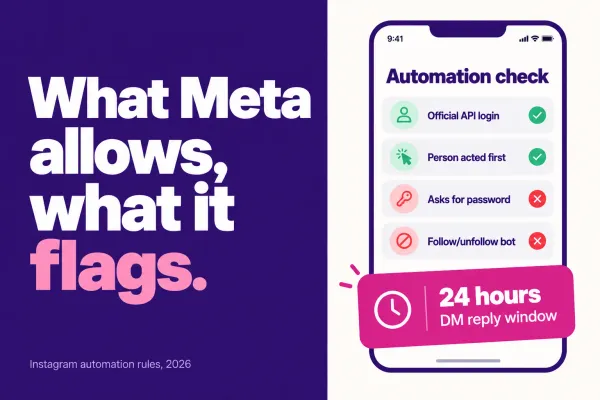
No. App Review checks that an app uses its permissions as described. It doesn't control how much you send. Meta's documentation still limits approved apps. An app can reply to a person's message within 24 hours, with a Human Agent exception that lets a human reply for up to 7 days, and the platform overview lists 750 private replies an hour per account for post and reel comments. API publishing is capped at 100 posts in a 24 hour moving period.
Accounts still get restricted for spammy flows run through approved tools. The evidence is mostly community reports, and our ManyChat safety post covers what we could and couldn't confirm. An approved tool running a spammy automation is still a spammy automation, and the account takes the hit.
A five-check test for any third-party app
Run these before you connect anything. Checks one and five are hard stops. Fail either and the answer is no, however good the rest looks.
- Read the login URL. It should sit on an Instagram or Facebook domain. If the tool asks for your password on its own page, stop.
- Read the permission list. Meta generates it from what the app was approved for. Compare it with what the tool says it does, and ask why if a scheduler wants message access you didn't expect.
- Check the connected apps list afterward, under Settings, Website permissions, Apps and websites. A properly connected app appears there with a Remove button.
- Check the label. If a tool says Tech Provider or Business Partner, ask which one. A vendor that can't say is guessing or marketing.
- Compare the feature list with the API. Meta's documented Instagram API covers messaging, comment moderation, private replies, publishing, ads and insights. A tool that promises auto-follow, auto-like or cold DMs to strangers is not doing that through the official API. Stop.
Five passes is a tool we would connect to a business account. Three or four with no hard stop means ask the vendor questions first. Any hard stop means walk away. We built this checklist from Meta's documentation. It is not a Meta standard, so treat it as a filter, not a guarantee.
What should you do if you already connected a risky app?
If you handed a password to a tool or connected something you no longer trust, work through this in order.
- Remove the app. Open Settings, then Website permissions, then Apps and websites, switch to the Active tab and tap Remove, per a vendor help article updated in October 2025. A 2019 report put the setting under Security, so look for Apps and websites if your path differs.
- Change your password. Instagram's 2018 announcement says that revokes access for apps holding your credentials.
- Check where the account stands. Open Account Status, which Instagram built to show restrictions, and run our free shadowban checker.
- If the account is suspended or disabled, follow our appeal steps.
Where does ReelDrop fit?
We make ReelDrop, so weigh this accordingly. It connects through Meta's own login screen, asks for five permissions (basic profile, publishing, comments, messages and insights), and never sees your password. It is registered with Meta as a Tech Provider and is not listed as a Meta Business Partner. Our safety page lists the permissions, and the connection docs show the flow.
Frequently asked questions
Can a third-party app get my Instagram account banned?
Connecting an app does not cause a ban by itself. Instagram has acted against apps that sell fake likes, follows and comments, and against people who share passwords with them. Meta publishes no penalty for connecting an app through the official login. The risk sits in how an app gets access and what it automates.
Is it safe to give a scheduling app my Instagram password?
No. Instagram's Terms of Use bar requesting or collecting other users' usernames and passwords, and an app on the official login has no need for yours. A tool that asks for your password on its own page signs in as you, which is the setup Instagram's 2018 action against third-party growth apps targeted.
How can I tell if an app uses Instagram's official login?
Start the connection and read the address bar on the login screen. It should be an Instagram or Facebook domain, not the tool's own. After connecting, the app should appear under Settings, Website permissions, Apps and websites, with a Remove button. If it never appears there, it did not connect through Meta's authorization flow.
Is a Meta Tech Provider the same as a Meta Business Partner?
No. Meta Tech Provider is a developer status tied to business verification, access verification and App Review. Meta Business Partner is a separate badge and directory program, reported to have Member and Badged tiers. A tool can hold one without the other, so ask a vendor which it means.
How do I see which apps have access to my Instagram account?
Open Instagram, go to Settings, then Website permissions, then Apps and websites, and look at the Active tab. Each connected app is listed with a Remove button, and removing one cuts off its access. Menu names have shifted over the years, so look for Apps and websites if your path differs.
Does Meta approval mean an app can send unlimited messages?
No. App Review checks that an app uses its permissions as described, not how much you send. Meta's documentation still limits replies to 24 hours after a person's message, with a 7 day exception for human agents, and caps API publishing at 100 posts per 24 hours. Spammy automation can still get an account restricted.
Sources
- Meta: Tech Providers
- Meta: Instagram Platform overview
- Meta: App Review
- Meta: content publishing
- Instagram: inauthentic activity (2018)
- Instagram Help: Terms of Use
- Instagram Help: data scraping
- Instagram: Account Status
- Constant Contact: remove an Instagram app
- TechCrunch: third-party app controls (2019)
- Stackmatix: Meta Business Partner program
- Pipeboard: partner badge page
- Is ReelDrop safe?
- Why Meta bans accounts
- Connect your account (docs)
- Shadowban checker
- Are scheduling apps safe?
- Is ManyChat safe?
- 8 safest Instagram tools
- Account suspended? How to appeal