

Instagram comment to DM automation
Updated: September 2026
Comment-to-DM is the one automation nearly every creator wants: someone comments a keyword on your Reel, and ReelDrop sends them the link by DM when the comment lands, without you touching your phone. ReelDrop pairs it with a public reply on the comment, so the rest of the audience can see the keyword works. ReelDrop's free plan includes 5 active DM automations — comment triggers on reels — plus a full Instagram Reels scheduler, and it never asks for a credit card. Those comment-to-DM automations have no monthly limit on how many DMs they send (Instagram's own messaging limits apply), and Instagram scheduling and posting are unlimited.
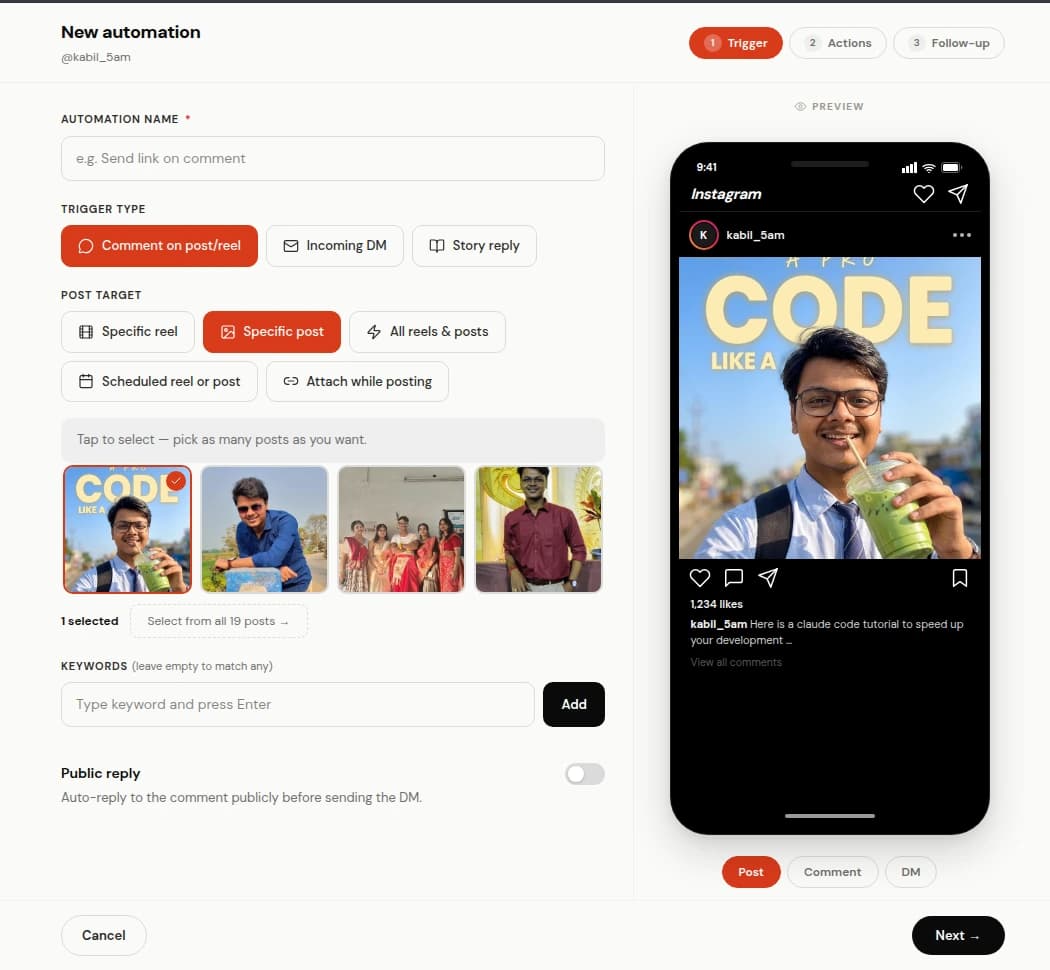
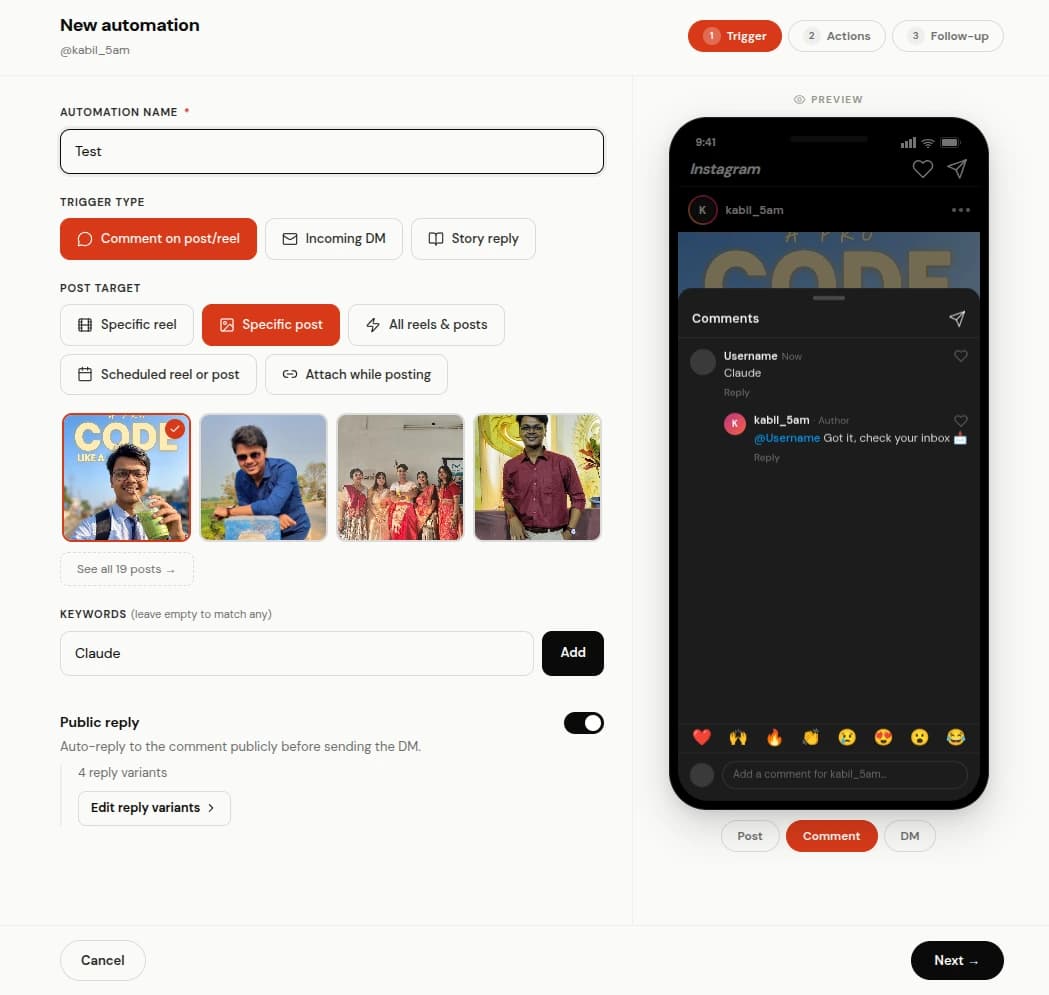
Point it at a post and pick the word
Choose the comment trigger, then choose what it watches: one specific Reel from a grid of your recent media, a post you have not published yet, or everything you post. Add the keyword. GUIDE, LINK, MEALS, whatever your caption asks for.
Match mode decides how forgiving it is. Contains catches send me the guide and guide please!!, which is what most comments actually look like. Exact fires only when the comment is that single word. Any ignores keywords and replies to every comment, which suits a giveaway and badly suits anything controversial.
Two replies, one public and one private
The public reply goes on the comment itself. It is short, and its job is social proof for everyone scrolling past. Write a handful of variants and each commenter gets a different one.
The DM is where the link lives. It opens with a short message and a button, and the link card arrives once they tap. You can attach up to three buttons, and a live phone preview shows the conversation the way the commenter will read it. A per-post reply limit caps the public replies if a Reel takes off harder than expected.
Attach it while you schedule the Reel
The usual version of this workflow is two products: a scheduler for the Reel, a DM tool for the keyword. In ReelDrop the automation picker is in the composer, so you attach the automation to the post at the same moment you pick the time slot, and it is live the second the post publishes. No gap where the Reel is public and the automation is not running.
How ManyChat prices this
ManyChat is the tool most people compare comment-to-DM against, and the two products meter completely different things. ManyChat charges for Active Contacts, the people who reply to you: its free plan has been 25 Active Contacts a month plus 4 live automations since 2 March 2026, Essential is $14 a month for 250 contacts, and Pro is $29 a month for 2,500. On the free tier the first message carries ManyChat branding.
ReelDrop meters automations instead of people, so a Reel that goes unexpectedly well does not move you up a tier mid-campaign. The free plan is 5 active automations with no contact cap, and the comment trigger is included in it. ManyChat also has no post publishing, so running comment-to-DM there means running a scheduler beside it. Where ManyChat wins is branching: its flow builder is the best on Instagram and ReelDrop does not have one.
The full side-by-side, including the tiers where ManyChat is the better buy:
How ManyChat prices comment-to-DMOne evergreen keyword, running all year
A yoga teacher keeps one automation pointed at every post, with the keyword START, sending her beginner sequence PDF. She has not opened the automation screen since March. It keeps delivering the PDF from posts she made about something else entirely, which is the whole appeal of an evergreen keyword: it works on the Reel you were not thinking about.
A keyword per launch
A photographer runs three offers a year and gives each one its own keyword and its own automation. When a launch ends, she pauses that automation rather than deleting it, and the numbers from last time are still sitting there when she reruns it.
Every trigger by plan
Starter is a real free plan rather than a trial, but it is deliberately one trigger type: a comment on a post or Reel, on up to five active automations. Everything else in the builder unlocks at Influencer.
| Trigger or capability | Starter (free) | Influencer ($9.99/mo) | Creator ($29/mo) |
|---|---|---|---|
| Active DM automations | 5 | Unlimited | Unlimited |
| Comment-to-DM on a Reel or post | Yes | Yes | Yes |
| Story-reply trigger | No | Yes | Yes |
| DM keyword trigger | No | Yes | Yes |
| Follow gate with API-verified follow check | No | Yes | Yes |
| Timed follow-ups (30 minutes to 24 hours) | No | Yes | Yes |
| Retrigger over comments that already happened | No | Yes | Yes |
| Auto-DM on posts and carousels, not only Reels | No | Yes | Yes |
| One automation across all your Reels and posts | No, target specific Reels | Yes | Yes |
| AI DM reply | No | No | Yes |
| Instagram accounts | 1 | 1 | 5, one per workspace |
ReelDrop plans as of September 2026. Paid plans start with Influencer at $9.99 a month ($79 a year); Creator is $29 a month, with founding pricing at $149 a year or $249 once. India pricing is on the pricing page.
Frequently asked questions
How fast does the DM arrive?
Seconds. Instagram sends ReelDrop a webhook when the comment lands, and the reply and DM dispatch from that.
Does it reply to the same person twice?
No. Each comment event is logged once, so a person who comments the keyword three times gets one DM, not three.
Can it work on a post I published before setting it up?
Yes. Point the automation at any recent post, then use retrigger to replay comments that already happened, up to 50 comments per post across five posts.
What if someone comments the keyword but does not follow me?
That is what the follow gate is for. Turn it on and ReelDrop verifies the follow with the Instagram API before the link goes out, asking them to follow first if they have not.
Is comment-to-DM against Instagram's rules?
No. Meta built the comment-to-DM path into its Messenger Platform, and ReelDrop uses it as documented, through the official API and a Meta app review. The tools that get accounts banned are the ones that ask for your password and imitate a human tapping around the app.
Do I need Meta One to send people a link from my Reel?
No. Meta's paid plans (Meta One Advanced and up, and the higher Meta Verified plans) let you add a clickable link to a set number of Reels a month. Comment-to-DM works differently: ReelDrop sends the link by DM to anyone who comments your keyword, and the comment trigger is on the free plan. ReelDrop can't add Meta's link to the Reel itself; that is done in the Instagram app when you post.
ReelDrop handles scheduling, AI carousels, captions, and DM automation in one place. Start free today.
Get started