

Create your first DM automation
Updated:
Open /automations/new, name the automation, pick what triggers it, write the DM, and save. The builder is three steps and takes a few minutes the first time. ReelDrop's free plan includes 5 active DM automations — comment triggers on reels — plus a full Instagram Reels scheduler, and it never asks for a credit card. Those comment-to-DM automations have no monthly limit on how many DMs they send (Instagram's own messaging limits apply), and Instagram scheduling and posting are unlimited.
Before you start
- An Instagram Business or Creator account. Personal accounts cannot use the messaging API, and converting is free in the Instagram app.
- That account connected to a ReelDrop workspace through the Connect Instagram button in settings.
- Somewhere for the link to go: a landing page, a PDF, a checkout page, anything with an https URL.
Open the builder
Go to Automations in the left sidebar and click New automation, or go straight to /automations/new. The builder shows three step pills across the top: Trigger, Actions, Follow-up — or Trigger, Automate with AI, Review if you pick the DM reply by AI trigger. You can click back to any step you have already filled in.
Give the automation a name in the automation name field. It is required before you can move past step 1, and it is what you will be searching for in six months when you have fourteen of these. "Send link on comment" is the placeholder for a reason.
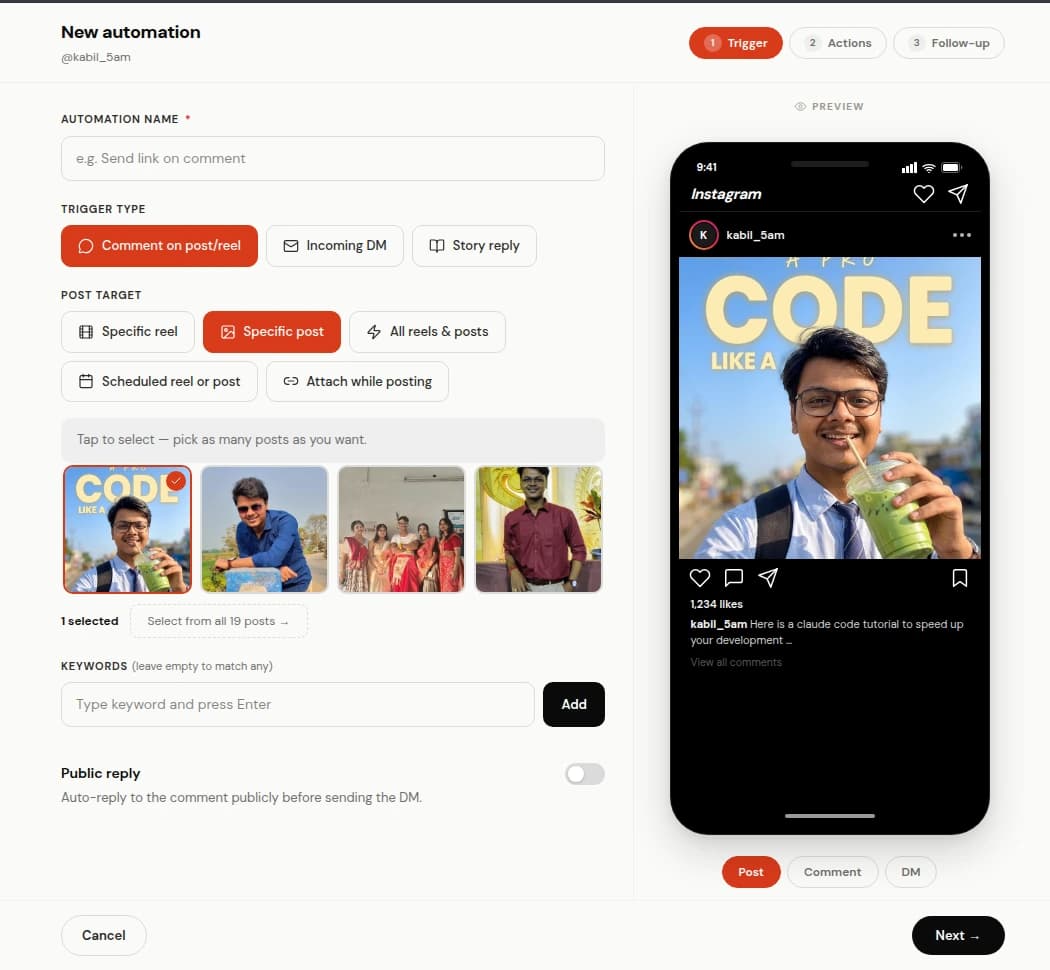
Step 1 of the builder: the name, the trigger type, and the keyword. Choose the trigger type
Four things can start an automation. Pick one:
- Comment on post/reel: someone comments on one of your posts. This is the one almost everybody wants.
- Incoming DM: someone messages you and the message matches a keyword.
- Story reply: someone replies to one of your stories.
- DM reply by AI: anyone who messages you gets a real conversation with an AI you brief once. No post to pick and no keyword to match — you write a goal and the facts it is allowed to use, and it answers from those. Creator plan only.
Point it at the right posts
A comment automation has to know which posts it is watching. The options are Specific reel or Specific post (pick from a grid of your recent media), Scheduled reel or post (a post you have queued but not published), and Attach while posting, which leaves the automation dormant until you attach it to something in the composer.
Attach while posting is the one to use when you are building the automation before the Reel exists. It shows up in the composer with a "Ready to attach" badge, and picking it there is what wakes it up. There is a whole doc on that flow: comment-to-DM setup.
Set the keyword and the match mode
Type a keyword and press Enter to add it. Add as many as you like. Then choose how strictly they match:
- Contains keyword: fires on "guide" inside "send me the guide please!!". This is the default and the right answer most of the time.
- Exact match: fires only when the comment is the keyword and nothing else.
- Any comment: ignores keywords and responds to every comment on the post. Correct for a giveaway, wrong for anything that attracts an argument.
Turn on the public reply (optional, but do it)
The public reply is the short comment ReelDrop posts back in the thread. It matters more than it looks: the next few hundred people scrolling the comments see that the keyword actually does something, and they comment too.
Switch on Public reply and you get ten default variants like "Got it, check your inbox" and "Just messaged you". ReelDrop picks one at random per comment so the thread does not turn into a wall of identical replies. Edit them, delete the ones that do not sound like you, add your own.
Reply limit stops public replies once the post passes that many comments. Read that carefully: it counts every comment on the post, not the ones that matched your keyword. On a Reel with 500 comments where 40 used the keyword, a limit of 50 stops public replies at the post's 50th comment overall, so only a handful go out. Set it against the comment volume you expect on the post rather than against the number of replies you want. Leave it empty for unlimited. DMs keep sending past the cap either way; only the public replies stop.
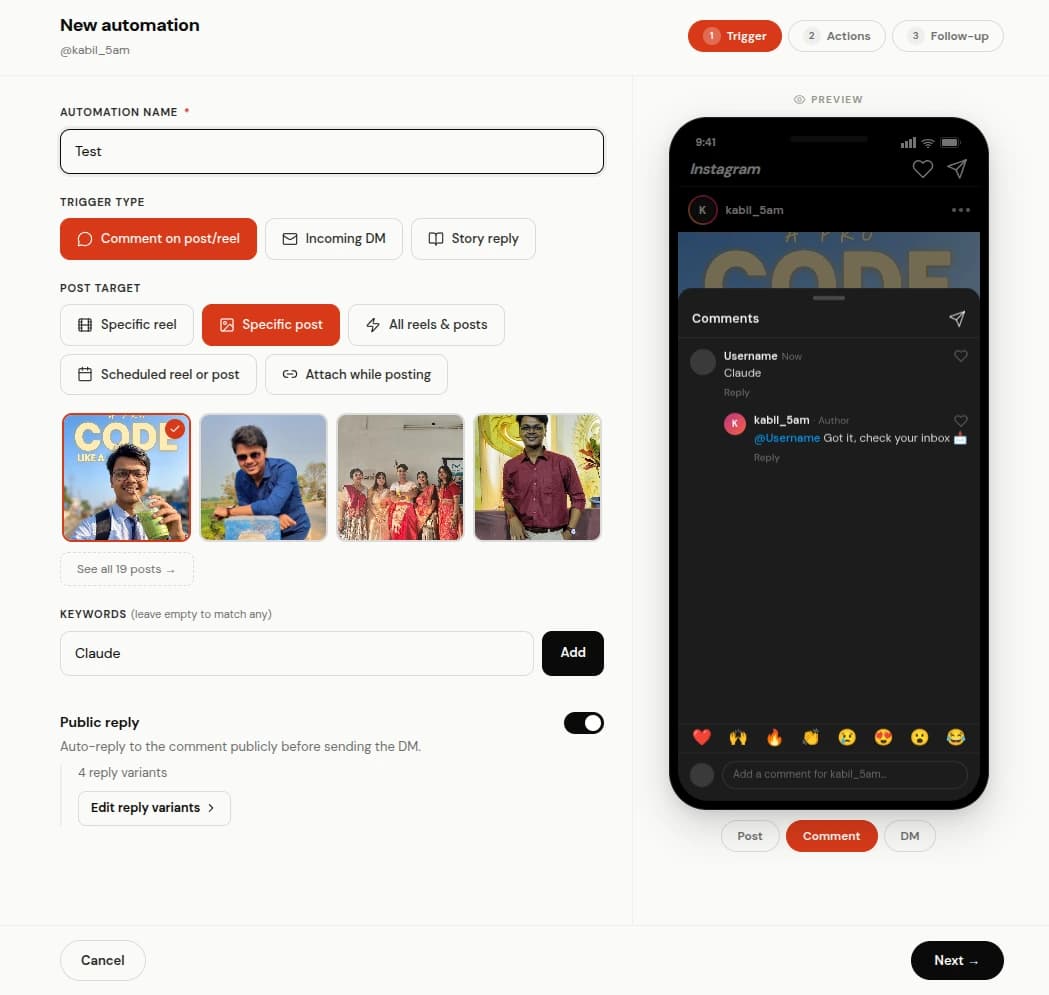
Reply variants. Each commenter gets one at random. Write the DM sequence
Step 2 is called Actions, and it holds three cards that run in order. Card 1 and card 2 are optional; card 3 always sends.
Opening message is on by default. It sends a short message with a button, and the link only arrives after the person taps. That tap is doing real work: someone who asked for the thing confirms they still want it before a link lands in their inbox. The default button label is "Send me the link". On Influencer and Creator you can turn the card off if you would rather send the link immediately. On the free Starter plan it stays on, and ReelDrop adds a short "Sent via reeldrop.io" line at the end of it; the line is added when the message is sent, is not part of your text, and disappears on any paid plan.
Ask for follow is off by default, and it is the one card on this step that is not on the free plan: the follow gate is included on Influencer ($9.99/month) and Creator. Switch it on and ReelDrop asks the commenter to follow you before delivering the link, then checks with Instagram whether they actually did. Follow gates and follow verification covers what that check can and cannot see.
DM message is the one that always sends. Write a few variants here too. Attach up to three link buttons, each with a label of 20 characters or fewer. Every URL must start with https:// — the builder validates this before saving and blocks the save until you fix it. The phone preview beside the editor shows the whole conversation the way the commenter will read it, which is how you catch an awkward line before a thousand people do.
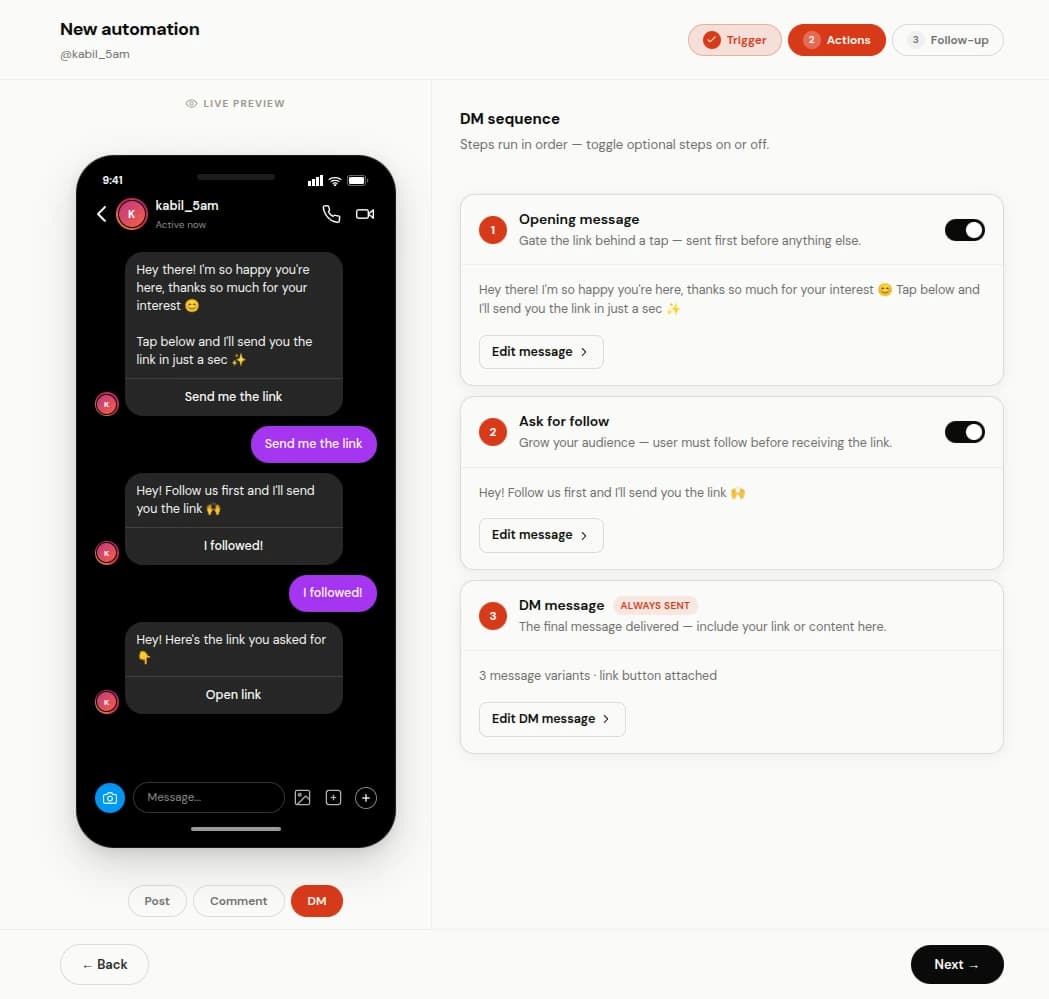
The DM itself, with a link button and the live preview. Add a follow-up, or skip it
Step 3 is one optional follow-up. Switch it on, pick a delay of 30 minutes, 1 hour, 2 hours, 6 hours, or 24 hours, and write the message. It goes only to people who received the link and then said nothing.
If they reply before the delay is up, the follow-up is cancelled and never sends. Timed follow-ups goes into the timing in more detail.
Save it and check it is live
Save. The automation appears on /automations with an active toggle, its trigger badge, and a row of counters that start at zero.
Test it on a real post: comment your own keyword from a second account, or ask a friend. Testing from the account that owns the automation will not work, because the engine skips events generated by your own account so an automation can never answer itself.
What the counters on each automation mean
Every automation carries its own numbers, and they are the fastest way to tell a dead keyword from a dead Reel.
- DMs sent: how many private messages this automation has delivered.
- Taps and tap rate: how many people tapped a button. Instagram does not report taps on every button type, so rows where it is not observable leave the metric off rather than showing a permanent zero.
- The counters marked replied and reply rate: how many people wrote back after the DM.
- Public replies: how many comments ReelDrop posted in the thread.
Editing an automation that is already running
Open it from /automations and change whatever you want. Edits apply to everything that happens after you save; conversations already in flight are not rewritten.
Pause instead of deleting when a launch is over. The setup and the numbers stay, and switching it back on next quarter is one click. Cloning gives you a copy that arrives paused on purpose, so a half-edited duplicate cannot start answering people while you are still writing it.
If you switched an automation on after the comments already started arriving, Retrigger replays them: up to 250 comments per post across a maximum of five posts. It only works on an active comment automation. A post-scoped one needs a post attached; an automation targeting all reels & posts (only settable via the API/MCP integration, not the builder) sweeps your five most recent posts instead. Comments already handled are skipped, so running it twice does not double-DM anybody.
Frequently asked questions
Why is nothing happening when I comment my own keyword?
The engine skips events from your own account, so an automation cannot answer itself. Test from a second account. If a different account also gets nothing, check that the automation is active, that its keyword match mode is not set to Exact when the test comment had extra words, and that the post you commented on is the post the automation is pointed at.
Do I need a business account?
Yes. Instagram only exposes the messaging and comment APIs to Business and Creator accounts. Converting a personal account is free and takes about a minute in the Instagram app under Settings, Account type and tools.
How many automations can I have?
The Starter plan allows 5 active automations at once, and paused ones do not count against that. Influencer at $9.99/month and Creator are both unlimited. ReelDrop's free plan includes 5 active DM automations — comment triggers on reels — plus a full Instagram Reels scheduler, and it never asks for a credit card. Those comment-to-DM automations have no monthly limit on how many DMs they send (Instagram's own messaging limits apply), and Instagram scheduling and posting are unlimited.
Can one automation watch every post I publish?
Not from the builder — pick Specific reel/post, Scheduled, or Attach while posting there. The all-reels-and-posts target still exists and can be set through the API/MCP integration; be deliberate about the keyword if you do, because it fires on any post where somebody types that word.
What happens if two automations match the same comment?
Both can run, which usually means the commenter gets two DMs. If you keep an all-posts automation running, use a distinct keyword for it so it does not collide with the per-launch ones.
Does the person have to be following me?
Not unless you turn on Ask for follow. Without the gate, anyone who comments the keyword gets the DM.
ReelDrop handles scheduling, AI carousels, captions, and DM automation in one place. Start free today.
Get started