
Docs menuDM automation
DM automation
DM send limits and account safety
ReelDrop does not cap how many DMs an automation sends in a month, on any plan. It limits pace instead: each account's replies to comments are spread across the hour and slowed when Instagram pushes back, and a new automation stops replying in public after 1,000 replies on one post. This page covers those limits and what ReelDrop shows when something stops working.
5 steps13 min readUpdated
Feature page: Instagram DM Automation
On this page
- 1. Check what actually has a number
- 2. Keep a public reply limit on posts you expect to travel
- 3. Keep the message variants
- 4. Test on a small post before a big one
- 5. Check the list after a launch
- Limits with a number
- Pace: learned per account, not a fixed number
- The 24-hour messaging window
- When an automation stops firing
- When a post is deleted
- When your plan changes
- Two automations on one post
- Read the activity log
- What the engine does on your behalf
- What ReelDrop never does
- FAQ
- Related
Step 1: Check what actually has a number
Six things in ReelDrop DM automation are hard numbers. Everything else is paced per account or governed by Instagram.
- Public replies per post: 1,000 on a new automation, counting replies sent. Change it or clear it under Reply limit.
- Active automations: 5 on Starter, unlimited on Influencer ($9.99/month) and Creator. Paused ones do not count.
- Buttons per DM: up to 3, each a link, a PDF (up to 25 MB) or a product carousel (up to 10 cards), with a label of 20 characters or fewer.
- Quick replies per DM: up to 13, each 20 characters or fewer (Influencer and Creator).
- Retrigger: up to 250 existing comments per post, across a maximum of 5 posts, none older than 7 days.
- Follow-up delivery: up to 200 due follow-ups per sweep, with the rest carried to the next one.
Step 2: Keep a public reply limit on posts you expect to travel
Reply limit lives on the public reply step of the builder, and a new automation starts at 1,000. It counts the public replies this automation has sent on one post, not the comments the post received, so off-topic comments never use it up, and each post has its own count. Clear the field for no limit. An automation saved before the default existed keeps the limit it had.
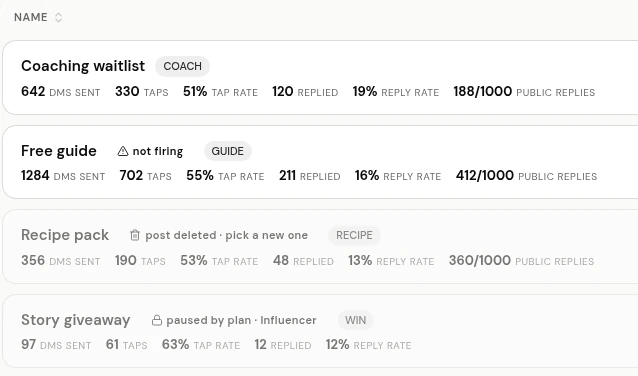
Each reply claims its place before it is sent, so two comments arriving together cannot both get past the last one. DMs keep sending after the limit, so nobody who commented goes unanswered in private. The automations list shows the busiest post against the limit, for example 412/1000 public replies, and turns the number red at 95%. If you raise the limit, Retrigger sends the replies the old one held back.
Step 3: Keep the message variants
Both the public reply and the DM take multiple variants, and ReelDrop rotates them. Public replies are picked at random per comment, since everyone on the post can see them. DM variants rotate per user, so the same person sees a consistent message across a conversation.
Sending one identical string a thousand times is the pattern spam classifiers are built to find. That is why the variants are there. Deleting all but one is the most common way people make their own automation look automated.
You do not have to write them all. On both steps, +10, +50 and +100 add wordings from a bank of pre-written replies and DMs, skipping any you already have, and you edit from there. Starter keeps up to 10 public reply variants per automation; Influencer and Creator have no cap.
Step 4: Test on a small post before a big one
Run any new automation on an ordinary post first and read the DM as it arrives on a phone. The link that goes nowhere and the button label truncated at 20 characters are both obvious in the first delivered message, and neither is obvious in the builder.
Step 5: Check the list after a launch
Open Automations a few hours after a post goes live. A row that needs you carries a label: “not firing”, “post deleted · pick a new one” or “paused by plan”. Each one is explained below, with what to do about it.
For one person who says the DM never came, open the automation’s ⋯ menu and choose Activity. It lists every comment the automation handled, what went out, and why anything Instagram refused did not.
Once there are a lot of automations, the list keeps them findable. Search matches a name or a keyword, the trigger menu filters to one trigger type, and the column headings sort by name, created or updated. The same ⋯ menu renames and clones (a clone arrives paused, so it cannot double-DM anyone), and Select turns on checkboxes for deleting up to 100 at once.
Limits with a number
These are enforced by ReelDrop and will not change without a note here.
| Limit | Value | Where it applies |
|---|---|---|
| Active DM automations | 5 on Starter, unlimited on Influencer and Creator | Per workspace. Paused automations are not counted. |
| Buttons per DM | 3 | Links, PDFs and product carousels in any mix. Each label 20 characters or fewer. A non-https URL is rejected at save time. |
| Cards per carousel button | 10 | Each card needs a title; the image, subtitle and link are optional. Sent only when the person taps the button. |
| PDF size | 25 MB | PDF files only. Checked by the builder before the upload starts. |
| Quick replies per DM | 13 | Each 20 characters or fewer. Shown in the Instagram app only, not on desktop. Influencer and Creator. |
| Public replies per post | 1,000 on new automations; change it, or clear it for no limit | Counts the replies this automation sent on that post. DMs keep sending past it. |
| Retrigger scope | 250 comments per post, 5 posts, last 7 days | Comments already handled are skipped, so a second run does not double-send. |
| Follow-ups per sweep | 200 | Anything past that is delivered on the next sweep. |
| Bulk delete | 100 automations per batch | Select more and the rest stay selected, ready for a second run. |
| API-published posts | 100 per account per 24 hours | Instagram's publishing limit, not a DM limit. Relevant if you schedule at volume. |
Pace: learned per account, not a fixed number
There is no ReelDrop cap on DMs per day or per month. There is a pace. Each Instagram account has its own hourly allowance for replies to comments, one for public replies and one for private ones, and sends are spread across the hour in five-minute slices instead of going out as fast as comments arrive.
The allowance is learned, not set. When Instagram refuses a send for going too fast, the allowance drops below the pace Instagram refused and the account pauses, for longer each time it happens again in a row. After an hour with no refusal it grows back a little at a time. A DM that has to wait is queued and goes out when there is room. A public reply that would have to wait is skipped instead, because a thank-you under a comment hours later is noise and the DM is what the person asked for; Retrigger can send skipped replies later.
If Instagram flags the account’s public replies as spam, public replies stop for a day and then restart slowly. DMs have their own allowance and keep going. Either way the app shows one notice a day, titled “Instagram is limiting your replies”, so a quiet automation has an explanation.
Some tools advertise a fixed daily cap as a safety feature. It is a number they chose, and it tells you nothing about what Instagram will accept from your account today. The real ceiling is Meta's, it varies by account, and it is applied when ReelDrop makes the API call. A refused send does not go out, and nothing in ReelDrop could talk Instagram into accepting more than it wants to.
The 24-hour messaging window
Instagram lets a business message a person for 24 hours after that person messages the business. Story replies and incoming DMs both open that window, and automations on those triggers reply inside it.
Comment-to-DM is the exception, and it is an exception Meta built. The DM is addressed to the comment rather than to the user, which is the documented mechanism for a business answering someone who commented but never messaged. It is why comment triggers reach people the other two cannot.
When an automation stops firing
An automation can be switched on and still match nothing. ReelDrop counts the comments an active automation should have answered and could not, and the automations list marks it “not firing”. The hint on the badge reads, for example: “12 comments skipped since this last worked — the Instagram connection for this workspace has expired. Reconnect the account in Settings.”
The count resets the moment the automation fires again, so the badge never reports an old problem. A comment that simply does not contain your keyword is the automation working, and is never counted.
An expired connection shows in three more places: a banner across the automations page that says “Your Instagram connection was lost.”, with a Reconnect Instagram button; a notice in the app titled “Instagram connection lost”; and an email. Reconnecting from Settings brings every automation back without editing any of them.
When a post is deleted
Instagram sends nothing when a post is deleted, so ReelDrop asks. When the automations list opens, it checks the posts your comment automations are attached to, at most once every ten minutes; the builder checks the automation it opens every minute. Only posts published from your own account are taken off this way. A collab someone else posted looks the same to the API as a deleted post, so the builder flags it as “No longer on Instagram” and leaves the decision to you.
A deleted post comes off the automation, which keeps running on its other posts, and the row says “1 post deleted”. When it was the last post, the automation pauses and the row says “post deleted · pick a new one”. The builder explains it above the post picker: “A post you picked was deleted on Instagram, so we took it off this automation.” Pick a new post and save, and the automation turns back on by itself. Switching it on without a new post is refused: “The post this automation was attached to was deleted on Instagram. Pick a new post first.”
When your plan changes
Moving to a plan that does not include a trigger pauses the automations that use it. Moving to a plan with a lower automation cap pauses the newest ones beyond it and keeps the oldest running. The workspace owner gets an email naming each paused automation.
In the list, those rows say “paused by plan”, followed by the plan that turns them back on, for example “paused by plan · Influencer”, and the label links to billing. After upgrading the label says “paused by plan · switch it on”: nothing restarts on its own, so switch each one back on from the list.
Two automations on one post
Instagram allows one private reply per comment. Two active automations that can both DM the same comment would race for it, and one would fail every time, so ReelDrop stops the pair before it exists.
In the post picker, a post another active automation answers is marked “Has automation:” followed by its name until you type a keyword, and “In use:” once your keyword matches theirs. Either way it cannot be ticked until your keyword differs from theirs (SLEEP and RESET can share a post; SLEEP and SLEEP cannot). Saving a clash anyway is refused with a message that names the other automation, and says so when it lives in another workspace connected to the same Instagram account. The same rule allows one DM reply by AI automation and one set of Ice Breakers per account.
Read the activity log
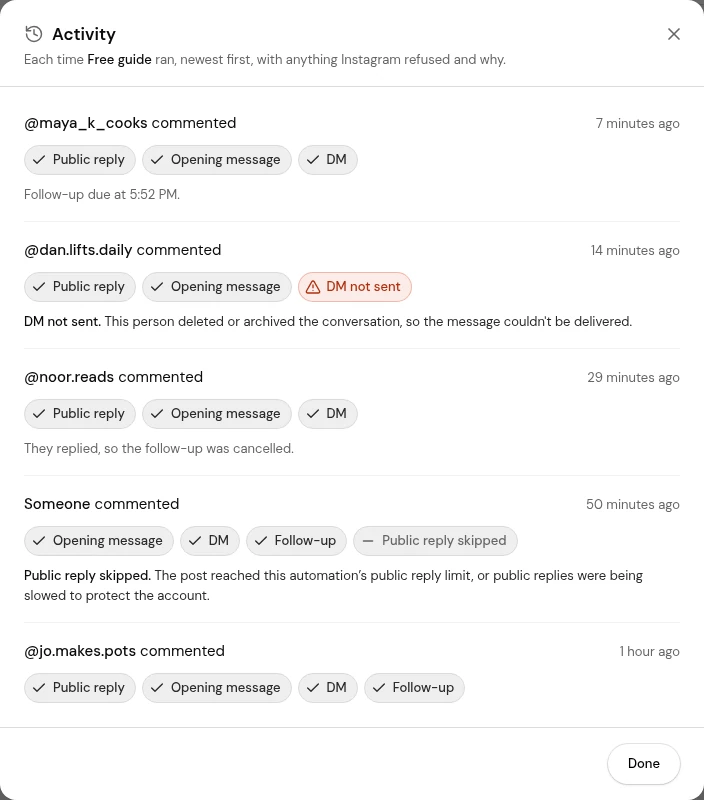
Every automation keeps a log of each event it handled. Open it from the automation’s ⋯ menu on the list, under Activity. Newest first, each entry shows who triggered it (their @handle once their DM thread is in your inbox, otherwise Someone), what they did, how long ago, and a badge for each step: Public reply, Opening message, Follow check, DM, Follow-up.
A step Instagram refused shows as a red badge such as “DM not sent”, with the reason underneath in plain words. Instagram’s error codes never appear. A step ReelDrop chose not to send, such as “Public reply skipped” at the reply limit, is grey, with its reason. The log also says when a follow-up is due, that it was cancelled because the person replied, or why it did not go out.
Older events load with Show older. The same log is readable from Claude or ChatGPT through the MCP server’s get_automation_logs tool. These are some of the reasons a refused or missed step can give:
- This person deleted or archived the conversation, so the message couldn't be delivered.
- This comment already got a private reply. Instagram allows only one per comment.
- Instagram only allows a private reply within 7 days of the comment.
- Instagram didn't let ReelDrop reply in this conversation because another app or inbox connected to your account is handling it.
- Message access is turned off for your Instagram account. In Instagram, open Settings → Messages and story replies → Connected tools and turn on "Allow access to messages".
What the engine does on your behalf
The parts of this that are ours rather than Meta's:
- Every incoming webhook is signature-verified before anything runs, so a forged event cannot trigger a send.
- Events your own account generates are skipped, so an automation can never answer itself into a loop.
- Each event is logged idempotently. A webhook Meta delivers twice results in one DM, not two.
- A partially failed run resumes at the step that failed rather than replaying the steps that already succeeded.
- Follow-ups are cancelled when the person replies, before they are sent.
- On Creator, the typing indicator adds exactly two calls per reply, one "seen" and one "typing…", and waits at most three seconds. If Instagram refuses either, the DM goes out straight away rather than waiting or retrying.
- Link URLs are validated before saving, so a non-https link is rejected in the builder rather than discovered in somebody's inbox.
- A failed send is sorted before anything retries it. Instagram having a bad minute is retried automatically; a refusal Instagram will never reverse, such as a deleted conversation, is recorded once and not sent again.
- When ReelDrop starts listening for a new kind of Instagram event, accounts connected before then are subscribed again in the background the next time the app checks the connection, so nobody has to disconnect and reconnect to get a new trigger.
What ReelDrop never does
ReelDrop is registered with Meta as a Tech Provider and runs entirely on the official Instagram Graph API. You connect through Meta's own login screen. ReelDrop never sees or asks for your Instagram password, does not simulate a browser or a mobile app, and does not scrape your account.
That distinction is the whole of the ban question. Accounts get restricted for password-based tools that log in as you and imitate human taps, because Instagram cannot tell that apart from a hijacked account and treats both the same way. An app using granted API permissions is a different thing entirely, and you can revoke those permissions at any time from your Instagram settings without asking us.
Frequently asked questions
How many DMs can I send per day?
There is no ReelDrop daily number. Replies to comments are paced per account across the hour, and the pace adjusts to what Instagram accepts from that account, so a busy day takes longer rather than failing. Any tool quoting you a precise daily cap is quoting its own queue setting, not Instagram's.
Will automated DMs get my account banned?
Not through this route. ReelDrop uses the official API with permissions you granted through Meta's own login screen, never your password, and the API enforces Instagram's rules server-side. Why Instagram accounts get banned covers what does cause restrictions.
What happens if Instagram refuses a send?
It depends on why. A temporary problem on Instagram’s side is retried automatically, picking up at the step that failed instead of resending what already went out. A refusal Instagram will never reverse, such as a conversation the person deleted, is not retried; it shows in the automation’s activity log with the reason in plain words.
Does a follow-up count toward the same limits?
Yes. It is an ordinary DM as far as Instagram is concerned.
Should I stagger my automations to be safe?
It is not necessary for ordinary volumes. If you run several accounts through several workspaces and expect a heavy day, spreading launches across the day is a reasonable habit, but it is a habit rather than a requirement.
Can I see which sends failed?
Yes. Open the automation’s ⋯ menu on the automations list and choose Activity. Each event lists what went out, and anything Instagram refused shows as a red badge, such as “DM not sent”, with the reason in plain words.
Why does my automation say “not firing”?
It is switched on but has been skipping comments it should have answered, almost always because the Instagram connection for the workspace expired. Reconnect the account in Settings; the label clears the next time the automation fires.
Why did my automation pause by itself?
Either every post it was attached to was deleted on Instagram (the row says “post deleted · pick a new one”) or the workspace moved to a plan that does not include it (the row says “paused by plan”). Pick a new post, or switch to the plan named on the label, and switch it back on.
Related
- The Instagram DM inboxThe 24-hour reply window, from the reader’s side.
- Is ReelDrop safe?Official API, no password, no browser simulation.
- Why Instagram accounts get bannedWhat actually causes restrictions.
- Is Instagram DM automation safe?The longer version of this question.
- The safest Instagram toolsHow to tell an API tool from a password tool.
Sources
Something here out of date or missing a step? Tell us and we will fix it.
Stop managing Instagram. Start growing with it.
Sign up free for AI carousels, DM automation, captions, and scheduling: built for creators who post less and grow more.
Built in Toronto by Piyush Sachdeva.