

Things to ask Claude once ReelDrop is connected
Updated:
Once the connector is set up, everything below is a plain-English message in a chat. The assistant checks in before it books anything: it shows you caption options, asks about the cover, and reads posting times from your own schedule settings instead of guessing.
Before you start
- ReelDrop connected to Claude. If not, start with Connect Claude to ReelDrop.
- For scheduling: the video, photo or story file at a link anyone can open (Google Drive "anyone with the link" works). Reels can also be uploaded from a local file.
Schedule one reel
Say: "Schedule this reel for Tuesday evening" and paste the video link. The assistant generates caption options with ReelDrop's caption writer, waits for you to pick one, asks whether you want Instagram's auto-generated cover or a custom cover image, then books the slot and confirms.
For a video that only exists on your machine, say so. The assistant requests an upload link from ReelDrop and sends the file straight there first.
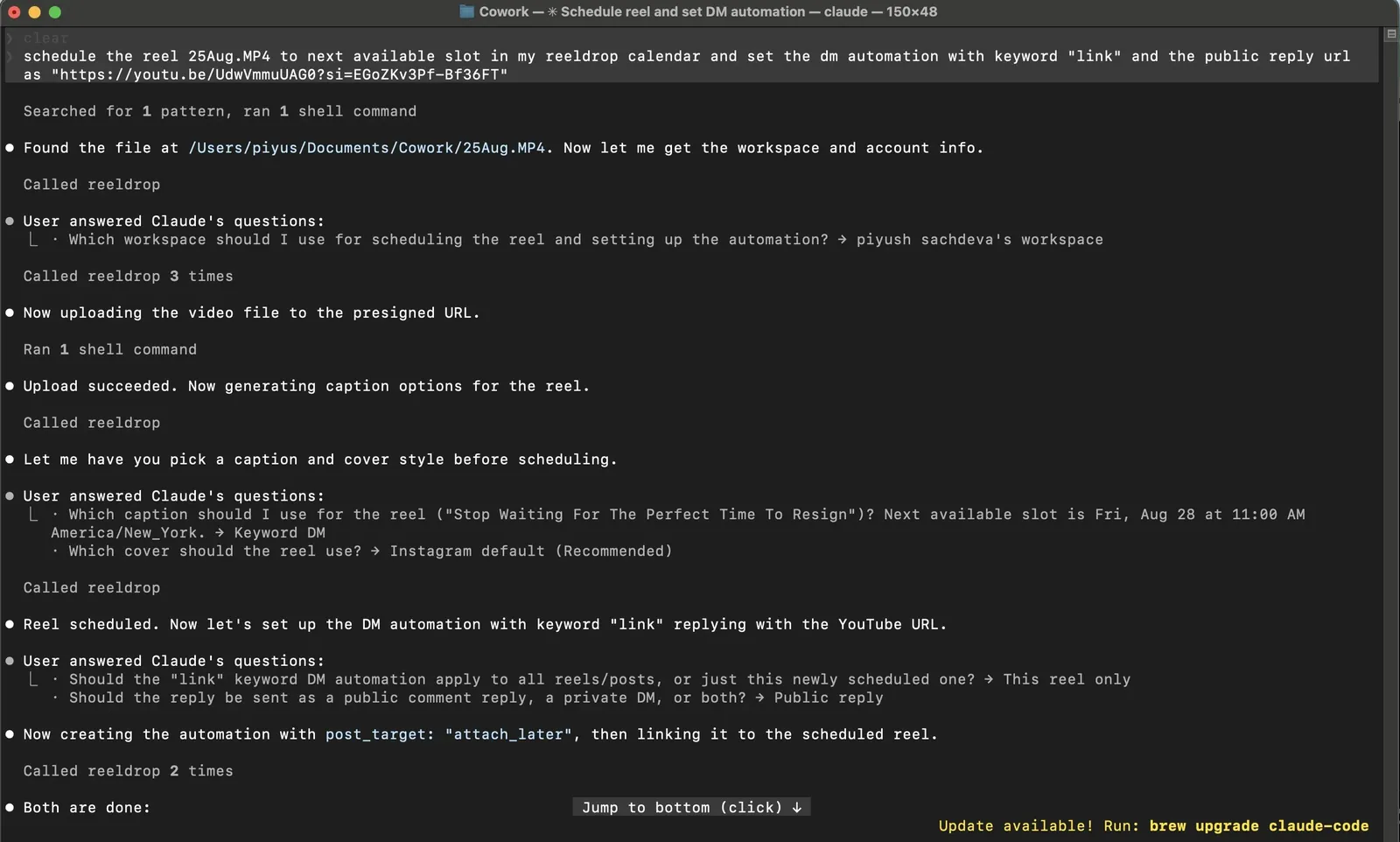
A real run: local file found, uploaded, captioned, scheduled, automation attached. Batch a week or two
Say: "Here are 8 videos, spread them across the next two weeks in my usual slots." Bulk scheduling takes up to 15 reels in one go. The assistant works through captions and covers for each, and books them against your saved posting slots.
Post or schedule a story
Say: "Post this to my story at 7pm" and paste the photo or video link. A story takes the picture or video and nothing else, so there is no caption or cover to choose. The assistant books the time, or posts it straight away if you say now. Each file is its own story: give it three links and it queues three, at the same time or spread out.
Instagram does not accept a caption on a story, so any text has to be part of the image or video itself. Stories need a link anyone can open; uploading a local file works for reels only.
Edit or cancel what is queued
Say: "What do I have scheduled this week?", then "Move Thursday's reel to Friday 9am and tighten the caption." Caption, hashtags, time, cover, and draft status are all editable in place, so there is no cancel-and-redo dance. Cancelling outright also works, right up until publish time.
Queued stories work the same way: ask what stories are lined up, then move one to a new time or cancel it. A story has no caption to edit, so the usual change is its time.
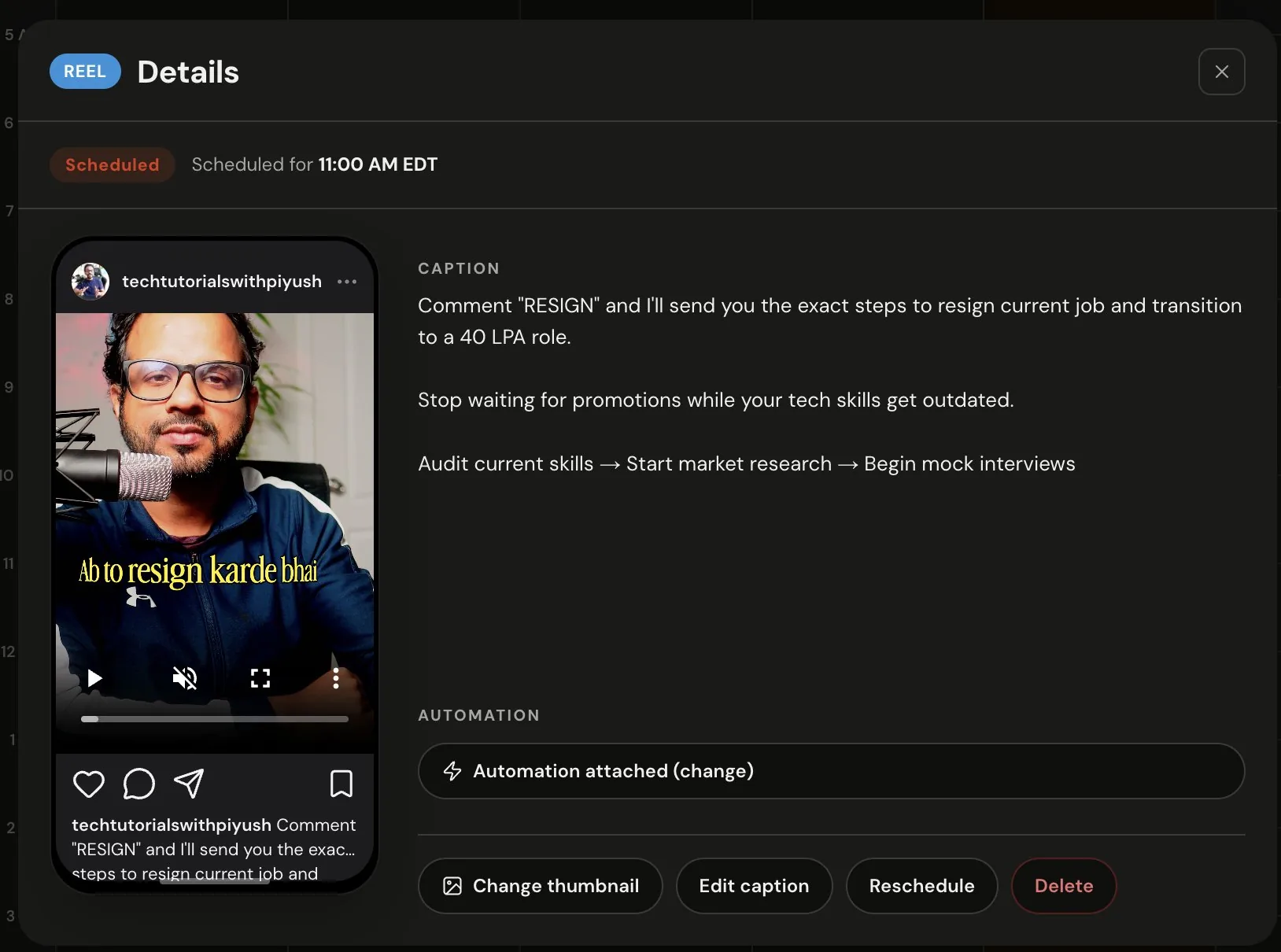
What a chat-scheduled reel looks like in the calendar. Everything here stays editable from the chat too. Pull your analytics
The assistant reads your real numbers, so performance questions get real answers:
- "How did my last 30 reels do?" (per-reel views, reach, likes, saves)
- "How is the account trending this month?" (followers, reach, demographics)
- "Did my stories this week outperform last week?"
- "How are my trial reels performing?"
Create or adjust DM automations
Say: "Add a comment-to-DM automation with the keyword GUIDE to the reel you just scheduled." The assistant can list, create, edit, and delete automations, and attach one to a reel before it publishes. It asks which reel you mean rather than picking one for you.
For a story-reply automation, the assistant can check which of your stories are live right now and ask which one the automation should answer. It can also attach the automation to a story it is scheduling.
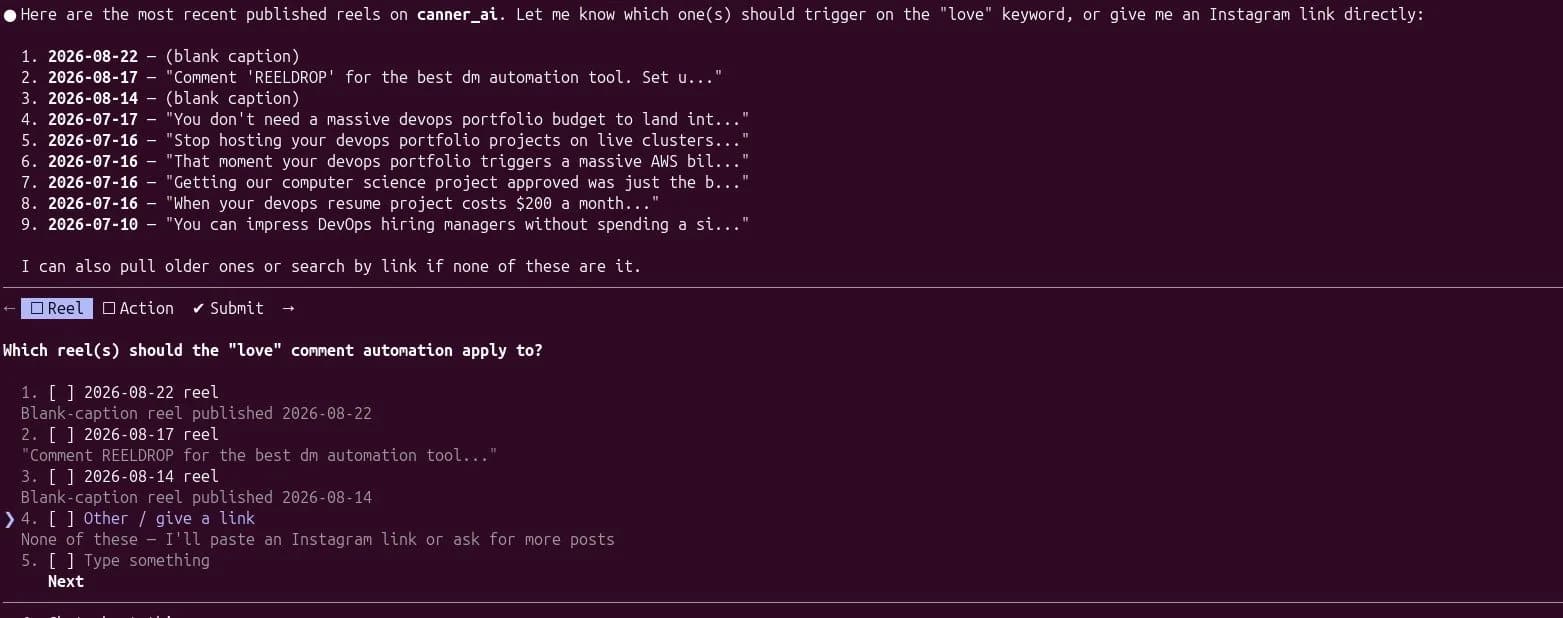
The assistant lists your recent reels and asks, instead of guessing.
Frequently asked questions
Will it publish something I have not seen?
No. Scheduling requires a caption and a cover choice, so the assistant has to surface both before anything is booked. If you tell it to choose, it will, but that is your call in the chat, not a default.
Why does it keep asking about covers?
Because ReelDrop needs one of two answers: Instagram's auto-generated cover, or a custom image URL. There is no "use the first frame" option, so the assistant cannot silently pick that.
Do captions generated in chat count against my allowance?
Yes, same as in the app: one generation returns several options and costs one from your monthly caption allowance. Creator has unlimited captions, so there this never comes up.
Can it work across my accounts?
One workspace at a time. Ask it to list your workspaces and name the one you mean; each workspace carries its own Instagram account.
Can it schedule stories, and add a caption?
It can post a story now or schedule one for later, one photo or video at a time. It cannot add a caption: Instagram does not allow one on a story, so the text has to be in the image or video. The assistant is told this and should say so rather than leave a caption out without telling you.
ReelDrop handles scheduling, AI carousels, captions, and DM automation in one place. Start free today.
Get started