Feature
Instagram DM menu (persistent menu)
Updated
Most of your DMs are people asking for the same three things: the booking link, the free guide, the current offer. The DM menu puts those three things on buttons that stay one tap away in every conversation with your account. A button can open a link, or run one of your automations so the tap sends the same DM a comment would. It is Instagram's own persistent menu, set through the official API, and it is not on the free Starter plan. ReelDrop Influencer is $9.99 a month, or ₹449 in India, for unlimited DM automations with every trigger type, the follow gate and story replies included, plus unlimited scheduling.
On this page
- See it in the app
- Set up the menu once, on the Automations page
- A link, or a tap that runs an automation
- What Instagram shows, and when
- It looks after itself
- The coach whose DMs were all the same question
- A shop with a weekly drop
- The newsletter that lives one tap from every chat
- Every trigger by plan
- FAQ
- Keep exploring
See it in the app
Set up the menu once, on the Automations page
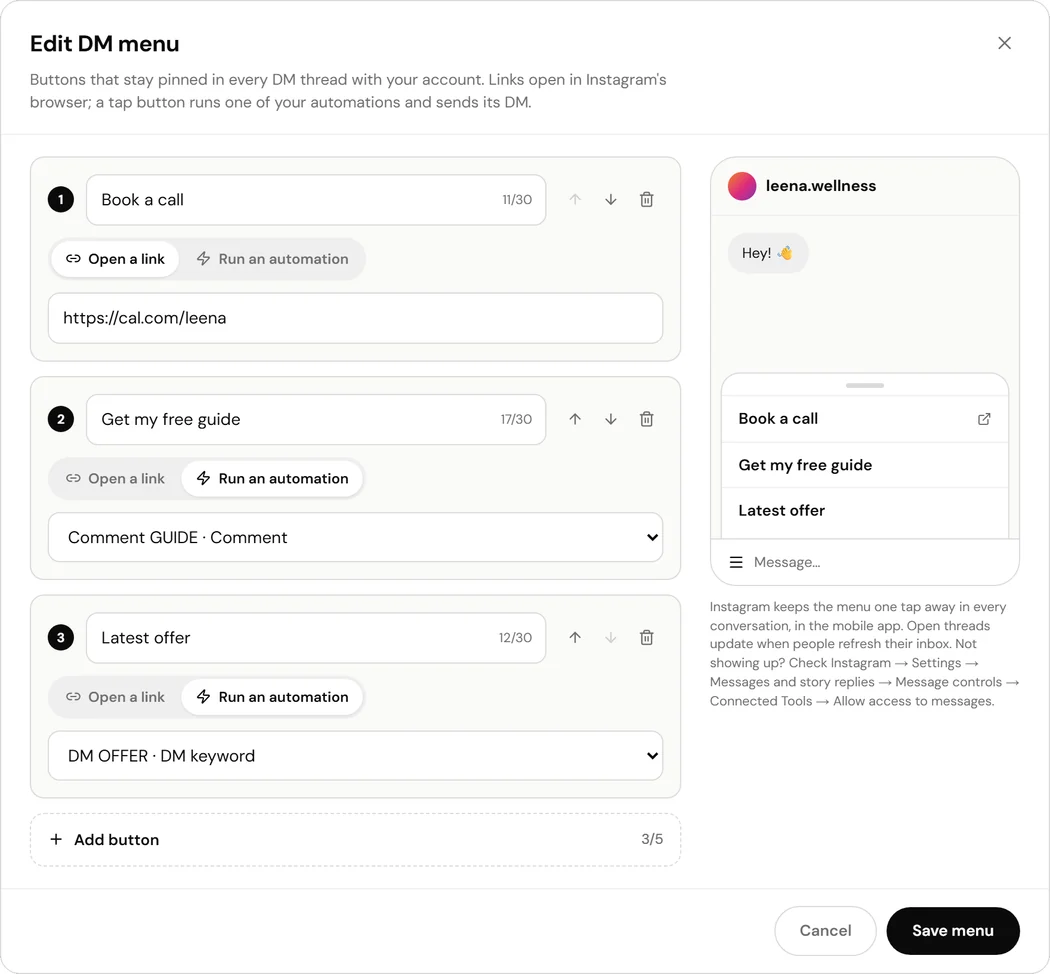
The DM menu sits at the top of the Automations page, above your list. Open it, add up to five buttons, and save. The menu goes to Instagram straight away, and the card says Live once Instagram has accepted it.
Titles are capped at 30 characters, the length Instagram shows before it cuts a title off, and two buttons cannot share a name. Links have to start with https. The editor points at the exact button that needs fixing before anything is sent, rather than letting Instagram reject the menu or truncate it in someone's inbox.
A link, or a tap that runs an automation
A link button opens the page in Instagram's own browser, which is the right choice for a booking page, a shop or a sign-up form.
An automation button is the part a link-in-bio cannot do. Pick one of your comment, DM-keyword or story-reply automations, and a tap sends that automation's DM to the person who tapped it. If the automation asks people to follow first, the tap gets the follow check too; if it has a timed follow-up, that is armed as well. The opening step is skipped, because tapping the button already is the yes it asks for.
Taps are counted on the automation they run, next to its DMs sent, so you can see which button actually gets used.
What Instagram shows, and when
The menu shows in the Instagram mobile app, in every conversation with your account, including old ones. A change reaches new conversations straight away. Chats a person already has open keep the previous menu until they refresh their inbox, which is how Instagram handles every account's menu, not a ReelDrop delay.
A tap counts as the person messaging you, so it opens Instagram's 24-hour messaging window. That is what lets the automation answer the tap at all, and it is why a menu button is allowed to start a conversation where a cold DM is not.
The menu and ice breakers live side by side. Ice breakers are the questions Instagram shows only in a brand-new conversation, before the first message. The menu stays in every thread after that. Saving one never touches the other.
It looks after itself
Delete an automation and any menu button that ran it comes off the menu, and off Instagram, with it, so nobody is left tapping a button that does nothing. A button that runs a paused automation stays, with a warning on the card, because pausing is usually temporary.
Disconnecting and reconnecting Instagram puts the menu back on the account. Moving to a plan without the menu takes it off Instagram but keeps the buttons saved, so it is one click to publish again later.
The coach whose DMs were all the same question
A fitness coach gets the same messages every day: how do I book, is the free plan still available, what does coaching cost. Her menu has three buttons. Book a call opens her calendar. Free 7-day plan runs the automation that already sends the plan to anyone who comments START. Coaching prices opens the pricing page. The questions still arrive, but most of them now arrive as a tap with an answer attached.
A shop with a weekly drop
A small jewellery brand drops new pieces every Friday. Latest drop runs the automation for that week's keyword, so the same DM goes to people who comment and people who simply open the chat. Shipping and returns is a link. When the drop changes, they point the button at the new automation, and there is nothing else to update.
The newsletter that lives one tap from every chat
A food creator answers dozens of recipe requests a week in the DMs. Her menu has a single button, Get the weekly recipes, that runs her newsletter automation with the follow gate on. Every conversation, including the ones that started about something else, now has a way to sign up that does not involve her typing a link.
Every trigger by plan
Starter is a real free plan rather than a trial, but it is deliberately one trigger type: a comment on a post or Reel, on up to five active automations. Everything else in the builder unlocks at Influencer.
| Trigger or capability | Starter (free) | Influencer ($9.99/mo) | Creator ($29/mo) |
|---|---|---|---|
| Active DM automations | 5 | Unlimited | Unlimited |
| Comment-to-DM on a Reel or post | Yes | Yes | Yes |
| Story-reply trigger | No | Yes | Yes |
| DM keyword trigger | No | Yes | Yes |
| Follow gate with API-verified follow check | No | Yes | Yes |
| Timed follow-ups (30 minutes to 24 hours) | No | Yes | Yes |
| DM menu: up to 5 buttons pinned in every DM thread | No | Yes | Yes |
| Quick replies, including email and phone capture | No | Yes | Yes |
| Retrigger over comments that already happened | No | Yes | Yes |
| Auto-DM on posts and carousels, not only Reels | No | Yes | Yes |
| One automation across all your Reels and posts | No, target specific Reels | Yes | Yes |
| AI DM reply | No | No | Yes |
| Typing indicator: "seen", then "typing…", before each automated reply | No | No | Yes |
| Instagram accounts | 1 | 1 | 5, one per workspace |
Frequently asked questions
What is a persistent menu on Instagram?
A short list of buttons Instagram keeps available in every DM conversation with a business or creator account. Meta calls it the persistent menu; in ReelDrop it is the DM menu. Each button opens a link or sends a postback that ReelDrop turns into an automated DM.
How many buttons can the menu have?
Up to five. Meta recommends five as the most that reads well on a phone, and ReelDrop holds the menu to that. Each title can be up to 30 characters.
Which automations can a button run?
Any of your comment, DM-keyword or story-reply automations that send a DM. AI DM reply is not offered, because it answers what someone writes rather than sending a fixed DM, and neither are ice breakers, whose replies belong to the question tapped.
Why do I not see the menu in my DMs?
Check three things. It shows in the Instagram mobile app, not on desktop. A chat that was already open keeps the old menu until the inbox is refreshed. And the account needs Instagram → Settings → Messages and story replies → Message controls → Connected Tools → Allow access to messages switched on, the same setting ice breakers need; Instagram does not let ReelDrop read it.
Can I use the DM menu and ice breakers together?
Yes. Ice breakers show only in a brand-new conversation, before anyone has messaged. The menu shows in every conversation. Saving or removing one never changes the other.
Which plan includes the DM menu?
Influencer and Creator. The free Starter plan covers comment-to-DM on up to 5 active automations; the DM menu, story replies, DM keywords and the follow gate unlock on Influencer at $9.99 a month.
Does a menu tap count as a conversation for the 24-hour window?
Yes. A tap is the person messaging you, so it opens Instagram's 24-hour window and the automation can reply. Anything the person writes afterwards lands in your inbox as usual.
Do I need a business account?
Yes. The menu is set through the official Instagram API, which works with Business and Creator accounts connected to ReelDrop. Converting a personal account is free and takes a few minutes in the Instagram app.
Keep exploring
Stop managing Instagram. Start growing with it.
The DM menu is on Influencer and up. Comment-to-DM on reels is free on Starter.
Built in Toronto by Piyush Sachdeva.