Docs menuDM automation
DM automation
The DM menu
The DM menu is Instagram's persistent menu: up to five buttons that stay one tap away in every DM conversation with your account. A button opens a link, or runs one of your automations so the person who tapped gets that automation's DM. There is one menu per Instagram account, and you edit it from the Automations page.
5 steps3 min readUpdated
On this page
Before you start
- An Instagram Business or Creator account connected in Settings.
- A paid plan. The DM menu is on Influencer at $9.99 a month and on Creator. On Starter the card shows an Upgrade to Influencer button instead of the editor.
- For buttons that run an automation: a comment, DM-keyword or story-reply automation that sends a DM. AI DM reply and ice breaker automations cannot be picked.
Step 1: Open the DM menu card
Go to /automations. The DM menu card sits at the top of the page, above your list. It says Off until a menu is saved. Click Set up menu.
Step 2: Name the button
Type the title people will see, up to 30 characters. The counter beside the field turns red past 30, because Instagram cuts longer titles off. Two buttons cannot have the same title.
Step 3: Choose what it does
Each button has two options. Open a link takes an https URL and opens it in Instagram's browser. Run an automation shows a list of your automations that can send a DM; open the Choose an automation… list and pick one. Paused automations are listed with (paused) after the name.
- Open a link
- Run an automation
- Choose an automation…
Step 4: Add the rest, and order them
Click Add button for each extra button, up to five. The arrows on each button move it up or down, and the bin removes it. The phone on the right lists the buttons in the order Instagram will.
- Add button
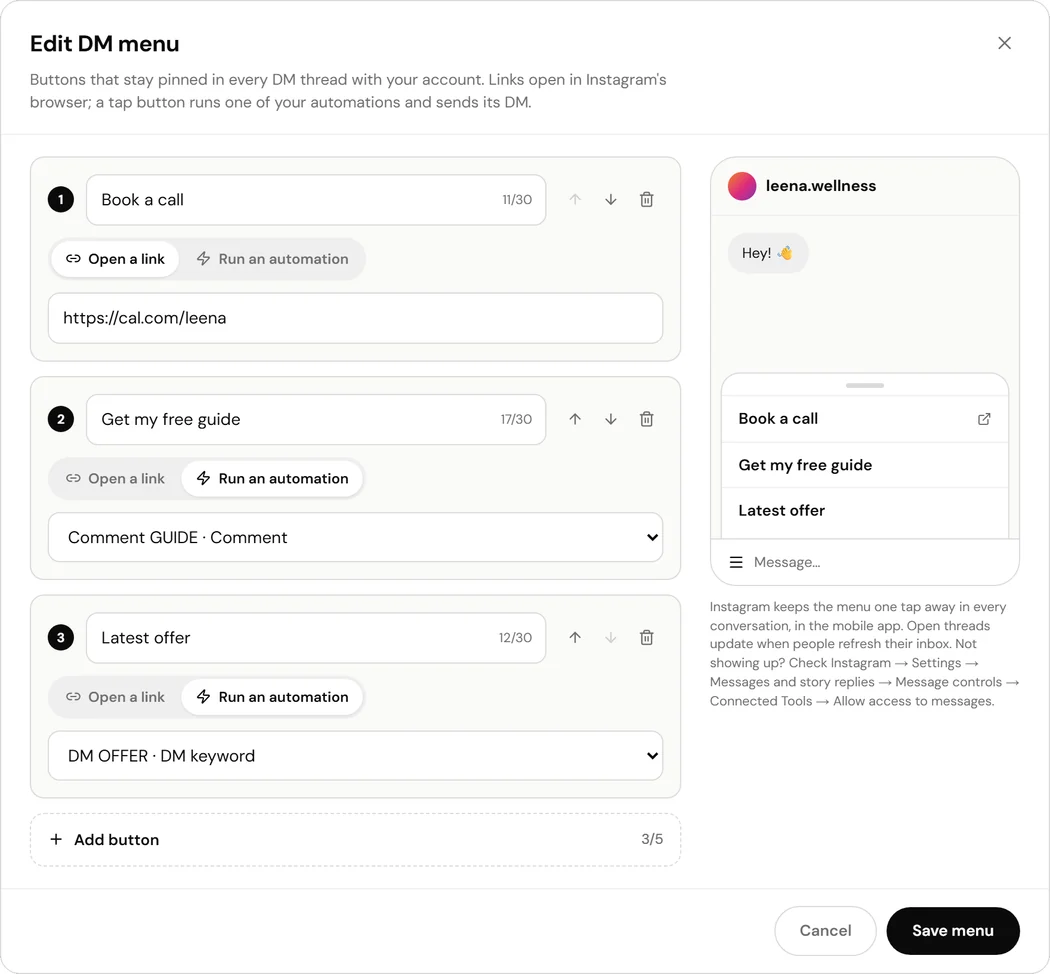
The editor with a link button and two buttons that run automations. Step 5: Save the menu
Click Save menu. If a title or link needs fixing, the editor says which button and why, and nothing is sent. Once Instagram accepts the menu, the card says Live and lists each button with the automation it runs.
- Save menu
- Live
What a tap on an automation button does
The person who tapped gets that automation's DM. If the automation asks people to follow first, they get the follow check before the DM. If it has a timed follow-up, that is armed too. The opening step, the one that asks for a tap before sending the link, is skipped, because the menu tap already is that tap.
A tap counts as the person messaging you, so it opens Instagram's 24-hour messaging window. Each tap is added to the automation's taps count on /automations.
When Instagram shows changes
New conversations get the new menu straight away. A chat someone already has open keeps the previous menu until they refresh their inbox. That is Instagram's behaviour for every account's menu.
The menu shows in the Instagram mobile app. If it does not appear, check Instagram → Settings → Messages and story replies → Message controls → Connected Tools → Allow access to messages, the same setting ice breakers need. Instagram does not let ReelDrop read it.
What the card can say
- Off: no menu is saved.
- Live: Instagram holds exactly the menu you saved.
- Not live: Instagram refused the menu. The reason is shown under it, often a rate limit after several saves in a few minutes. Click Try again.
- Not published: the menu is saved but not on Instagram yet, for example after moving back to a paid plan. Click Publish.
- A warning under a button whose automation is paused: taps send nothing until you turn that automation back on.
Removing the menu
Open the editor and click Remove menu, then Remove to confirm. The menu comes off Instagram; open chats drop it when they refresh. Deleting an automation also removes any menu button that ran it, and on a plan without the DM menu it is taken off Instagram while your buttons stay saved.
Frequently asked questions
Can I have a different menu for different people?
No. Instagram holds one menu per account, and everyone who messages you sees the same buttons.
Does the menu replace ice breakers?
No, they work together. Ice breakers show only in a brand-new conversation, before the first message. The menu shows in every conversation. Saving one never changes the other.
Why can I not pick my AI DM reply automation?
AI DM reply answers what someone writes rather than sending a fixed DM, so a tap would have nothing to send. Ice breaker automations are left out for a similar reason: their replies belong to the question that was tapped.
How often can I change the menu?
Instagram allows about ten menu and ice breaker changes per ten minutes per account. Saving an unchanged menu does not use any of them. If you hit the limit, the card says so and Try again works a few minutes later.
What happens if I disconnect Instagram?
The menu stays saved in ReelDrop. When you reconnect, it goes back on the account automatically.
Related
Something here out of date or missing a step? Tell us and we will fix it.
Stop managing Instagram. Start growing with it.
Sign up free for AI carousels, DM automation, captions, and scheduling: built for creators who post less and grow more.
Built in Toronto by Piyush Sachdeva.