Feature
Instagram DM inbox with AI reply drafts

Piyush Sachdeva, Founder, ReelDropPublished
ReelDrop's inbox puts every Instagram DM that arrives after you connect your account into one list you can sort, snooze, tag and work through, beside the automations that started many of those conversations. When you want help answering, it drafts up to three replies from the thread and from your own past answers, and they stay drafts until you edit one and press send. Reading the inbox is free on every plan, Starter included. Replying from it, reacting, sharing a post and AI drafts are paid: they start on Influencer at $9.99 a month.
On this page
- Open, closed and all chats
- Snooze, notes and tags
- A pipeline board for leads
- AI reply drafts that stay drafts
- Photos, videos, voice notes, PDFs and shared reels in the thread
- Excluding a person, and what gets deleted
- How it works with comment-to-DM automations
- Reply windows, limits and safety
- A coach who sells in the DMs
- A shop that answers the same five questions
- A creator who keeps family out of the tools
- What is free and what is paid
- FAQ
- Keep exploring
Open, closed and all chats
The list opens on open chats: the conversations where the other person had the last word, so it reads as what is waiting on you. Closed chats are the ones where you, or one of your automations, replied last. All chats shows both, and ReelDrop remembers which one you picked.
Nobody has to file anything for this to work. The status comes from who wrote last, so a reply moves a chat to closed and a new message from the person moves it back to open. If you dealt with something without replying, the check button marks it closed by hand, and a new message reopens it the same way.
The unread and hot lead chips narrow the list, and the outreach, archived and snoozed folders hold what is not in play yet. Search covers names, usernames, the email or phone number someone shared with you, and the text of the messages themselves.
Snooze, notes and tags
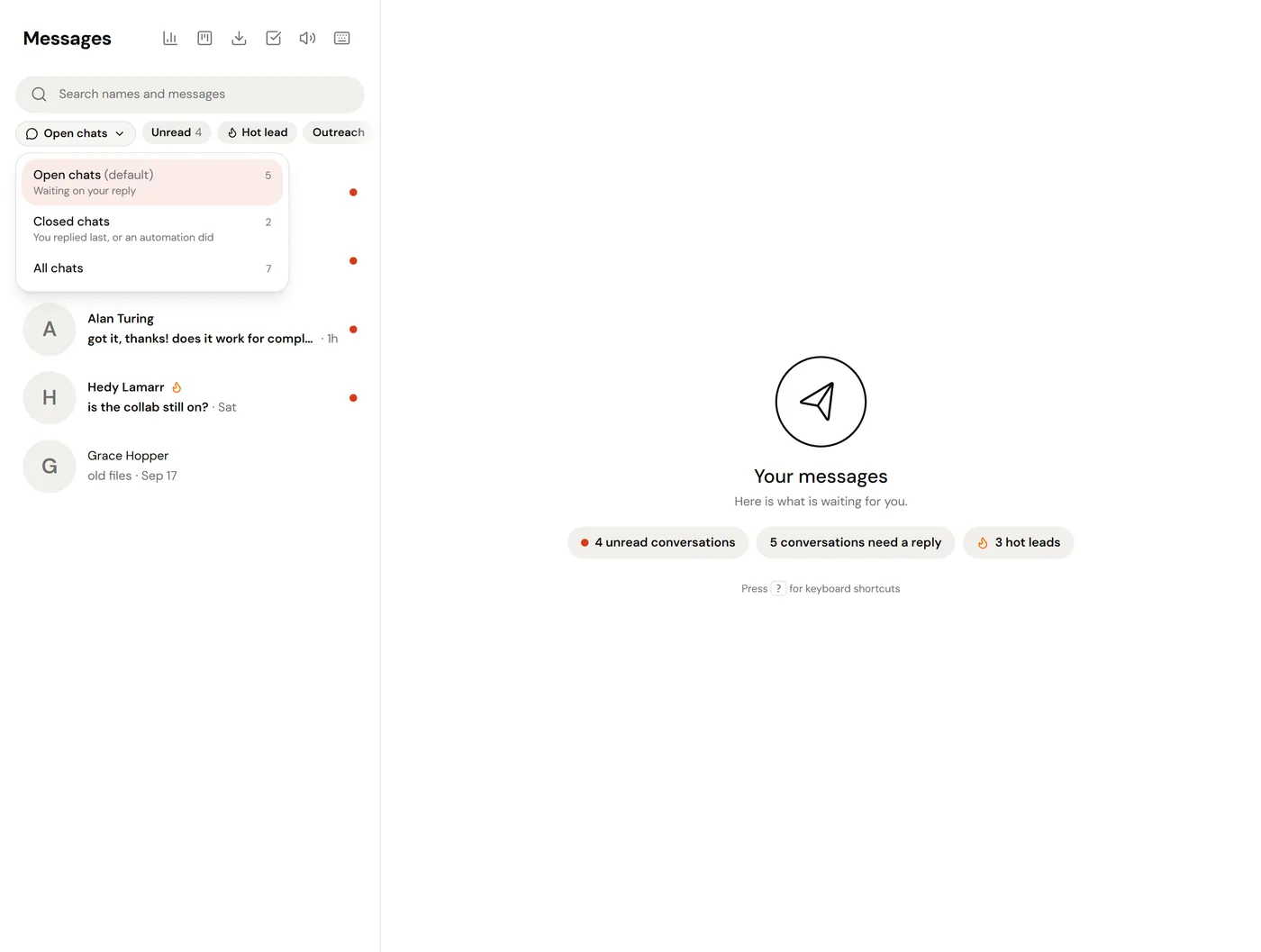
Snooze takes a conversation out of every list until a time you choose: later today, tomorrow morning, this weekend, next week, or any date and time up to a year ahead. When the time comes it is back at the top, unread and marked Back from snooze. If the person writes first, the snooze ends early.
Each conversation has one private note of up to 1,000 characters that saves as you type. Only people in your workspace see it. Tags are your own labels, up to eight per conversation, with customer, collab and support one tap away, and the flame button marks a hot lead.
All of this works on the free plan.
A pipeline board for leads
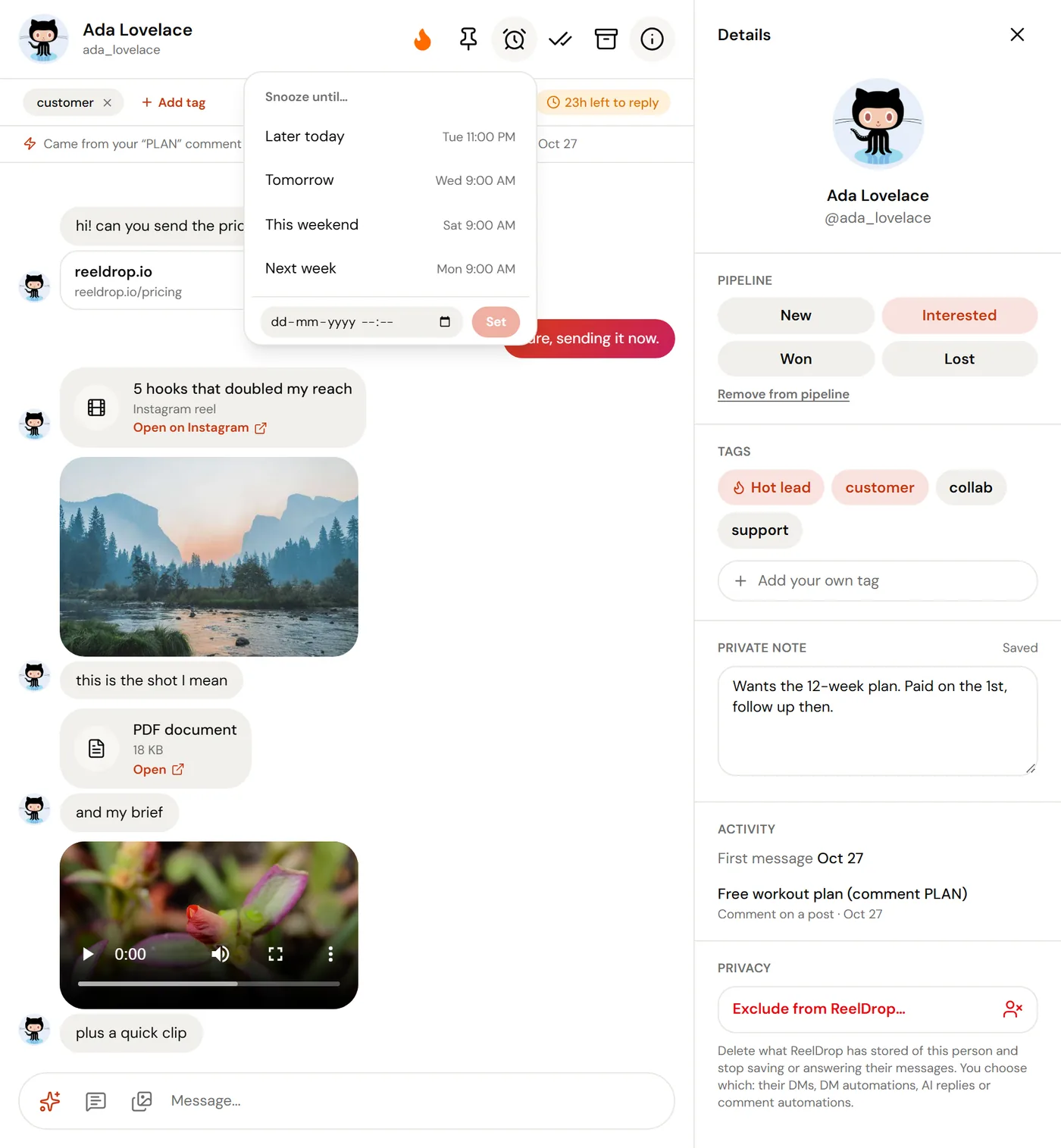
The lead pipeline is a board with four columns: New, Interested, Won and Lost. A conversation lands in New when you mark it a hot lead, or when you give it a stage from its details panel. On a computer, drag cards between columns; on a phone, each card's menu has Move to and Remove from pipeline.
Each card shows the person, their latest message and your note, so the board reads as a list of deals rather than a list of chats. Archiving a conversation does not take it off the board. Insights, next to it, counts the leads you won and the share of leads that converted.
AI reply drafts that stay drafts
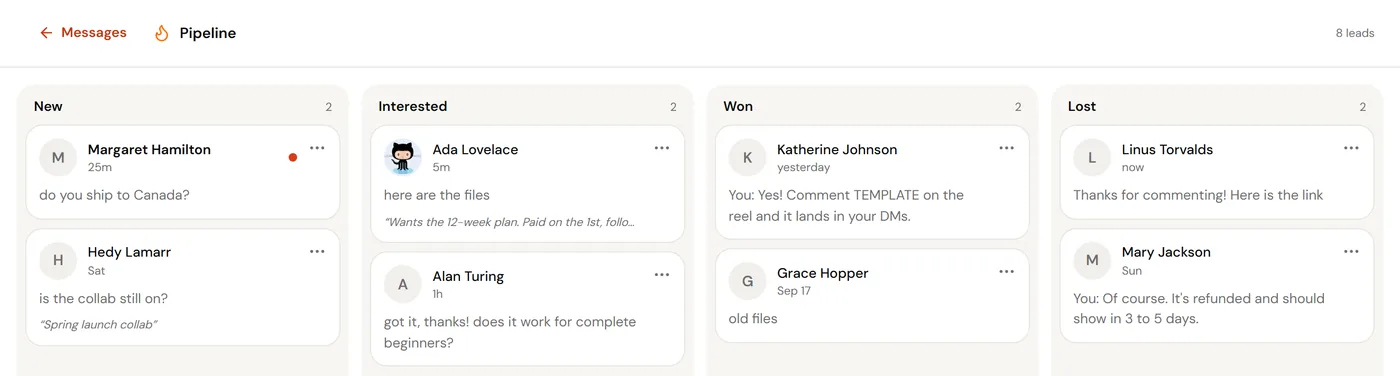
Ask for suggestions in a conversation and ReelDrop writes up to three replies. They are built from the last 20 messages in the thread, up to eight replies you have typed in the inbox before (so they sound like you), your saved replies and your note on the person. A draft that contains a link you have never used is dropped rather than shown, and drafts are told not to invent prices, dates or policies.
Picking a draft puts it in the reply box. Nothing is sent until you have read it, changed what you want, and pressed send. Suggestions are offered inside Instagram's 24-hour window, while the person's message is the latest one, which is when a fast answer matters anyway.
Drafts come with replying, so they start on Influencer and do not use any monthly AI credits. They are not the same as DM reply by AI on Creator, which is an automation that answers on its own.
Photos, videos, voice notes, PDFs and shared reels in the thread
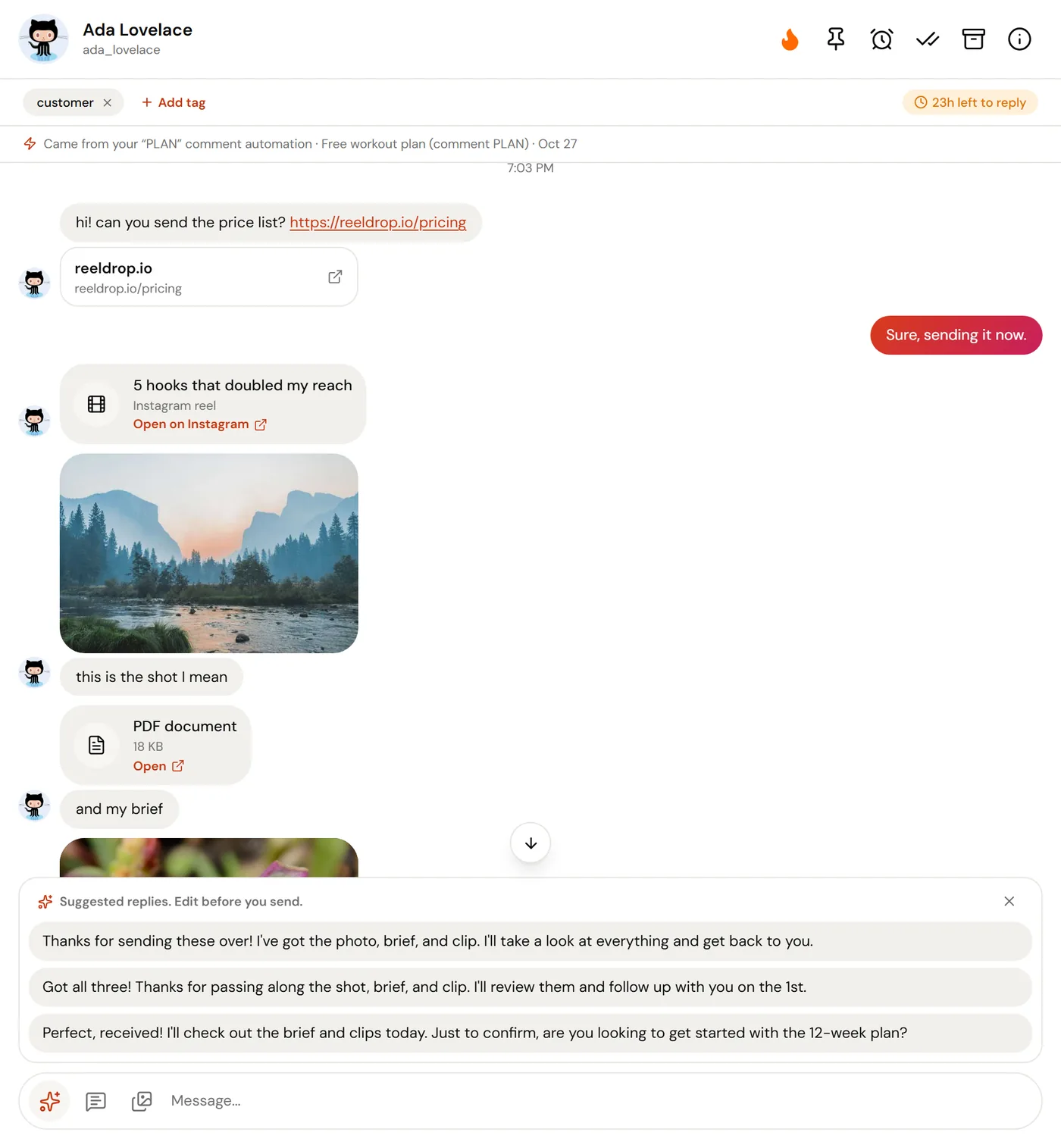
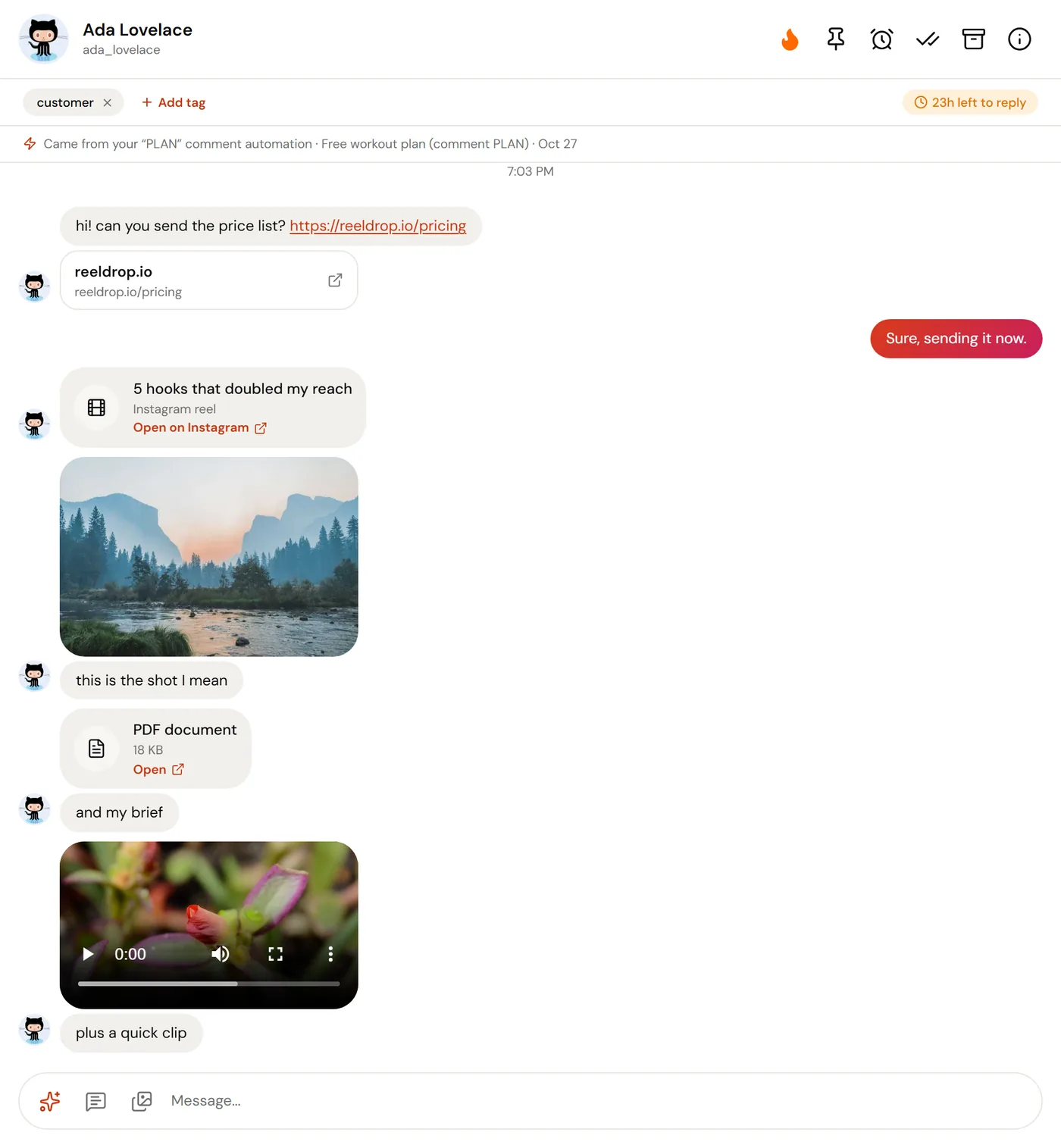
What people send shows in the conversation the way it was meant to. Photos appear in the thread and open full size, several photos sent together become a grid, videos and voice notes play in place, and PDFs and other files open from a card that shows their size. A reel, post or story someone shares arrives as a card with an Open on Instagram link, and links typed into a message are clickable.
Instagram's own links to media expire quickly, so ReelDrop keeps a private copy when a message arrives: photos at a reduced size, videos up to 25 MB, and PDFs, voice notes and other files up to 10 MB. Copies are kept for 30 days and message text for a year.
From your side, you can reply with text, quote a specific message, react with an emoji, or share one of your own posts or reels into the chat. Sending a photo, video or file from the inbox is not supported.
Excluding a person, and what gets deleted
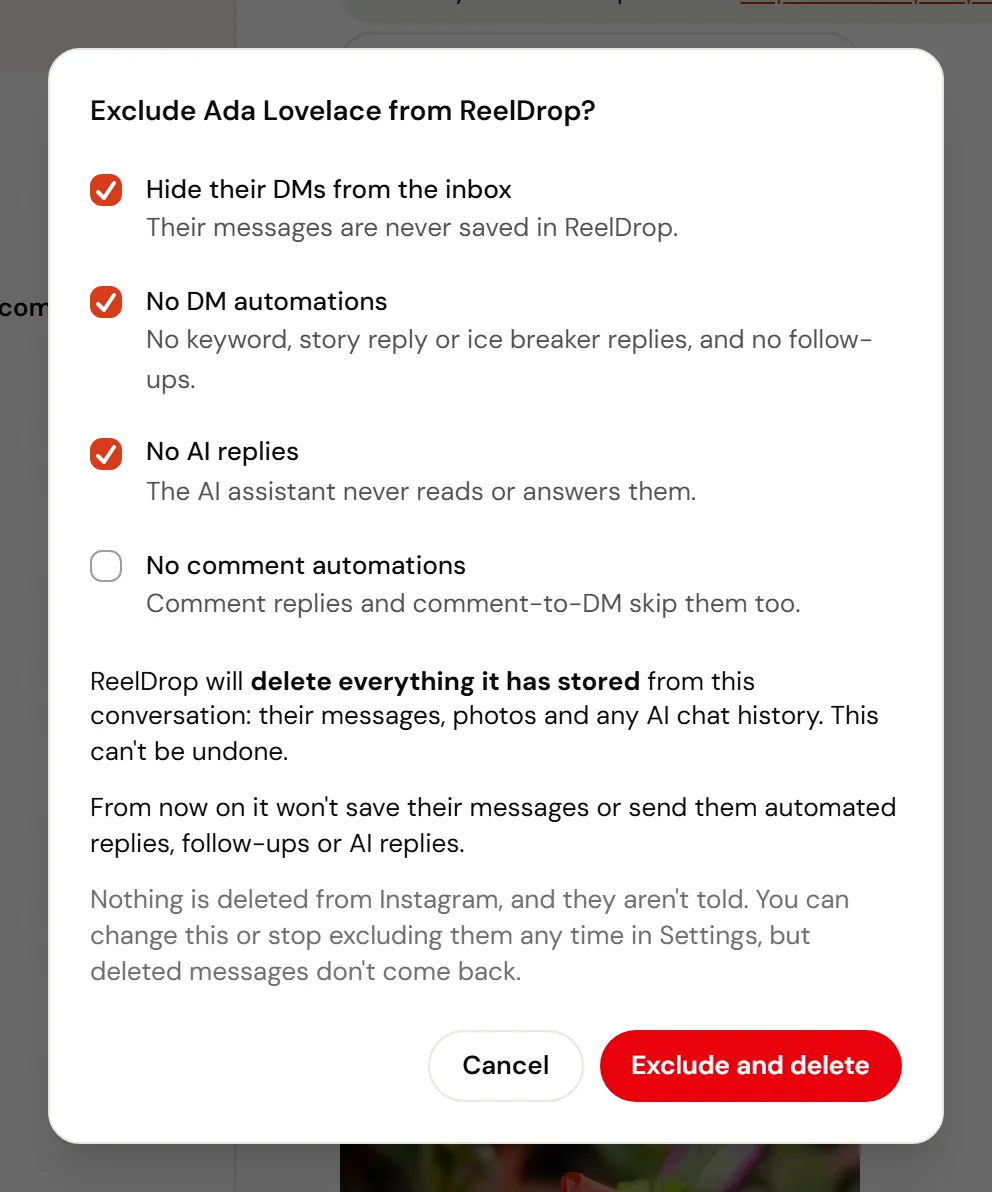
Some people should not be in your tools at all: a family member, a client under NDA, someone who asked you to stop. Exclude them from a conversation's menu, or by username in Settings under DM privacy before they have ever written, and choose what ReelDrop keeps away from them.
Hiding someone from the inbox deletes everything ReelDrop has stored from that conversation: the thread, the messages, and the photos and files. Turning off AI replies for them also deletes their AI chat history. The deletion is permanent, and the messages do not come back if you stop excluding them later. Nothing is deleted from Instagram, and the person is not told. Any follow-ups waiting for them are cancelled.
- Hide their DMs from the inbox (on by default): their messages are never saved in ReelDrop.
- No DM automations (on by default): no keyword, story reply or ice breaker replies, and no follow-ups.
- No AI replies (on by default): the AI assistant never reads or answers them.
- No comment automations (off by default): comment replies and comment-to-DM skip them too.
How it works with comment-to-DM automations
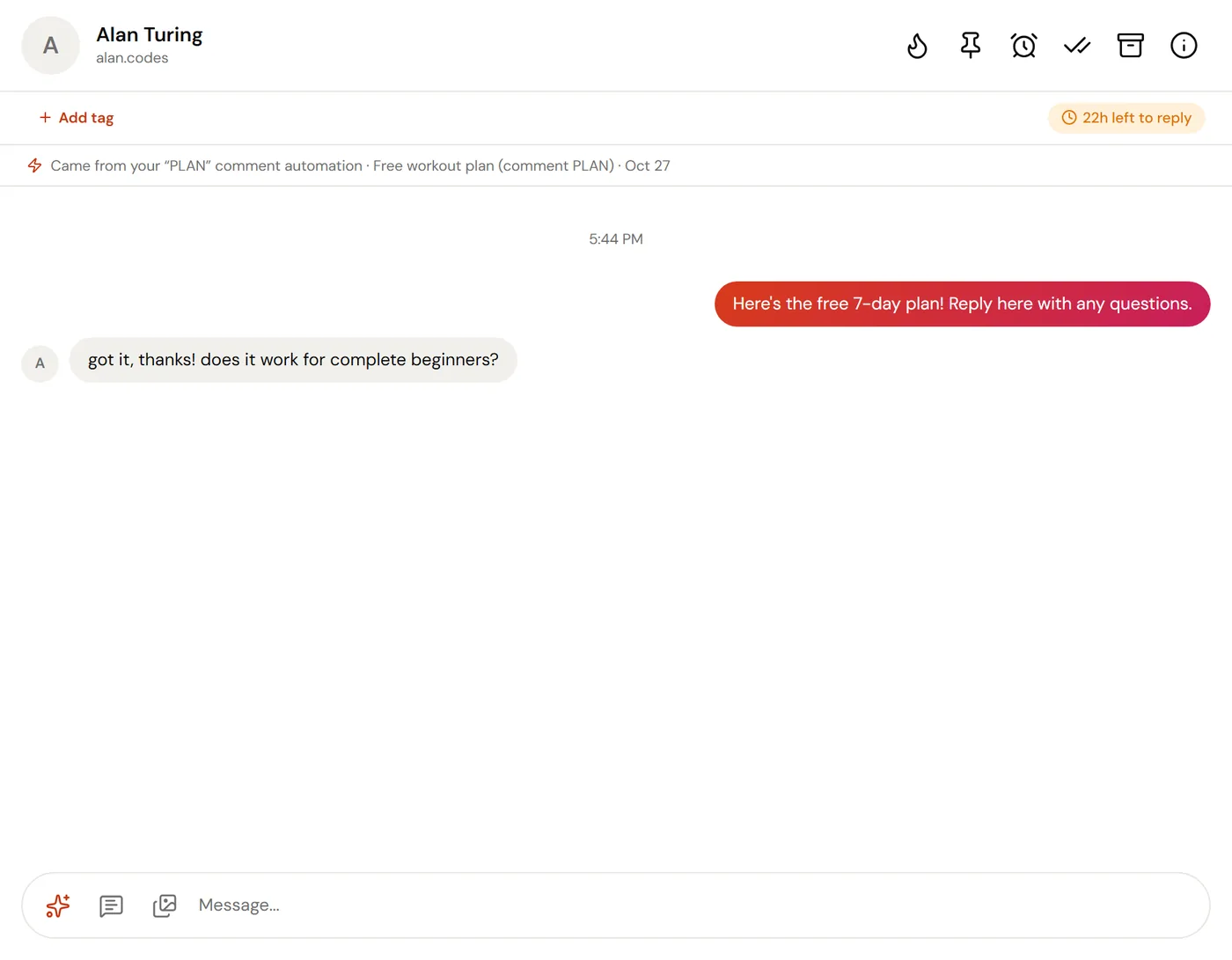
Every DM your automations send shows in the conversation it belongs to, next to what you type yourself, and a banner at the top says which automation started it. A conversation where only an automation has written so far waits under outreach, and joins the list the moment the person answers. When an automation answered last, the chat counts as closed, so open chats stays a list of conversations that need a person.
A tap on one of your quick replies tags the conversation for you, and an email address or phone number someone shares through a quick reply shows under Contact info. The download button above the list exports those contacts as a CSV, on every plan.
Replying by hand does not pause or switch off an automation. Timed follow-ups stop when the person replies, not when you do.
Reply windows, limits and safety
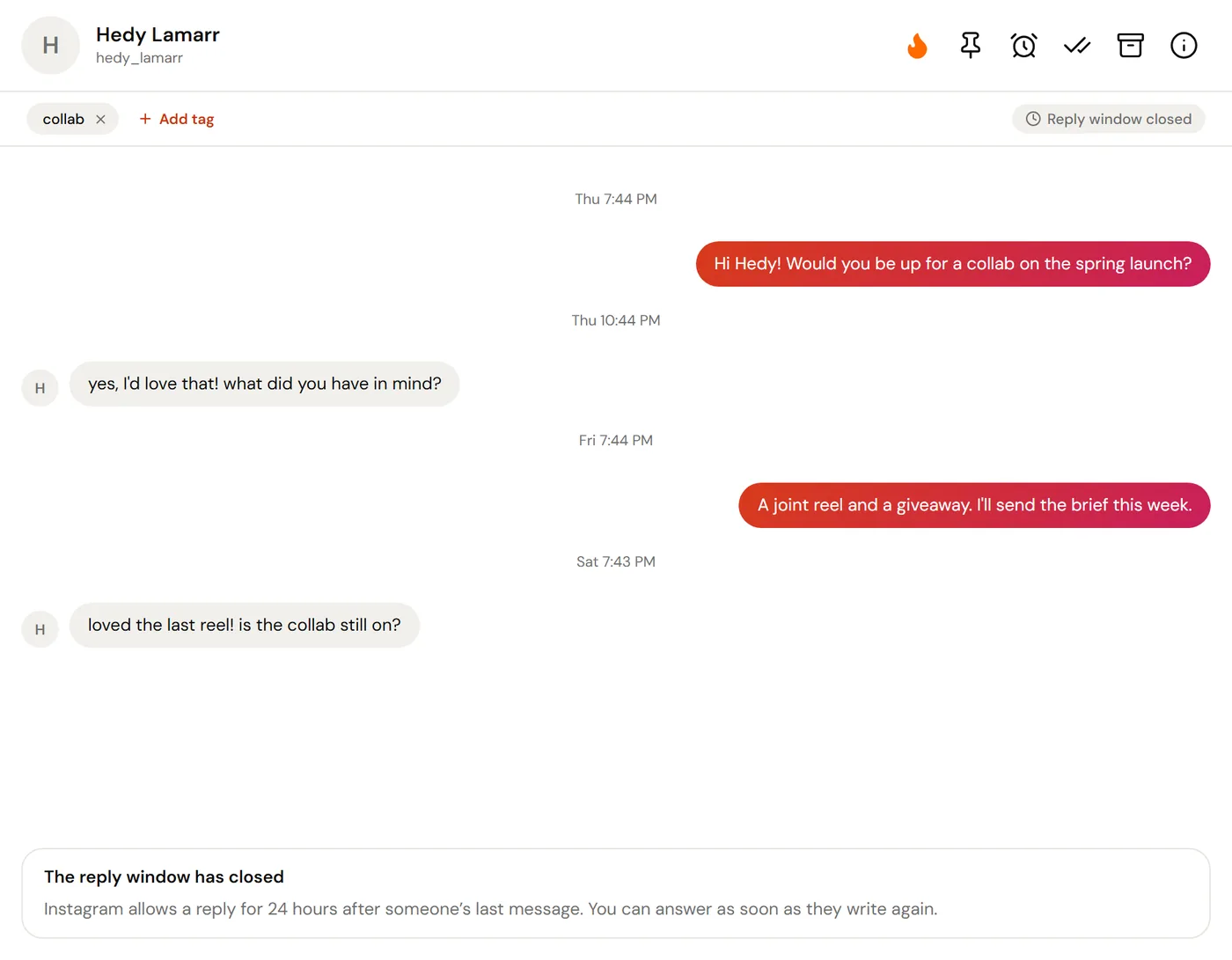
Instagram sets the timing, not ReelDrop. A reply has to go within 24 hours of the person's last message, whether you type it, pick a suggested reply or an automation sends it. A countdown above the thread shows how long is left, and once the window has closed the reply box says so and opens again as soon as they write.
Inbox replies are messages you type one at a time, up to 1,000 characters each, so ReelDrop puts no daily cap on them and they do not count against your automation limits. Everything goes through Instagram's official messaging API on a connected Business or Creator account, and ReelDrop never asks for your Instagram password.
Which limits are Instagram's, which are ReelDrop's, and how to stay well inside both.
Read the send limits docA coach who sells in the DMs
A comment-to-DM automation sends the free workout plan to everyone who comments PLAN. Most people say thanks and leave; the ones who ask about coaching land in open chats. The coach flames those as hot leads, writes a note ("wants the 12-week plan, paid on the 1st"), snoozes the thread to the 1st, and drags it from Interested to Won when the payment comes in.
A shop that answers the same five questions
Shipping times, sizing, returns, restocks, discount codes. The shop's saved replies cover them, and the AI drafts are built from those saved replies and from how the team has answered before, so most answers are a pick, a small edit and send. Tags split customers from collab requests, and the support tag marks what still needs a refund.
A creator who keeps family out of the tools
A creator's sibling messages the business account every day. One exclusion, set in Settings under DM privacy, keeps those messages out of the inbox, out of the AI assistant and out of every DM automation, and deletes what had already been stored.
What is free and what is paid
Everything that helps you read and organise is on every plan. Sending is the part that costs a real Instagram message each time, so it is the part on the paid plans.
| Inbox capability | Starter (free) | Influencer ($9.99/mo) | Creator ($29/mo) |
|---|---|---|---|
| Read every conversation, with photos, videos, voice notes and files | Yes | Yes | Yes |
| Open, closed and all chats, search, snooze and archive | Yes | Yes | Yes |
| Private notes, tags and the lead pipeline | Yes | Yes | Yes |
| Exclude a person | Yes | Yes | Yes |
| CSV export of shared emails and phone numbers | Yes | Yes | Yes |
| Reply, react, quote a message, share a post | No | Yes | Yes |
| AI reply drafts | No | Yes | Yes |
| DM reply by AI (an automation that answers on its own) | No | No | Yes |
Frequently asked questions
Is the Instagram DM inbox free?
Reading it is. Every plan, Starter included, sees every conversation that arrives after the account is connected, and can snooze, tag, add notes, use the pipeline and exclude people. Replying, reacting, sharing a post and AI drafts start on Influencer at $9.99 a month.
Can AI reply to my Instagram DMs?
In two ways. In the inbox, AI writes up to three drafts that you edit and send yourself; that is on Influencer and Creator. DM reply by AI, on Creator, is an automation that answers on its own. Both run on Instagram's official API, inside its 24-hour messaging window.
Why can I not reply to this person?
Either they have never written to you, so the thread sits under outreach, or their last message is more than 24 hours old. Instagram allows a reply for 24 hours after someone's last message. You can answer as soon as they message you again.
Does the inbox show my old conversations?
No. It shows messages that arrive after your account is connected to ReelDrop.
Why is a message still unread after I read it in Instagram?
Instagram does not tell ReelDrop when you read a message in its app, so the inbox cannot copy that. Open the conversation in ReelDrop and it clears here.
Can my team see the inbox?
The inbox belongs to the workspace, so members of that workspace see the same conversations, notes and tags. Another workspace cannot see them, even for the same Instagram account.
Keep exploring
Stop managing Instagram. Start growing with it.
Reading the inbox is free on every plan. Replying and AI drafts start on Influencer.
Built in Toronto by Piyush Sachdeva.