

Plan your Instagram grid on top of your real feed
Updated: September 2026
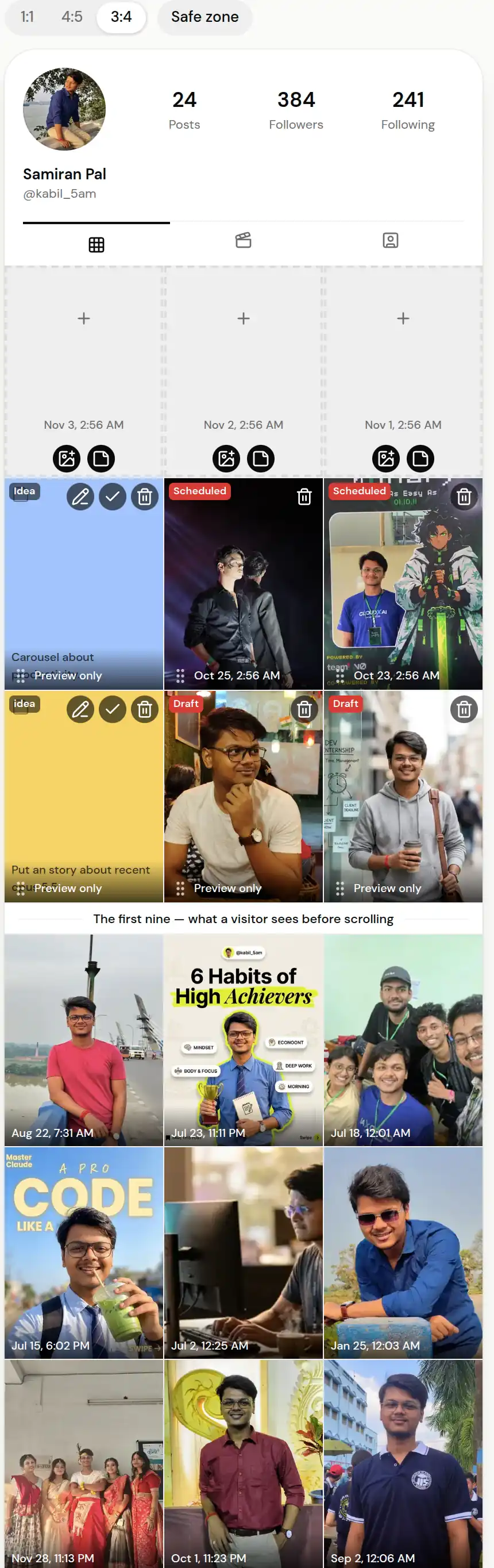
ReelDrop's grid planner shows your live Instagram profile as the 3-column grid a visitor sees, with your drafts and scheduled posts placed above it in the order they will publish. Drag one tile onto another to swap their times, drop coloured idea tiles into empty slots, and switch the crop between 1:1, 4:5 and 3:4 to match how Instagram shows your profile. It is included on every plan, including Free.
What does the grid planner show?
Your published posts, pulled from Instagram, newest first. They are read-only, because Instagram does not let anyone reorder posts that are already live. The board loads the last 18 by default, which is six rows, and can show up to 60 when you want to look further back.
Above them sit the posts you have planned: drafts and scheduled posts that have a date. They are ordered by when they will publish, so the top row of the board is what your profile will look like once everything has gone out. Anything you change in the calendar or the composer shows up here too.
Instagram's API does not say which posts you have pinned, so pinned posts appear in date order rather than at the top. The page says so under the grid.
How do I reorder posts?
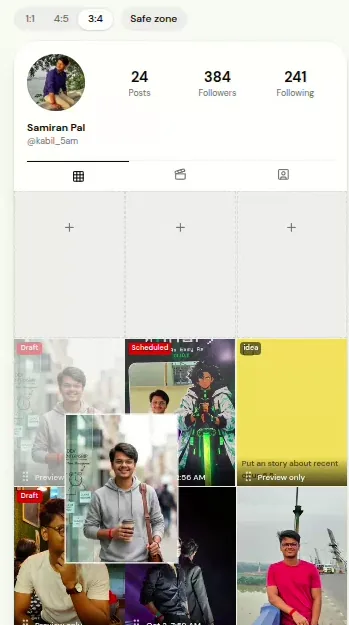
Drag one planned tile onto another and the two posts swap publish times. A scheduled post's publish job moves with it, so what you see on the board is what will happen. Published posts cannot be dragged.
On a phone, press and hold a tile for a moment before dragging, so scrolling does not move anything by accident. With a keyboard, focus a tile, press Space, move it with the arrow keys and press Space again.
Can I plan posts I have not made yet?
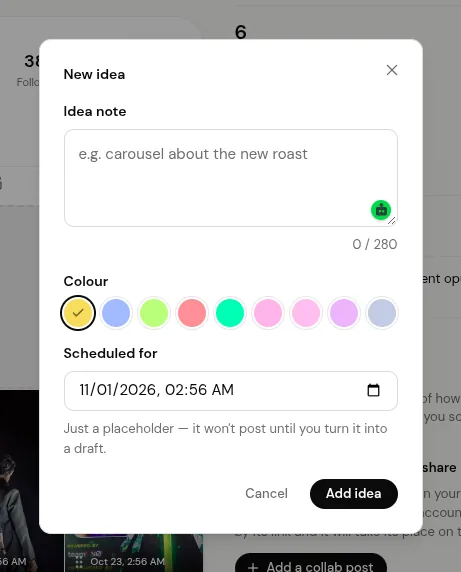
Yes. Add an idea tile to an empty slot: pick a colour, write a note of up to 280 characters, and it holds that spot on the board. When the post is ready, turn the idea into a draft at the same time slot.
You can also tap an empty slot to open the composer at that time, or drop a photo straight into the slot and ReelDrop saves it as a draft there.
Which crop should I preview?
Instagram's profile grid now shows posts as 3:4 thumbnails, so a square or 4:5 image is cropped at the top and bottom. Switch the board between 1:1, 4:5 and 3:4 to see what survives the crop before you publish.
A portfolio that has to look intentional
A wedding photographer knows new clients scroll the grid before they read a single caption. She plans the next nine posts as ideas first, one colour per gallery, then swaps two drafts so no two dark receptions sit side by side. The calendar tells her when each one goes out; the grid tells her how the profile will read to someone deciding whether to enquire.
A brand that rotates content types
A small skincare brand alternates product shots, customer quotes and Reels. On the grid, three quote cards in a row are easy to spot, so the social lead drags one down a slot and the product shot takes its time. It takes seconds and nothing has to be rescheduled by hand.
Batching a month in one sitting
A creator who shoots on Sundays drops the week's photos into empty slots, adds idea tiles for the Reels she has not edited yet, and fills them in during the week. The board shows gaps before the week starts rather than on the morning a post was meant to go out.
Frequently asked questions
Is the grid planner free?
Yes. It is included on every ReelDrop plan, including the free Starter plan, which also has unlimited scheduling.
How is this different from the free grid planner tool?
The free tool at /free-tools/instagram-grid-planner needs no account: you upload photos, arrange them, and nothing leaves your browser. It is a preview only. The grid planner in the app works on your real Instagram feed and your real schedule, so moving a tile changes when the post publishes.
Does dragging a tile change when the post goes out?
Yes. Dropping one planned tile on another swaps their publish times, and a scheduled post's publish job moves with it.
Can I reorder posts that are already published?
No. Instagram does not allow reordering published posts, so they are read-only on the board. You can pin up to three posts to the top of your profile in the Instagram app.
Why is my pinned post not at the top?
Instagram's API does not report which posts are pinned, so the board shows them in date order.
Does it work on my phone?
Yes. The board keeps three columns on a phone. Press and hold a tile to drag it.
What do I need to use it?
An Instagram Business or Creator account connected to ReelDrop. Personal accounts cannot be connected through Meta's API.
Do stories show on the grid?
No. Stories never appear on your profile grid, so the board leaves them out.
ReelDrop handles scheduling, AI carousels, captions, and DM automation in one place. Start free today.
Get started