

Plan your Instagram grid
Updated:
Open Grid to see your Instagram profile as ReelDrop will publish it: your live feed with drafts and scheduled posts placed above it, in the order they will go out. Drag one planned tile onto another to swap their times, add an idea tile to an empty slot, and switch the crop to see what survives Instagram's 3:4 thumbnail. It is included on every plan, including Free.
Before you start
- An Instagram Business or Creator account connected to the workspace. Connect your Instagram account covers that.
- Nothing else required — the board shows your published feed even with zero drafts or scheduled posts.
Open the grid
Go to Grid in the left sidebar, or More on a phone. The board loads your last 18 published posts, newest first, with your drafts and scheduled posts placed above them in the order they will publish.
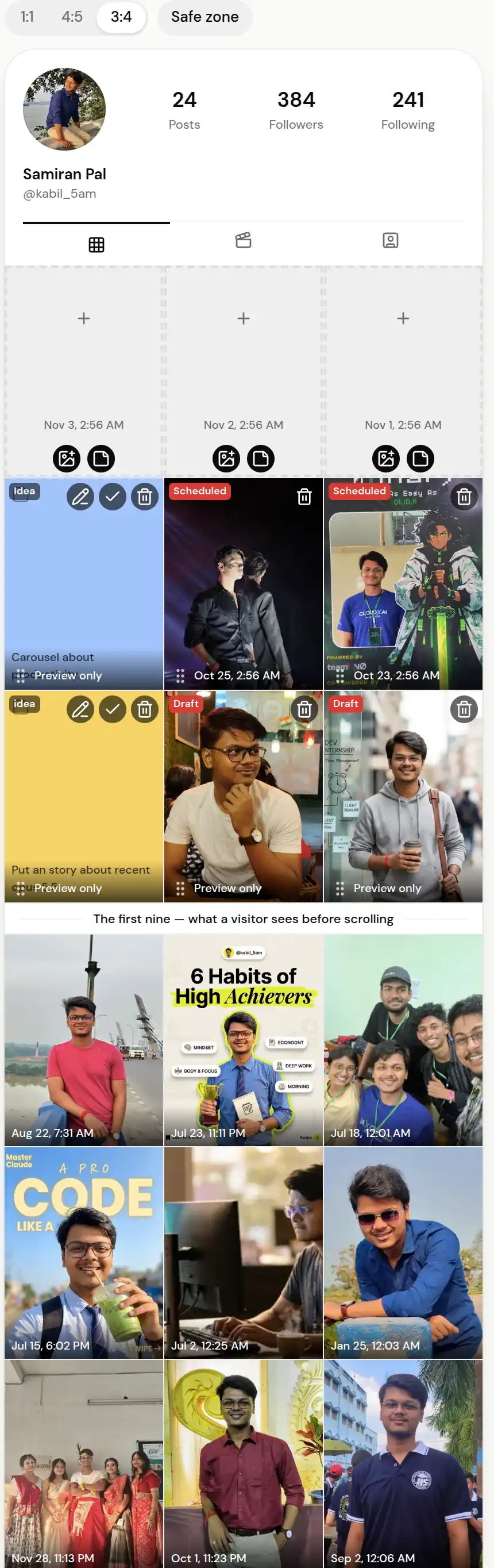
Your published feed, with what's scheduled sitting above it in publish order. Drag a tile to change its publish time
Drag one planned tile onto another and the two swap publish times — the scheduled job moves with the tile, so what the board shows is what will happen. Published posts are read-only, because Instagram does not let anyone reorder a post that is already live.
On a phone, press and hold a tile for a moment before dragging, so scrolling does not start a drag by accident. With a keyboard, focus a tile, press Space, move it with the arrow keys, and press Space again to drop it.
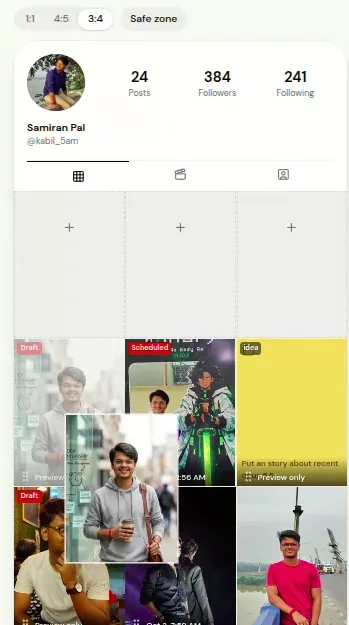
Drop one tile on another and the two posts swap publish times. Hold a slot with an idea tile
Tap an empty slot and the composer opens at that time — the fastest route once the post is ready. To hold the slot before that, tap the note icon on the slot instead: pick a colour, write a note of up to 280 characters, and save. The idea tile keeps that spot until you open it and turn it into a draft at the same time.
The photo icon next to it skips the idea step: pick a picture and ReelDrop saves it into that slot as a draft, ready for a caption.
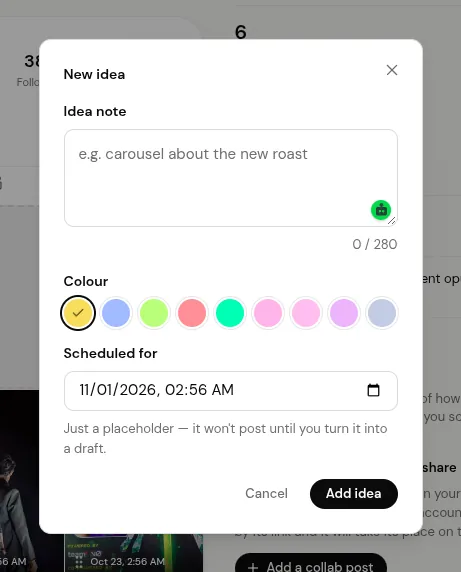
Idea tiles hold a slot for a post you haven't made yet. Check the crop before you publish
Switch the board between 1:1, 4:5 and 3:4 to see what Instagram's profile grid actually keeps of each image. Instagram now shows posts as 3:4 thumbnails, so a square or 4:5 image gets cropped at the top and bottom.
Show more of your published feed
The board starts with your last 18 published posts, which is six rows. Select Show more to load further back, up to 60.
Pinned posts
Instagram's API does not report which posts you have pinned, so the board shows them in date order rather than at the top. Pin up to three posts from inside the Instagram app; the board's order does not change what is actually pinned.
Trial reels and stories
Trial reels and reels you chose not to share to the feed never appear on the board, even after a trial reel graduates to your full audience on Instagram — ReelDrop doesn't track that graduation, so the board keeps excluding it. Stories are left out too, because they never show on a profile grid, on Instagram or in ReelDrop.
Frequently asked questions
Does dragging a tile change when the post publishes?
Yes. Dropping one planned tile on another swaps their publish times, and the scheduled post's publish job moves with it.
Can I reorder posts that are already published?
No. Instagram does not allow reordering published posts, so they stay read-only on the board. You can pin up to three posts to the top of your profile from inside the Instagram app.
How many published posts does the board show?
18 by default, newest first, which is six rows. Select Show more to load further back, up to 60.
What's the character limit on an idea tile's note?
280 characters.
Does the grid planner work on my phone?
Yes. The board keeps three columns on a phone. Press and hold a tile for a moment before dragging, so scrolling does not move anything by accident.
Is the grid planner free?
Yes. It is included on every ReelDrop plan, including the free Starter plan, which also has unlimited scheduling.
How is this different from the free grid planner tool?
The free tool at /free-tools/instagram-grid-planner needs no account: you upload photos, arrange them, and nothing leaves your browser. It is a preview only. This board works on your real Instagram feed and your real schedule, so moving a tile changes when the post actually publishes.
ReelDrop handles scheduling, AI carousels, captions, and DM automation in one place. Start free today.
Get started