Docs menuDM automation
DM automation
Instagram Ice Breakers
Ice Breakers are the tappable questions Instagram shows at the top of a brand-new DM thread with your account, before the person has typed anything. You can have up to 4. In ReelDrop they are an automation: write the questions, give each one its own reply, and ReelDrop puts them on Instagram when you save. They are on Influencer and Creator.
5 steps4 min readUpdated
On this page
Before you start
- An Instagram Business or Creator account connected in Settings.
- A paid plan. Ice Breakers are on Influencer at $9.99 a month and on Creator. On Starter the Ice breakers card in the builder shows a lock and an Influencer pill that opens billing.
- Instagram → Settings → Messages and story replies → Message controls → Connected Tools → Allow access to messages, switched on. Without it the questions never appear, and Instagram does not let ReelDrop read the setting, so the builder cannot check it for you.
Step 1: Start a new automation
Go to /automations and click New automation. Type a name in the automation name field; the builder will not move on without one.
- New automation
Step 2: Pick the Ice breakers trigger
Under the trigger type, click Ice breakers. The step pills across the top change to two, Questions and Replies. There is no post to pick and no keyword to match: a tap on one of the questions is the trigger.
- Ice breakers
- Questions
- Replies
Step 3: Write the questions
Four questions are filled in to start you off: How can I work with you?, Can I get your free guide?, Where can I shop your products? and I have a question. Rewrite them, or remove one with the bin beside it; Add question puts a new one back, up to 4, which is as many as Instagram shows.
Each question can be up to 80 characters. The counter changes colour as you get close and the field stops at the limit, because Instagram cuts a longer question off without an error. The phone on the right shows the thread the way someone who has never messaged you will see it. Click Next.
- Add question
- Next
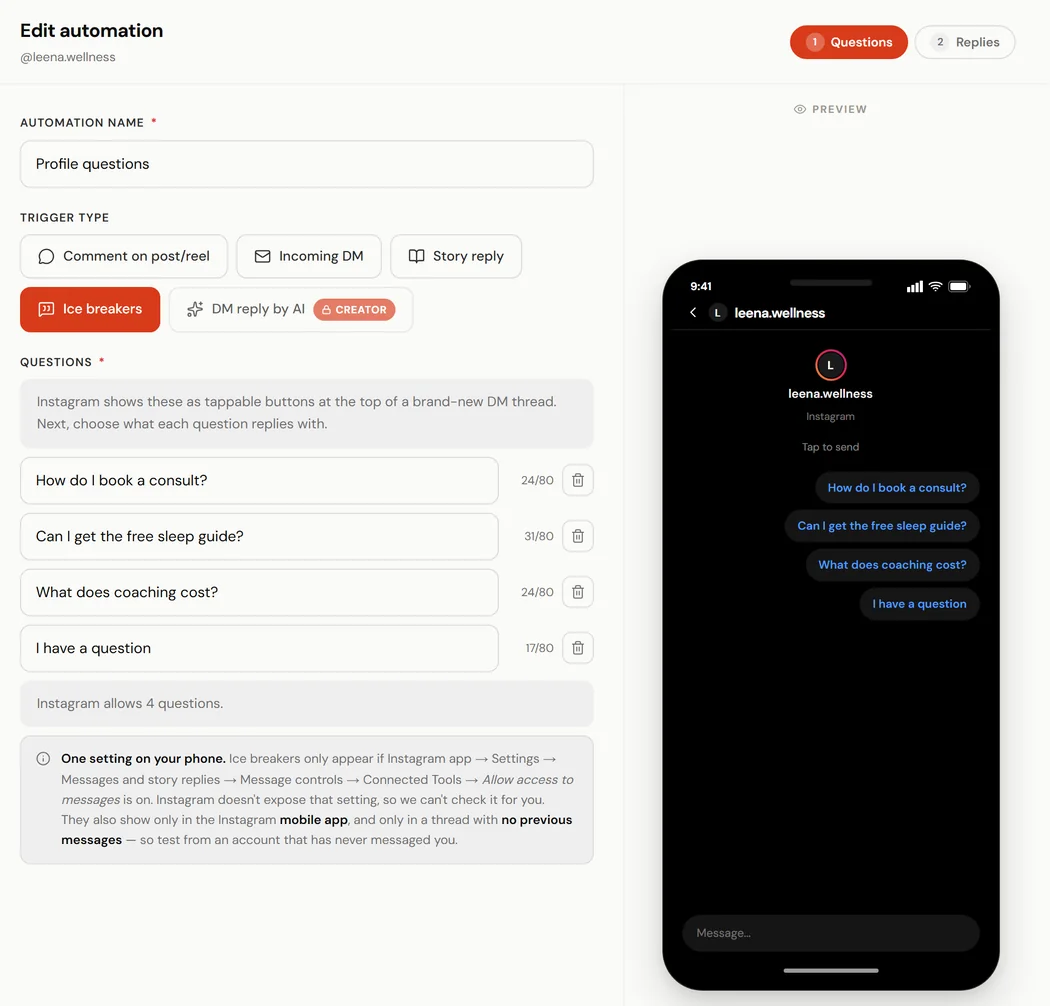
The Questions step, with the new-thread preview on the right. Step 4: Give each question its reply
The Replies step lists every question with what it sends. Click Edit reply on one to open it. Write the message, or start from Browse starter messages.
Under Buttons, + Link adds a link, + PDF uploads a PDF of up to 25 MB, and + Carousel links adds a row of cards that each open a link. A reply can carry 3 buttons, the most Instagram shows on one message, and the message itself can be up to 640 characters. Click Done, then do the same for the other questions.
- Edit reply
- + Link
- + Carousel links
- Done
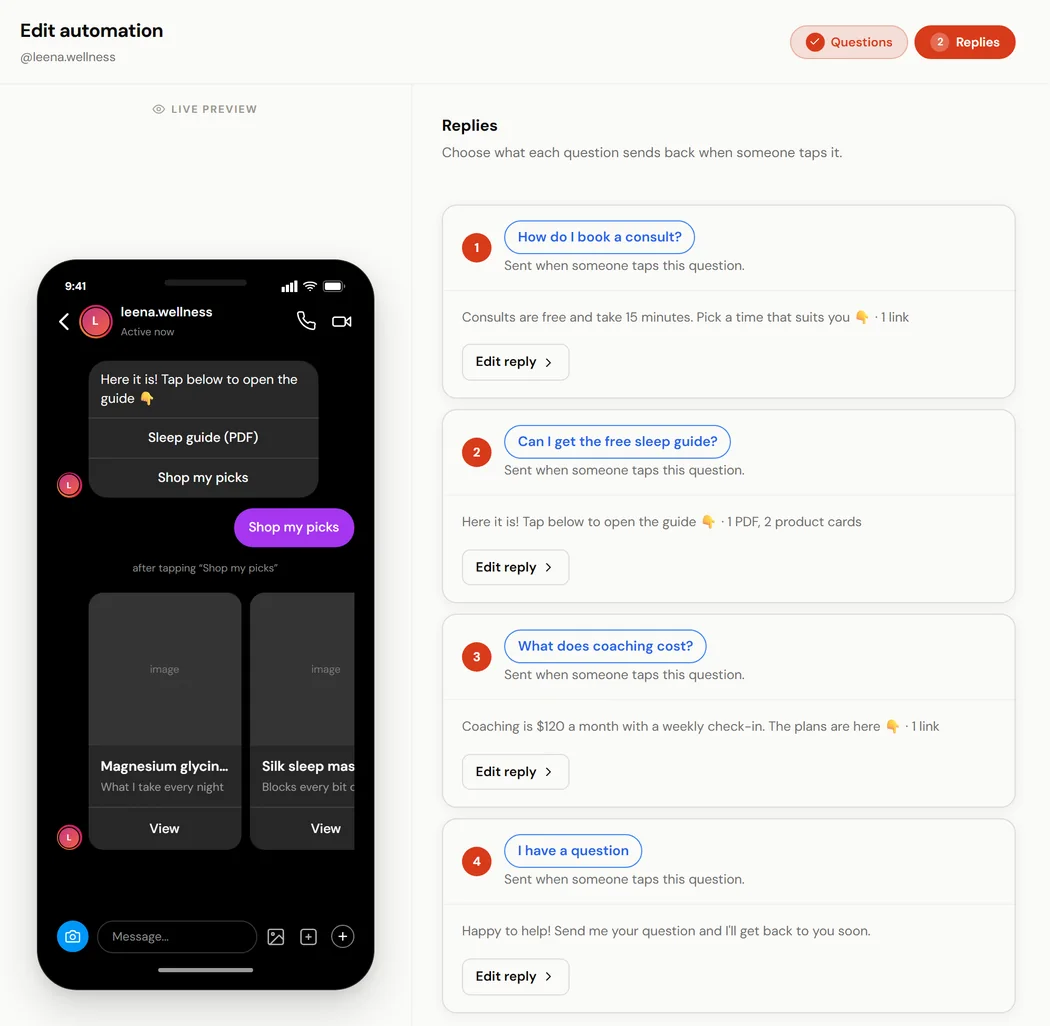
The Replies step. The phone shows the reply to the question you point at. Step 5: Save with Finish
Click Finish. The automation is created switched on, and ReelDrop sends the questions to Instagram as part of the same save, so there is no queue to wait for.
If Instagram refuses them, the message after saving says why, and the automation shows Not live on Instagram on /automations. Fix the cause, usually an expired connection or too many changes in a few minutes, and save again.
- Finish
- Not live on Instagram
What people see, and where
The questions appear in the Instagram mobile app, above the message box, in a conversation that has no messages in it yet. They do not show on desktop, and once the conversation has a message in it they are gone from that thread. That makes them a first-contact feature: the person who opens your DMs from your profile or a Reel, and has never written to you, is the one who sees them.
A tap sends the question to you as that person's message, and the reply you wrote for that question goes straight back. To test, use a phone and an Instagram account that has never messaged yours.
One set per account
Instagram holds one set of Ice Breakers per account, and every change replaces the whole set. So one Ice Breakers automation runs per Instagram account at a time. Switching on a second one is refused with a message naming the automation that already owns the questions: pause or delete that one first. A cloned copy arrives paused for the same reason.
Changing or removing them
Open the automation from /automations, change the questions or replies, and click Finish. Saving questions Instagram already has makes no call to Instagram at all; a changed set replaces the old one.
Instagram allows about ten Ice Breaker and DM menu changes per ten minutes per account. Past that, the message says Instagram is rate-limiting this account, and a save a few minutes later goes through.
Pausing the automation takes the questions off Instagram, and switching it back on puts them back. Deleting the automation removes them too.
If you move to the free plan
Ice Breakers are not on Starter. When an account moves to Starter, an active Ice Breakers automation is paused and its questions are taken off Instagram, and you get an email listing what was paused. Nothing is deleted: the questions and replies stay saved, and the automation can be switched back on after moving to Influencer or Creator.
Ice Breakers and the DM menu
They work together. Ice Breakers show only in a brand-new conversation, before the first message; the DM menu stays in every conversation after that. Saving one never changes the other. An Ice Breakers automation cannot be picked for a menu button, because each of its replies belongs to the question that was tapped.
Frequently asked questions
How many Ice Breaker questions can I have?
Up to 4, which is Instagram's limit, each up to 80 characters.
Why do I not see the questions on Instagram?
Check four things. They show in the Instagram mobile app only. They show only in a conversation with no messages yet, so test from an account that has never messaged you. Allow access to messages has to be on, under Instagram → Settings → Messages and story replies → Message controls → Connected Tools. And the automation has to be switched on, without Not live on Instagram next to it on /automations.
Can each question send something different?
Yes, that is what the Replies step is for. Every question has its own message and its own buttons, so the pricing question can send the rate card while the guide question sends the PDF.
Do Ice Breakers need a keyword?
No. A tap on a question is the trigger. If you also want a reply for people who type a word, build a DM keyword automation alongside it.
Which plan includes Ice Breakers?
Influencer at $9.99 a month, and Creator. The free Starter plan covers comment-to-DM on up to 5 active automations.
Related
- Instagram DM automationEvery trigger, Ice Breakers included, and what each plan has.
- The DM menuButtons that stay in every conversation after the first message.
- Create your first DM automationThe builder for comment, DM and story-reply triggers.
- DM automation limits by planWhat Starter, Influencer and Creator each allow.
Something here out of date or missing a step? Tell us and we will fix it.
Stop managing Instagram. Start growing with it.
Sign up free for AI carousels, DM automation, captions, and scheduling: built for creators who post less and grow more.
Built in Toronto by Piyush Sachdeva.