

9 Best Meta Business Suite Alternatives in 2026

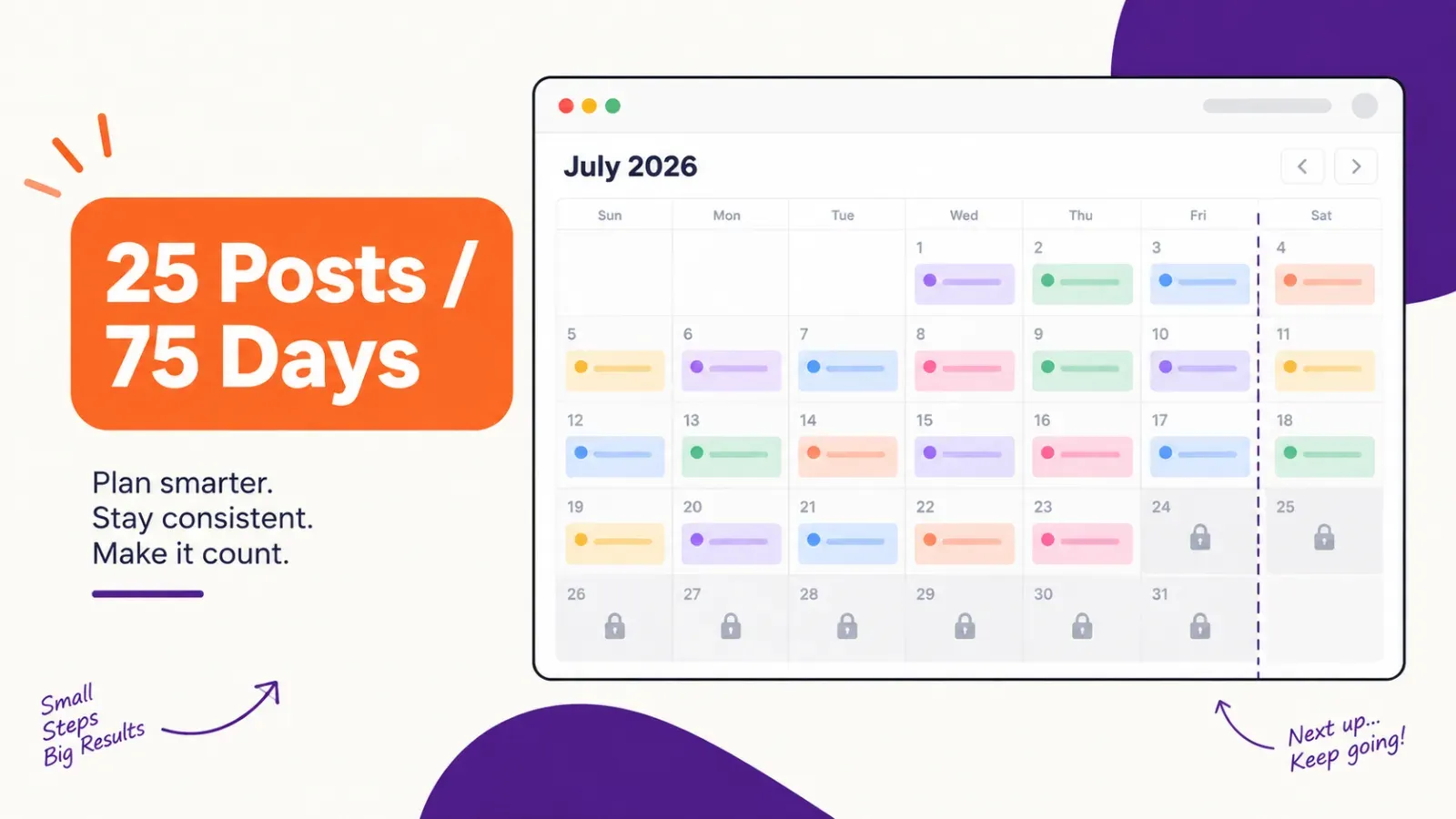
Instagram's native scheduler and Meta Business Suite both got busier this year, but neither dropped the core limits: a 75-day scheduling window, a 25-post daily cap, and Stories that lose their stickers once scheduled. Nine tools remove at least one of those caps: ReelDrop, Buffer, Metricool, Publer, Later, Pallyy, Planoly, SocialBee, and Vista Social.
Updated: September 2026
Disclosure: ReelDrop is our product. We make it, and it appears in this article, so read our rankings and recommendations with that in mind.
Table of contents
- How we evaluated these tools
- Why people switch from Meta Business Suite
- Meta Business Suite alternatives at a glance
- 1. ReelDrop
- 2. Buffer
- 3. Metricool
- 4. Publer
- 5. Later
- 6. Pallyy
- 7. Planoly
- 8. SocialBee
- 9. Vista Social
- What switching actually costs for one account
- Which should you pick?
- Frequently asked questions
- Sources
How we evaluated these tools
We checked each tool's own pricing page in September 2026: how it publishes to Instagram, whether it has a genuinely usable free plan, how transparent the pricing stays once you add a second account, and whether it does anything past scheduling. We're honest about where ReelDrop loses on this list too. For the wider field beyond Business Suite specifically, our Instagram scheduler roundup covers more ground.
Why people switch from Meta Business Suite
Meta Business Suite is free, and for a while that's reason enough to stick with it. The reasons people eventually leave tend to repeat.
- Scheduling tops out at 25 posts a day and 75 days in advance. Third-party tools generally drop both limits.
- Stories scheduled through Business Suite lose polls, questions, and native music. You either post the interactive version manually or accept a plainer scheduled one.
- Reels can be scheduled, but Meta's own documentation still points people back to the Instagram app for full creative control, including trending audio.
- There's no DM or comment automation. Every "send me the link" comment gets typed by hand.
- The inbox has a reputation for lag: comments that don't load, ad metrics that don't match the post itself, sessions that need refreshing mid-task.
None of that makes Business Suite bad, exactly. It's free and official, and for someone posting three times a week to one account, the caps rarely bite. The tools below exist for everyone else. Whichever one you land on, ReelDrop's free best-time-to-post tool works no matter which scheduler you use.
Meta Business Suite alternatives at a glance
| Tool | Best for | Free plan | Starting price |
|---|---|---|---|
| ReelDrop | Solo creators who want DM automation built in | Yes: 1 account, unlimited scheduling | Free, paid from $9.99/mo |
| Buffer | Posting the same content to several platforms | Yes: 3 channels, 10 queued posts each | $6/mo per channel |
| Metricool | Analytics alongside scheduling | Yes: 1 brand, 20 posts/month | ~$20/mo |
| Publer | Adding accounts on a tight budget | Yes: 3 accounts (no X), 10 posts each | $5/mo (1 account) |
| Later | Established visual planning for agencies | No, 14-day trial | ~$25/mo |
| Pallyy | Client work billed per brand | Yes: 1 social set, 15 posts/month | $25/mo |
| Planoly | Instagram grid planning | Yes: mobile app, 10 uploads/month | $16/mo |
| SocialBee | Recycling evergreen content categories | No, 14-day trial | $29/mo |
| Vista Social | Teams managing 15+ profiles | No, 14-day trial | $99/mo ($79 annual) |
Best free option: Buffer's free plan is the most generous overall, three channels, ten queued posts each, permanently, no trial clock attached. If you're Instagram-only and don't want any post-count ceiling, ReelDrop's free Starter plan caps captions and DM automations instead of posts, so scheduling itself is unlimited. For more free-tier options specifically, see our roundup of free Instagram schedulers.
The 9 alternatives, one by one
1. ReelDrop
ReelDrop is built for one person running an Instagram account, not a team running twelve. It publishes through the official Graph API as a Meta Tech Provider, a narrower, separate program from the Meta Business Partner directory that Buffer and Later hold. What sets it apart here is DM automation: comment-to-DM triggers, follow gates that check the Graph API before releasing a link, and timed follow-ups.
The free Starter plan doesn't cap how much you schedule, only AI captions (3/month) and active DM automations (5). Paid plans add unlimited captions, up to 5 accounts, and an MCP server for scheduling and DM edits from Claude or ChatGPT.
- Content calendar with reel, carousel, and post scheduling via the official API
- AI carousel generator, 3 to 10 slides, 34 themes
- Comment, DM, and story-reply automation with follow-gate verification
- AI caption generator with tone labels
- Trial reel scheduling with performance tracking
- Instagram analytics on every plan, including free
Starting price: Free (reeldrop.io/pricing), paid from $9.99/month.
Honest trade-off: it's still Instagram-only, and a younger product with a shorter track record than the other eight tools here. It publishes via the official Graph API and never asks for your password, only a revocable access token.
2. Buffer
Buffer is the plain, reliable option on this list. There's no grid preview, no DM automation, and the AI assistant is for repurposing captions rather than generating them from scratch, but the queue view is the clearest of any tool here, and it's stayed that way for years.
The free plan now includes the AI assistant with unlimited weekly credits, which used to be paid-only. Instagram publishing goes through the official API on Business and Creator accounts.
- Queue-based scheduling across 3 free channels, unlimited on paid plans
- AI Assistant for caption drafts and repurposing
- 30-day analytics history free, longer on paid tiers
- Community inbox for comments and mentions
- First-comment scheduling on Instagram and LinkedIn (paid only)
Starting price: Free (3 channels), Essentials $6/month per channel, or $5/month billed annually (buffer.com/pricing).
Honest trade-off: no DM automation and no hashtag research. Buffer publishes and reports; it doesn't try to run your comment section for you. Long-established Meta Business Partner, official Graph API. See our Buffer vs Later comparison if you're deciding between the two.
3. Metricool
Metricool leads with analytics rather than a calendar. If you want to know which post actually drove profile visits, not just which one got scheduled cleanly, its reporting goes deeper than a pure scheduler like Buffer or Publer.
The free plan covers one brand at 20 posts a month, stingier than Business Suite's own daily cap once you're posting more than a few times a week, so most people upgrade quickly if Instagram is their main channel.
- Auto-publish to Instagram on all paid tiers
- Competitor tracking, 5 profiles on the free plan
- 30-day analytics retention on free, longer on paid
- Best-time-to-post recommendations
- Cross-platform reporting beyond just Instagram and Facebook
Starting price: Free (1 brand, 20 posts/month), paid from roughly $20/month (metricool.com/pricing).
Honest trade-off: the free plan's monthly post cap is more restrictive than the thing you're trying to escape. Publishes via the official API on all paid tiers.
4. Publer
Publer's pitch is simple: pay for exactly the accounts you use. The free plan covers 3 accounts, though not X/Twitter, since Publer has said openly that Twitter's Enterprise API pricing makes it uneconomical to offer for free.
Paid plans start absurdly cheap for a single account, then scale per profile, so the math changes fast once you're managing more than two or three.
- Unlimited scheduling and eternal post history on Professional and Business
- Bulk scheduling and post recycling
- AI Assist (requires your own OpenAI key on Professional, included on Business)
- Every 10th connected account or team seat is free
- 7-day trial on Professional, 14-day on Business
Starting price: Free (3 accounts, no X), Professional from $5/month for 1 account, Business from $10/month (publer.com/help).
Honest trade-off: per-account pricing is cheap at the low end and gets expensive fast past a handful of profiles. Schedules through official platform APIs, including Instagram's Graph API.
5. Later
Later was one of the first tools built around Instagram's grid, and it's stayed a common pick for agencies wanting visual planning and multi-platform scheduling in one dashboard. There's no permanent free plan anymore, just a 14-day trial.
Compared to newer, cheaper entrants like Publer or ReelDrop, Later's pitch is maturity: a longer track record and Meta Business Partner status that predates most of this list.
- Visual content calendar with drag-and-drop grid preview
- Auto-publish to Instagram, including Business and Creator profiles
- Caption Writer, a credit-metered AI tool on paid plans only
- Trial reel scheduling with performance tracking
- Media library built for batch content planning
Starting price: No free plan; Starter around $25/month, or roughly $18.75/month billed annually (later.com/pricing).
Honest trade-off: no free plan, and the entry price is the highest of the straightforward schedulers here. Long-standing official Meta Business Partner, official API publishing.
6. Pallyy
Pallyy prices by "social set," a bundle of up to 11 connected profiles for one brand or client, rather than by individual account. That's a good deal if you're using most of those slots, and an odd one if you just want to post to a single Instagram account.
It also shipped its own MCP server this year, live on every plan including Free, so Claude or ChatGPT can list what's scheduled and draft posts from a chat. ReelDrop still automates DMs in a way Pallyy doesn't, but the AI-assistant angle is no longer a ReelDrop exclusive.
- Instagram grid preview and drag-and-drop calendar
- Client approval workflows and shared calendar links
- AI captions on paid plans
- MCP server for Claude, ChatGPT, and Cursor, included on every plan
- Analytics limited to Instagram, Facebook, and LinkedIn
Starting price: Free (1 social set, 15 posts/month, images only), Pro $25/month, extra sets $10/month each (pallyy.com/pricing).
Honest trade-off: a single-account creator pays the same $25/month as someone using all 11 profile slots in that set. Publishes via official platform APIs.
7. Planoly
Planoly says it invented Instagram grid planning, and it's stuck with that identity since. The free plan lives only in Planoly's mobile app, capped at 10 uploads a month, so anyone who wants to plan from a laptop is paying from day one.
Like Pallyy, Planoly added its own MCP integration this year, right down to a blog post on automating a weekly posting workflow with Claude. It's a fast-moving feature area across the category now, not something one tool still has to itself.
- Visual feed planning with drag-and-drop reordering
- Auto-post where Instagram allows it, reminders where it doesn't
- AI idea generator for captions and post concepts
- Instagram DM automation on every paid tier
- Link-in-bio storefront with no transaction fees
Starting price: Free (mobile app, 10 uploads/month), Starter $16/month or $14/month annually, 1 social set (planoly.com/pricing).
Honest trade-off: the free plan is mobile-only, so it's not a real desktop-planning option. Auto-posts through official integrations where Instagram permits it.
8. SocialBee
SocialBee's model is built around content categories that recycle automatically, which suits accounts with a lot of evergreen material, tips, quotes, product photos, better than accounts built around timely posts. There's no free plan, only a 14-day trial.
Pricing is set by profile count rather than account type, so five Instagram accounts and five Facebook pages cost the same as a mix of both.
- Category-based content recycling that re-queues automatically
- AI Copilot for captions and post variations
- Canva integration for design inside the composer
- 10 supported platforms, all available on every tier
- Add-on profile packs at $15/month per 5 extra
Starting price: No free plan; Bootstrap $29/month, or $24/month billed annually, 5 profiles and 1 user (socialbee.com/pricing).
Honest trade-off: no unified social inbox, so comments and DMs still have to be handled inside Instagram itself. Publishes via official platform APIs.
9. Vista Social
Vista Social is priced for a team managing a real portfolio of accounts, not one creator. The entry Professional tier bundles 15 connected profiles and 3 users into a single flat price, a strong deal at that scale and a poor one for a single Instagram account.
There's no permanent free plan, just a 14-day trial with no card required. X/Twitter publishing costs extra on top of the base plan.
- Bulk scheduling and content calendar across profiles
- Review management for Yelp, Google, TripAdvisor, and similar sites
- Approval workflows starting on the Advanced tier
- Unlimited AI assistant on Advanced and above
- Social listening beyond your own connected profiles (paid add-on)
Starting price: No free plan; Professional $79/month, 15 profiles, 3 users (vistasocial.com/pricing).
Honest trade-off: built for 15-profile teams, so a solo creator with one account pays for a lot of unused capacity. Publishes through official platform integrations.
What switching actually costs for one account
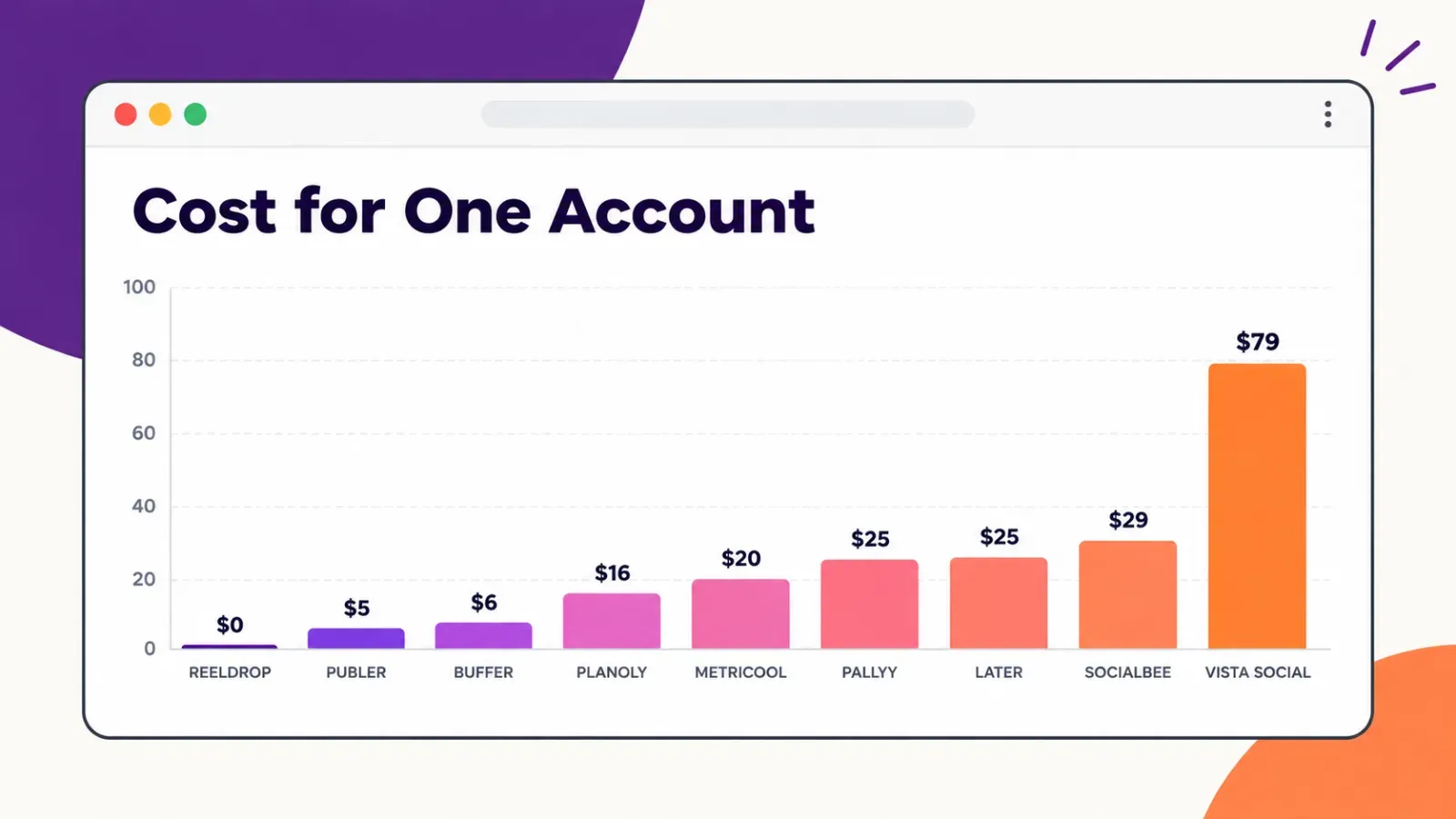
The at-a-glance table answers "who is this for." It doesn't answer what most solo creators actually want to know: for exactly one Instagram account, what's the cheapest plan with no post-count cap? These tools price by channel, social set, or profile count, so the answer isn't obvious from the marketing pages. Here it is, cheapest to priciest, on monthly billing:
| Tool | Cheapest plan with no post-count cap | Monthly cost, 1 account |
|---|---|---|
| ReelDrop | Starter (free) | $0 |
| Buffer | Essentials | $6 |
| Publer | Professional | $5 |
| Planoly | Starter | $16 |
| Metricool | Starter | ~$20 (Business or higher for uncapped monthly volume) |
| Pallyy | Pro | $25 |
| Later | Starter | ~$25 |
| SocialBee | Bootstrap | $29 |
| Vista Social | Professional | $99 |
The spread is bigger than it looks. ReelDrop and Buffer treat a single account as the intended use case and price for it. Pallyy, SocialBee, and Vista Social treat it as a rounding error inside a bundle built for far more profiles than one person needs, fine for an agency, a bad deal otherwise.
Which should you pick?
DM automation built in, not bolted on: ReelDrop. Posting the same content to Instagram, Facebook, LinkedIn, and X from one dashboard: Buffer. Analytics that matter as much as the calendar: Metricool. Adding accounts on a tight budget: Publer. Client brands with approval workflows: Pallyy for a handful of clients, Later for a longer track record. Instagram's grid above all else: Planoly. Mostly evergreen content that benefits from recycling: SocialBee. A team of five or more managing 15-plus profiles: Vista Social.
Frequently asked questions
Is Meta Business Suite actually free?
Yes, it costs nothing to use. It caps scheduling at 25 posts a day and 75 days ahead, strips interactive stickers from scheduled Stories, and has no DM automation, AI captions, or hashtag tools, which is why creators pair it with, or eventually replace it with, a dedicated scheduler.
Which Meta Business Suite alternative has the best free plan?
Buffer's free plan covers 3 channels with 10 queued posts each, permanently, with no trial clock. ReelDrop's free plan caps captions and DM automations instead of posts, so an Instagram-only creator can schedule without limit. Metricool and Publer also have workable free tiers with smaller caps.
Can I schedule Instagram Reels and Stories outside Meta Business Suite?
Reels, yes, across every tool on this list. Full-feature Stories with polls, questions, and native music generally still need to be posted from the Instagram app itself; scheduled Stories through any third-party tool, including Business Suite, tend to lose those interactive elements.
Do these tools risk getting my account flagged?
Every tool on this list publishes through Instagram's official Graph API rather than password-sharing or scraping, the same distinction Meta draws in its own account-restriction policies. That's different from follow/unfollow bots or engagement-pod tools, which do carry real restriction risk.
What's the cheapest way to get unlimited Instagram scheduling for one account?
ReelDrop's free Starter plan and Buffer's $6/month Essentials tier are the two cheapest routes to scheduling with no 75-day or post-count ceiling. Publer's $5/month Professional plan is close behind, and is the cheapest paid option that also includes X/Twitter, which Publer's free tier leaves out.
Do any of these tools automate Instagram DMs, not just scheduling?
ReelDrop is built specifically for this, with comment-to-DM triggers, follow-gate verification, and timed follow-ups on a 30-minute-to-23-hour window. The other eight tools here are schedulers and analytics platforms first; none of them currently match that depth of DM automation, even the ones with a unified comment inbox.
Is Later worth it without a free plan?
Later remains one of the more established visual planners, especially for agencies that want grid preview and multi-platform scheduling together. Without a free tier, it's a harder recommendation than Buffer or ReelDrop for a single creator whose only goal is escaping Meta Business Suite's limits.
Sources
- Publer Help Center: Plans and Pricing
- Pallyy Pricing
- Pallyy MCP server feature page
- Planoly Pricing
- SocialBee Pricing
- Vista Social Pricing
- Buffer Pricing
- Later Pricing
- Metricool Pricing
- How to Use Meta Business Suite in 2026: Setup, Features
- SocialBu: How to Schedule Instagram Posts and Reels in 2026
- Why Meta Business Suite Is So Buggy