7 Best Instagram Schedulers for Solo Creators in 2026
Seven Instagram schedulers compared for one-person workflows: prices verified July 2026, honest trade-offs, and the best free option.


You batch-filmed six reels on Sunday and still hadn't posted a single one by Wednesday. For solo creators, the best Instagram schedulers in 2026 are ReelDrop (one-tab workflow with AI captions, carousels, and DM automation), Buffer (best multi-platform free plan), Pallyy (visual grid planning), and Meta Business Suite (free and official). All seven tools below publish through Instagram's own API.
Updated: September 2026
Disclosure: ReelDrop is our product. We make it, and it appears in this article, so read our rankings and recommendations with that in mind.
TLDR
- ReelDrop is the pick if Instagram is your only platform. It bundles scheduling, AI captions, AI carousels, and DM automation, and it's the only tool here that also runs from Claude through MCP.
- Buffer wins if you post to more than Instagram. Its free plan (3 channels, 10 posts each) is the best free option for multi-platform creators.
- Meta Business Suite is free forever with no caps, but there's no AI help and the calendar is clunky.
- Pallyy and Planoly are for creators who plan by how the grid looks, not just what's in the queue.
- Tailwind is back on our list. It quietly re-added Instagram scheduling alongside Pinterest, which it hadn't done in early 2026.
- Publer is the cheapest option for high-volume posting, if you can live with an interface built for people posting several times a day.
Which Instagram scheduler should a solo creator pick in 2026? If you only post to Instagram, ReelDrop is the strongest option: it combines a scheduler, an AI caption and carousel generator, and DM automation in one $29/month plan (or a free tier with unlimited scheduling and 5 DM automations). If you also post to TikTok, LinkedIn, or Pinterest, Buffer's free plan or its $5/month Essentials plan covers more ground per dollar. If you want to spend nothing at all, Meta Business Suite schedules unlimited posts, reels, and stories for free, with no AI features attached.
Table of contents
- How we evaluated these tools
- The seven schedulers at a glance
- 1. ReelDrop
- 2. Buffer
- 3. Pallyy
- 4. Planoly
- 5. Publer
- 6. Tailwind
- 7. Meta Business Suite
- A 52-minute Sunday batch session
- Which scheduler should you pick
- Frequently asked questions
- Sources
How we evaluated these tools
We judged every tool on five things that matter when you're one person running the whole account: whether it publishes through the official Instagram Graph API (the only method Meta approves), whether the pricing page tells you the truth without a sales call, how much AI content help you actually get for the money, whether a usable free plan exists, and how fast one person can get a week of content scheduled. We checked every pricing page ourselves in September 2026, and every price below links to its source.
The seven schedulers at a glance
| Tool | Best for | Free plan | Starting price |
|---|---|---|---|
| ReelDrop | Instagram-only creators who want AI content help built in | Yes, 1 account, unlimited scheduling, 5 DM automations | $9.99/month (Influencer), $29/month (Creator) |
| Buffer | Creators posting to several platforms | Yes, 3 channels, 10 posts each | $5/month per channel |
| Pallyy | Visual grid planners | Yes, 15 posts/month, images only | $25/month (Pro) |
| Planoly | Aesthetic-first feeds | Mobile app only, 10 uploads/month | $14/month annual ($16 monthly) |
| Publer | High-volume bulk schedulers | Yes, 3 accounts, 10 posts/account | Around $12/month (Professional, scales with accounts) |
| Tailwind | Creators who also run Pinterest | Yes, 5 posts/month across IG, Pinterest, Facebook | $17.99/month annual (Pro) |
| Meta Business Suite | Anyone who wants free official scheduling | Entirely free | Free |
Best free option: Meta Business Suite, and it's not close on volume. It schedules unlimited posts, reels, and stories at zero cost. Buffer's free plan is the better pick if you also post outside Meta's apps, and ReelDrop's Starter plan is the free pick if you want AI captions and DM automation thrown in without a card on file.
1. ReelDrop
ReelDrop is built around one idea: a solo creator shouldn't need five tabs open to get a reel posted. Scheduling, AI captions, AI carousels, and comment-to-DM automation live in one place, so the Sunday batch session that used to sprawl across Canva, ChatGPT, a notes app, and a scheduler happens inside one tool. The AI carousel generator turns a topic (or a pasted link) into a full draft with 3 to 10 slides, and every slide is independently editable and regeneratable.
Pricing changed twice since spring. Starter is free: 1 Instagram account, unlimited scheduling and posting, 3 AI caption generations a month, 5 active DM automations, and 3 trial reels a month, with no post-count cap of any kind. A new Influencer tier launched in late August at $9.99/month ($79/year), built almost entirely around DM automation: unlimited automations, every trigger type (story reply, DM keyword, follow gate), and unlimited trial reels with performance tracking. Creator is $29/month, with founding pricing at $149/year or $249 as a one-time lifetime deal, and it adds up to 5 Instagram accounts, unlimited AI captions and hashtags, 100 AI carousel images a month plus purchasable credits, and AI reel thumbnails.
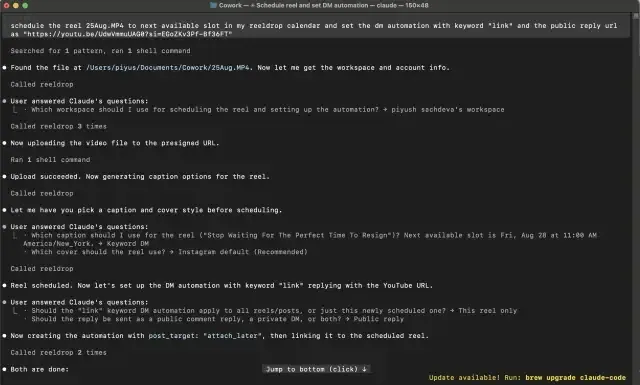
The newest thing worth knowing: ReelDrop runs an MCP server, so Claude Desktop or Claude Code can schedule reels, edit the queue, read analytics, and manage DM automations from a chat, included on Influencer and Creator. As far as we can tell, no competitor in this list offers anything comparable yet.
Now the honest part. ReelDrop is Instagram-only by design, so if TikTok or LinkedIn matter to you, it can't be your only tool. It's also a younger product than Buffer or Later, with a shorter track record, and the Studio plan (approval workflows, custom branding for agencies) hasn't shipped yet. There's no visual grid preview either, just a calendar with week and month views. We think the trade is worth it for one person running one Instagram account, but it is a trade.
- Instagram scheduling with auto-publish for posts, reels, and carousels
- AI carousel generator, 3 to 10 slides from a topic or a pasted link
- AI captions and hashtags, unlimited on Creator
- Comment-to-DM automation with real follow verification against the Instagram API
- First-comment scheduling on paid plans
- Runs from Claude via MCP (Influencer and Creator)
Trade-off: one Instagram account on Starter and Influencer, up to 5 on Creator, and no team seats confirmed on any tier yet. No grid preview, and it's a newer company than the decade-old incumbents on this list.
Account safety: publishes through the official Instagram Graph API as a Meta Tech Provider. You connect through Instagram's own authorization flow and never hand over a password.
2. Buffer
Buffer is what we recommend when someone says "I just want scheduling to work and I post everywhere." It's been around since 2010, the queue-based interface stays out of your way, and no comparable tool gives away more for free: 3 channels and 10 scheduled posts per channel, with an AI assistant included (5 suggestions a week on the free plan). Paid Essentials is $5/month per channel, or $60/year billed annually, which stays cheap as long as you're only running a couple of channels. A newer Team plan at $10/month per channel adds unlimited members and approval workflows.
Where it falls short for Instagram-first creators is depth. There's no visual grid planner, no carousel generation, and no DM automation, because Buffer is deliberately built for generalists. Its own research is excellent, though. Buffer's 2025 study of 2.1 million posts is where the "3 to 5 posts a week" advice later in this article comes from.
- Free plan with 3 channels and 10 posts per channel
- Unlimited scheduled posts on Essentials
- AI assistant for drafting and repurposing content
- Supports 8+ platforms from one queue
- Hashtag manager and advanced analytics on paid plans
Trade-off: per-channel pricing climbs as you add networks, and there's no Instagram grid planner or DM automation of any kind.
Account safety: a long-standing Meta partner that auto-publishes posts and reels through the official Instagram API.
3. Pallyy
Pallyy was built Instagram-first and it still shows in the grid preview and the drag-and-drop calendar. But the pricing structure has changed since spring, and it now leans more toward agencies managing multiple clients than the solo creator this list is for. The free plan gives you one social set and 15 scheduled posts a month, and it's worth reading the fine print: free-tier posts are image only, no video, no carousels, no reels. If reels are your main format, the free plan won't cover you.
Paid pricing is per social set, starting at Pro for $25/month (one set, extra sets $10/month each), with Agency at $99/month for 10 sets and 3 users, and Scale at $199/month for 30 sets. AI captions, queue scheduling, and post ideas all arrive at the Pro tier, not before. For one person on one Instagram account, $25/month buys unlimited posts, an actual grid preview, and an inbox that pulls in Instagram DMs and comments.
- Grid preview and drag-and-drop calendar
- Unified inbox for Instagram DMs and comments
- AI captions from the Pro tier up
- Auto-publish for posts, reels, and carousels on paid plans
- Link-in-bio page included on every plan
Trade-off: the free plan only publishes images, no video or reels, and pricing multiplies fast the moment you manage a second brand.
Account safety: connects through Instagram's official login flow and auto-publishes via the Graph API.
4. Planoly
Planoly is one of the original visual planners, and it still makes sense for creators whose feed aesthetic is the whole strategy. You lay the grid out visually, shuffle posts until it looks right, then schedule. Starter runs $14/month billed annually ($16 month to month) for one social set and one user, and AI-generated captions and post ideas are now included on every paid tier, not held back for higher plans. There's a free plan, but only inside the mobile app, capped at 10 uploads a month.
One nuance worth knowing: Planoly auto-posts where Instagram's API allows it, and sends a push reminder for native posting where it doesn't. That's not unusual (several tools on this list handle Stories the same way), but it means "scheduled" doesn't always mean "hands off" for every post type. Growth ($24/month annual, $28 monthly) adds a second social set and user; Pro ($47/$55) goes up to 6 sets and 6 users, which starts to look more like a small agency plan than a solo one.
- Visual grid planner, the feature it's known for
- Auto-post where Instagram allows it, push reminders where it doesn't
- AI idea generator and caption suggestions on every paid plan
- Free link-in-bio page and digital product storefront
- Automated Instagram DM replies included from Starter
Trade-off: the free plan lives only in the mobile app, and some content types still need a manual tap to go live rather than true auto-publish.
Account safety: auto-publishes through the official Instagram API where Instagram's own rules permit it.
5. Publer
Publer is the volume tool. Bulk-schedule with a CSV or a multi-post uploader, recycle evergreen content with spintax, auto-post from RSS feeds, and schedule the first comment on a post, all from a free plan that includes 3 social accounts, 10 scheduled posts per account, 25 saved drafts, and 24-hour post history. For the price of free, the feature density is honestly a little absurd.
The paid tiers are where things get murky. Publer's pricing page now runs on account-count and team-size sliders rather than showing a flat number, so we can't hand you a vendor-confirmed dollar figure here. Third-party pricing trackers put Professional around $12/month and Business around $21/month, but treat that as an estimate, not a quote, and check publer.com/plans with your own account count before you commit. Whatever the exact number, the density is also the trade-off. If you post four times a week rather than four times a day, a lot of what you're looking at goes unused.
- Bulk scheduling with CSV import and a multi-post uploader
- Evergreen content recycling with spintax variations
- First-comment scheduling for Instagram
- Free plan with 3 accounts, 10 posts each
- Auto-post for feed posts, reels, and stories
Trade-off: pricing isn't flatly listed, and the dense interface is built for people posting several times a day, not once or twice.
Account safety: auto-publish and first-comment scheduling run through the official Instagram API.
6. Tailwind
Tailwind belongs back on this list, and that's a change from where things stood earlier this year. For a stretch in 2026, Tailwind's pricing page sold Pinterest tools almost exclusively and Instagram had quietly disappeared from it. That's no longer true. The current pricing page lists Instagram, Pinterest, and Facebook together on every tier, with a genuine free-forever plan (5 posts a month, 1 account per network) and a Pro tier at $17.99/month billed annually ($29.99 month to month) covering 150 posts across all three platforms.
Tailwind still leads with Pinterest in its branding and its own research, and Advanced ($29.99/month annual, 2 accounts per network, 300 posts) and Max ($49.99/month annual, 3 accounts, unlimited posts) scale for creators running more than one brand. If Pinterest drives meaningful traffic for you alongside Instagram, Tailwind now covers both from one calendar again, which it didn't a few months ago.
- Instagram, Pinterest, and Facebook scheduling from one plan
- SmartSchedule posts at data-backed best times
- AI-assisted post design and copy (Ghostwriter)
- Forever-free plan, no card required
- Credit-based system shared across all three platforms
Trade-off: credits and post caps are shared across Instagram, Pinterest, and Facebook on one pool, so heavy Instagram posting eats into what you'd otherwise spend on Pinterest.
Account safety: a long-time official API partner for both Instagram and Pinterest; verify current per-platform limits on your specific tier before subscribing, since they scale with plan.
7. Meta Business Suite
Meta Business Suite is Meta's own free tool, and it's the baseline every paid scheduler has to beat. It schedules posts, reels, and stories to Instagram and Facebook, shows native analytics, and handles your shared inbox. No caps that matter, no card, no third party sitting between you and Meta. If your entire need is "post this on Thursday at 9am," you may not need to pay anyone.
You get what you pay for, though. The calendar is clunky, there's no AI content help of any kind, no hashtag research, no DM automation flows, and nothing outside Meta's own apps. Most creators who leave it don't do so because it broke. They leave because they got tired of writing every caption from scratch at 11pm. Pair it with a couple of free utilities, like a post-time calculator, and it stretches surprisingly far.
- Entirely free, forever
- Schedules posts, reels, and stories
- Native Instagram and Facebook analytics
- Shared inbox for comments and DMs
- Built by Meta, so API changes never break it
Trade-off: no AI help, a clunky calendar, and nothing beyond Meta's own platforms.
Account safety: it's Meta's own product, so this is as official as scheduling gets.
A 52-minute Sunday batch session
Here's what a one-tab workflow looks like with a timer running. We walked a week of content through ReelDrop, start to finish, for a creator with six batch-filmed reels and one carousel idea. Your times will vary, but not by much.
- 0:00 to 0:10, upload all six reels and drop them onto the calendar as drafts.
- 0:10 to 0:22, generate captions for all six, then edit each one by hand. AI gets you to 80 percent; the last 20 percent is where your voice lives.
- 0:22 to 0:30, turn the week's best-performing topic into an 8-slide carousel and tweak two slides.
- 0:30 to 0:40, slot everything into posting times when your audience is actually online, then add up to 5 targeted hashtags per post (Instagram capped captions at 5 hashtags in December 2025, so the old 30-tag blocks are done).
- 0:40 to 0:47, set one comment-to-DM automation on the carousel: anyone who comments a keyword gets a link, with a follow check before it sends.
- 0:47 to 0:52, schedule first comments where extra context helps, approve the week, close the tab.
The same session across separate tools (a scheduler, ChatGPT for captions, Canva for the carousel, a DM tool bolted on top) took just over 90 minutes in our timing, most of the difference being copy-paste and re-uploading media between apps. That gap, roughly 40 minutes a week, is the actual product most solo-creator tools are selling.
Which scheduler should you pick
One line each, no hedging.
- If Instagram is your whole business, pick ReelDrop. The AI content help and DM automation replace two other subscriptions, and the MCP integration is genuinely new.
- If you post to three or more platforms, pick Buffer, and its free plan may be all you need.
- If your grid aesthetic is the strategy, try Pallyy first for the inbox and DMs, then Planoly if you want the link-in-bio and product storefront bundled in.
- If you post daily or run high volume, Publer. Just check the actual price for your account count before you commit.
- If Pinterest and Instagram both matter, Tailwind is worth a second look now that Instagram is back on the pricing page.
- If you want to spend nothing, Meta Business Suite plus a handful of free tools for the gaps.
If you run a small business across several platforms rather than a single creator brand, our agency scheduler roundup covers that world instead, and the criteria change once you're managing clients rather than one voice.
Whichever you pick, insist on official API publishing. If a tool asks for your Instagram password, walk away.
Frequently asked questions
Which Instagram scheduler is best for a solo creator?
ReelDrop is our pick for creators who only post to Instagram, because scheduling, AI captions, carousels, and DM automation all live in one tab. Buffer is the better choice if you also post to TikTok or LinkedIn, and Meta Business Suite covers basic scheduling for free.
Can you still schedule Instagram posts for free in 2026?
Yes, in a few different ways. Meta Business Suite schedules unlimited posts, reels, and stories at no cost. Buffer's free plan covers 3 channels with 10 scheduled posts each. ReelDrop's Starter plan is free for 1 account with unlimited scheduling and posting, plus a handful of AI captions and 5 DM automations included.
Is auto-publishing safe for my Instagram account?
Yes, as long as the tool publishes through the official Instagram Graph API, which every scheduler on this list does. Meta's current documentation allows up to 100 API-published posts per account in any 24-hour window, far more than a solo creator needs. Avoid any tool that asks for your Instagram password directly.
Does scheduling a post hurt its reach compared to posting manually?
There's no evidence of a scheduling penalty. Sprout Social's 2026 study of nearly 2 billion engagements found the algorithm prioritizes when your audience is active over anything about how the post was published. Tools using the official API publish exactly like the native app does.
How many times a week should a solo creator post on Instagram?
Buffer's 2025 study of 2.1 million posts found 3 to 5 posts a week is the sweet spot for sustainable growth, roughly doubling follower growth compared with posting once or twice. One batching session a week comfortably covers that. Posting 6 or more times grows faster but burns solo creators out fast.
Does Tailwind support Instagram scheduling again in 2026?
Yes. After a stretch earlier in 2026 when Tailwind's pricing page listed Pinterest tools almost exclusively, its current plans include Instagram, Pinterest, and Facebook posting together, starting with a free plan and a $17.99/month Pro tier billed annually. Posts and credits are shared across all three platforms on one plan.
What changed with ReelDrop since earlier this year?
ReelDrop's free plan dropped its old post-count cap entirely (scheduling and posting are now unlimited on every plan), added a $9.99/month Influencer tier focused on DM automation, and shipped an MCP server that lets Claude Desktop or Claude Code schedule reels and manage automations directly from a chat.
Sources
- Buffer pricing
- Pallyy pricing
- Planoly pricing
- Publer plans
- Tailwind pricing
- Meta Business Suite
- Meta: publish content using the Instagram platform (100 posts per 24 hours)
- Buffer: how often to post on Instagram (2.1M post study)
- Sprout Social: best times to post on Instagram in 2026
- Social Media Today: Instagram limits captions to 5 hashtags
- ReelDrop pricing
- ReelDrop: run from Claude (MCP)
- Is ReelDrop safe? Official Instagram API, no password required
- ReelDrop free tools
- ReelDrop vs Later