12 Instagram Carousel Ideas That Drive Saves in 2026
12 carousel ideas people save, with 2026 data and a simple way to test which one works for your account.

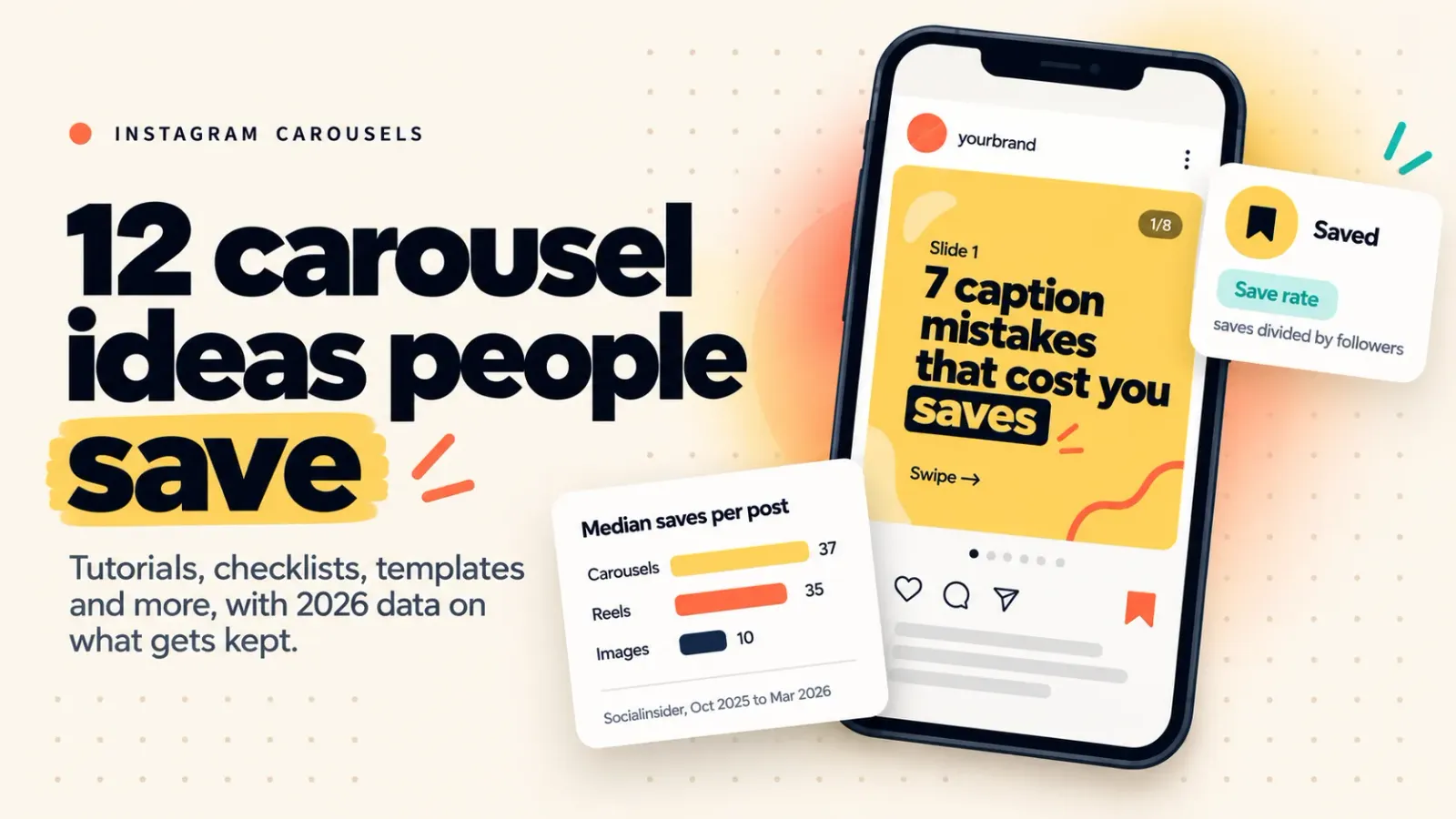
Carousels earned a median of 37 saves per post in Socialinsider's 2026 data, ahead of Reels at 35 and single images at 10. Saves reward posts people want to keep. These 12 carousel ideas are built for that: tutorials, checklists, templates and other formats worth coming back to.
Updated: October 2026
TLDR
- Carousels lead on saves in Socialinsider's 15-million-post study. The gap is wide against single images and thin against Reels.
- The 12 ideas below are reference formats: tutorial, mistakes list, template, checklist, myth vs reality, before and after, framework, cheat sheet, comparison, case study, roundup, and reader question.
- Start at 6 to 10 slides (our read; Instagram allows 20) and put the whole promise on slide one.
- Judge an idea by save rate, which is saves divided by followers, and compare it with your own past carousels.
Quick answers
- Which format gets the most saves? Carousels, by a small margin over Reels and a wide one over single images (median saves of 37, 35 and 10 in Socialinsider's data).
- How many slides should I use? Instagram allows 20. We start at 6 to 10 and cut the weakest third before designing.
- Do carousels reach non-followers? Less than Reels do. Metricool's 2026 study calls Reels the stronger format for discovery and carousels the stronger one for repeat engagement.
- Can I build a carousel from someone else's work? Only with material edits of your own. Instagram says mostly unoriginal accounts may be left out of recommendations to new people.
Table of contents
- Why do carousels get saved
- The 12 carousel ideas
- Which idea should you start with
- How to tell whether an idea worked
- Where a tool fits
- Frequently asked questions
- Sources
Why do carousels get saved
Socialinsider analyzed 15 million posts from 417,130 pages between October 2025 and March 2026. Median saves per post were 37 for carousels, 35 for Reels and 10 for images. Save rate (saves divided by followers) came out at 0.05%, 0.04% and 0.02%
Read that carefully. The carousel lead over Reels is two saves, which is close to a tie. The real gap is against single images. Metricool's June 2026 study reports a similar picture, with carousels generating nine times the saves of single-image posts across 24.4 million posts (January and February 2025 against the same months of 2026). Metricool sells a scheduler and published this as a press release, so treat it as vendor data.
Why do carousels get saved? Socialinsider's report quotes social media managers who say people keep what they will need later, such as tutorials, lists and templates. That is expert opinion, not a measurement by format, but it fits the numbers. There is also a distribution angle. One trade outlet relays that Instagram's Adam Mosseri has said carousels often get a second chance when someone does not swipe, with a later frame shown. That is secondhand, so make slide two work as a cold opening. For reach to strangers, Reels still lead; our Reels algorithm guide covers why.
The 12 carousel ideas
1. Step-by-step tutorial
Walk through one task from first tap to finished result, one step per slide. People save tutorials because they do not want to search for the same answer twice. Open with the end result ("Build a media kit in 6 steps") so the promise is clear. Skip any step that only makes sense with a screen recording.
2. Mistakes list
"7 caption mistakes" works because every reader checks themselves against it. Give each mistake one slide: what it looks like and what to do instead. Put the mistake most people make on slide two, since that may be the frame a re-served viewer sees first. Do not pad the list to reach a round number.
3. Fill-in template
Hand over a repeatable structure: a caption formula, a DM script, a weekly posting plan with blanks. Templates get saved because they get reused. Show a filled-in example on the slide before the blank version so readers see how it works. Keep each blank short enough to read on a phone.
4. Checklist
A checklist turns a process into pass or fail. "Before you publish: 9 checks" gives readers a reason to open the post again every time they post. We'd give each check its own slide with a one-line reason. Avoid vague items like "be authentic" that nobody can tick off.
5. Myth vs reality
Pair a common belief with what the evidence says. It suits topics where advice contradicts itself, such as hashtags or posting times. Put the myth and the correction on the same slide, and name the source of the correction right there. A myth-buster with no source is just another opinion.
6. Before and after
Show a real change: a rewritten caption, a reworked slide, a cleaned-up bio. The saved value is the pattern, so label what changed and why. Use your own work, or a client's with permission, never a stranger's post. If you show a result, say where the number came from.
7. Framework or mental model
Give readers a way to decide: a two-by-two, a three-question filter, a scoring rubric. Frameworks are easy to save and easy to apply. Name it plainly and run it on one real example before the last slide. Skip acronyms that exist only to be catchy.
8. Cheat sheet or glossary
Condense a reference: aspect ratios, caption lengths, terms a new creator hears and cannot decode. Entries should be short and consistent because readers will scan, not read. Date it. A specs cheat sheet goes stale, and the people who saved it will trust it for months.
9. X vs Y comparison
Compare two options on the same criteria: Reels or carousels for one goal, two caption styles, two tools. Use identical rows on every slide so readers can scan across. End with a verdict about who should pick which, not "both are great."
10. Case study teardown
Break down one post, launch or campaign: what was tried, what happened, what you would change. Use only numbers you can show, and give the date range if it is your own account. Case studies earn saves when readers can copy the structure, not just admire the result.
11. Curated roundup with your take
Collect five to eight resources, tools or posts and add your verdict on each. The verdict is the point. Instagram's original content guidelines say a screenshot of someone else's work with only a credit is not original, and mostly unoriginal accounts can be left out of recommendations to new audiences. Credit every source and write something the source did not.
12. The question your DMs keep asking
Answer one question you have received at least three times in comments or DMs. Real questions are topics you already know people want. End with a single prompt, such as commenting a keyword to get the longer version by DM. If you automate that reply, read our Instagram automation rules post first.
Which idea should you start with
| Idea | Best for | Starting slides |
|---|---|---|
| Tutorial | Teaching one task | 7 to 10 |
| Mistakes list | An easy, clear hook | 6 to 8 |
| Template | Reuse | 5 to 7 |
| Checklist | Repeat tasks | 6 to 9 |
| Myth vs reality | Contested topics | 5 to 7 |
| Before and after | Showing craft | 4 to 6 |
| Framework | Decisions | 5 to 8 |
| Cheat sheet | Lookup | 6 to 10 |
| Comparison | Choosing between options | 5 to 8 |
| Case study | Credibility | 6 to 9 |
| Roundup | Curation with opinion | 6 to 9 |
| Reader question | Comments and DMs | 4 to 7 |
Starting lengths are our read, not a tested benchmark. Instagram has allowed 20 slides since August 2024.
- New to carousels: start with a mistakes list or a tutorial.
- Your comments are full of questions: start with the reader question.
- You teach for a living: start with a template or a framework.
How to tell whether an idea worked
Socialinsider calculates save rate as saves divided by followers, times 100. Say an account has 4,000 followers and a carousel collects 28 saves. That is a 0.7% save rate (our arithmetic). The 0.05% carousel figure above pools accounts of every size, so it is a rough ruler at best. Your own last five carousels are a better one.
To test an idea, publish two formats on the same topic in the same weekly slot, two weeks running. Change only the format. Wait seven days (our choice; Metricool reports that most views arrive in the first three days) and compare save rates. One test proves nothing. Four tests start to show a pattern.
Where a tool fits
We build ReelDrop, so weigh this accordingly. Our AI carousel generator drafts 3 to 10 slides from a topic or a pasted YouTube link, lets you regenerate one slide without touching the rest, and schedules the result through the official Instagram API. AI carousel images are Creator-only ($29 a month, 100 images a month, see pricing). Starter and Influencer plans schedule carousels but do not include them.
ReelDrop is Instagram-only, and Canva or Figma with a reusable template does the job too. For slide one, the free hook generator helps with the promise, and our carousel guide covers sizing and slide order. For a wider comparison, see our roundup of AI carousel generators.
Frequently asked questions
How many slides should an Instagram carousel have?
Instagram allows up to 20 slides, a limit raised from 10 in August 2024. Most of the ideas above fit in 6 to 10 slides in our view, but treat that as a starting point, not a tested rule. Draft the content first, then cut the weakest third before you design anything.
Do carousels really get more saves than Reels?
Slightly, in one large dataset. Socialinsider's 2026 study found median saves of 37 for carousels and 35 for Reels, and save rates of 0.05% against 0.04%. The gap over single images is much wider, at 10 median saves. Treat carousels and Reels as close on saves.
What should the last slide of a carousel say?
Ask for one thing. For saves, a direct "save this for later" is the plain ask. Metricool reported that posts with comment-focused calls to action drew far more comments, but that finding is about comments, not saves. Whatever you ask for, make it match what the carousel promised.
Can I turn another creator's post into a carousel?
Only if you add real value. Instagram's guidelines say a screenshot of someone's work with only a credit is not original, and accounts that mostly post unoriginal content may be left out of recommendations to new people. Add your own analysis, examples or voice on every slide, and credit your sources.
Should I put hashtags on a carousel?
Instagram now limits captions to five hashtags, according to its December 2025 statement. Metricool found posts with at least one hashtag averaged fewer views than the platform average, though that does not prove hashtags cause lower reach. Use a few specific tags or none, and put your keywords in the caption text.
Which carousel idea is easiest to start with?
A mistakes list or a tutorial. Both have a built-in order, each slide holds one point, and the hook writes itself from the topic. Pick a subject you have already answered in comments, finish it in 6 to 8 slides, then compare its save rate with your next idea.
Sources
- Socialinsider: Instagram Engagement Report (May 25, 2026)
- Metricool: 2026 Instagram Study press release (June 16, 2026)
- Social Media Today: Instagram Expands Carousels to 20 Frames (August 8, 2024)
- Instagram for Creators: Original Content Guidelines
- Tubefilter: Instagram extends its unoriginal-content penalty to photos and carousels (April 30, 2026)
- Pulse Advertising: Boost Instagram Reach with Carousels (relays Mosseri)
- Social Media Today: Instagram Implements New Limits on Hashtag Use (December 18, 2025)
- Free hook generator
- How do I make Instagram carousels that perform?
- AI carousel generator
- 5 best AI carousel generators for Instagram
- 15 Instagram growth hacks that still work